Rogue API Detection (Shadow & Zombie API)  

The API Discovery module can detect rogue APIs by comparing live traffic against your uploaded OpenAPI specifications. This goes beyond inventory and provides security insights: you see which endpoints are undocumented or deprecated but still in use.
What this gives you:
-
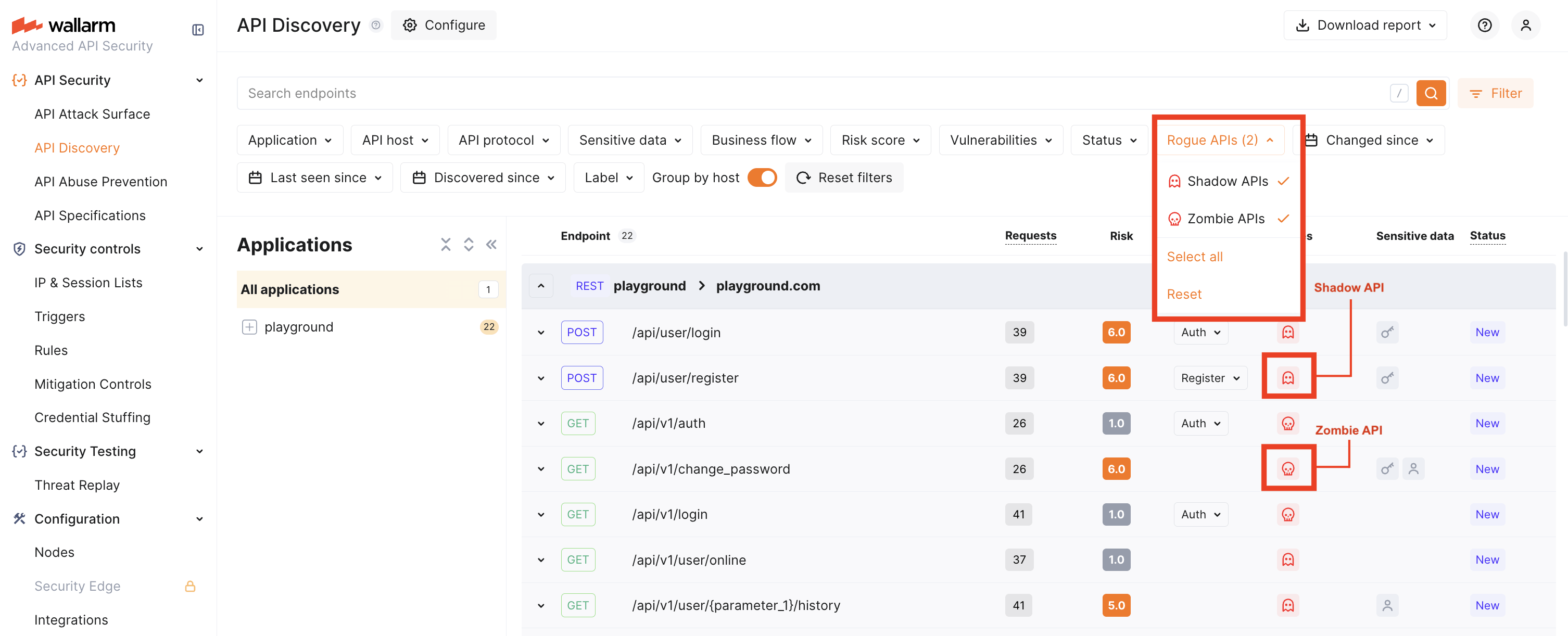
Shadow API detection — Find undocumented endpoints (in traffic but not in any of your specs).
-
Zombie API detection — Find deprecated endpoints that still handle traffic (removed from spec but still in use).
-
Cumulative baseline — Traffic is compared against the sum of all uploaded specifications that you have enabled for rogue API detection for a given host or application. You do not need to choose a single spec.
-
Configurable scope — Applications and/or hosts, selected in each API specification configuration, are considered as filters for the comparison: traffic within a selected scope only is compared with a specification.
| Rogue API type | What is it? |
|---|---|
| Shadow API | An undocumented API that exists in your infrastructure without being described in your specifications. |
| Zombie API | A deprecated API that is no longer in your current specification but still receives traffic. |
How it works
-
You upload one or more OpenAPI specifications and enable Rogue API detection for each, selecting the applications and hosts they apply to.
-
Wallarm builds a cumulative baseline from all such specs for each host/application: an endpoint is treated as shadow only if it is absent in all specs that are associated with that host or application.
-
Traffic is compared against this baseline. Endpoints that appear in traffic but not in the baseline are shadow; endpoints that were in a previous version of a spec but not in the current version and still appear in traffic are zombie.
-
Applications and/or hosts, selected in each API specification configuration, are considered as filters for the comparison: traffic within a selected scope only is compared with a specification.
Base paths and the servers section
Rogue API detection ignores hostnames and base paths from the servers section of your OpenAPI specification. To ensure accurate comparison:
- Define hosts and applications explicitly in Wallarm Console when enabling rogue API detection for each specification.
- Include base paths in the
pathssection of your specification. For example, if your API base path is/api/v1, use/api/v1/usersinstead of/usersas the path key.
Setup
-
Go to API Security → API Specifications (US Cloud or EU Cloud).
-
Click Upload specification and upload an OpenAPI 3.0 or 3.1 file (JSON or YAML).
OAS 3.1 requires NGINX Node 6.6.1+ or Native Node 0.20.0+.
-
Open the uploaded specification and go to the Rogue APIs detection tab.
API specification enforcement
Specifications can also be used for API specification enforcement.
-
Turn on Rogue API detection, then select the Applications and Hosts for which this spec should be used. Only endpoints for the selected hosts (and applications) will be checked for rogue APIs against this spec.
-
Save. Allow about 5 minutes for comparison to run.
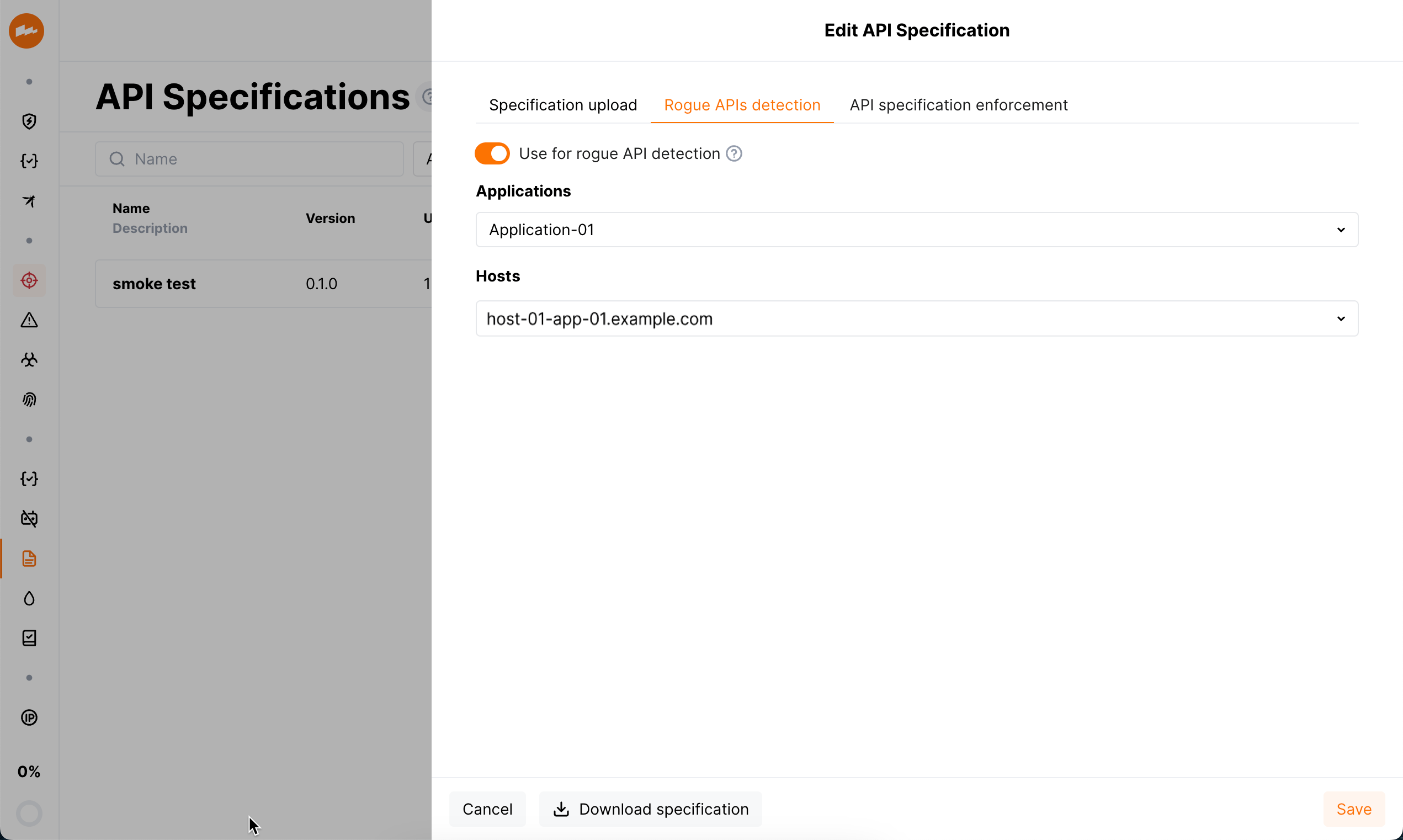
You can upload multiple specifications. Each one with Rogue API detection enabled for a given host or application contributes to the cumulative baseline for that host/application. An endpoint is classified as shadow only if it is missing from every spec that applies to that host/application.
When comparison runs
-
Comparison starts after you complete the setup above.
-
It re-runs if you change and save rogue API detection settings, or upload a new specification file.
-
If the specification is loaded from a URI and Regularly update the specification (every hour) is enabled, comparison can also re-run when the file at the URI is updated.
You can download the current specification from API Specifications → open the spec → Download specification.
Disabling
Rogue API detection uses every uploaded specification that has Use for rogue APIs detection (Rogue API detection) enabled. If you disable this option for a specification or delete the specification:
-
Rogue API detection will no longer use that specification.
-
All previously detected rogue API data that depended on that specification will be removed.
Viewing rogue APIs
After comparison has run (about 5 minutes after setup or after a restart):
-
Use the Rogue APIs filter to show only Shadow and/or Zombie endpoints.
Rogue API counts are also shown in API Specifications for each spec. Full UI integration of rogue API status into risk factors and endpoint details is planned for a later release. Until then, use the Rogue APIs filter in API Discovery as the main way to view shadow and zombie endpoints.
Specification versions and zombie APIs
Zombie APIs are endpoints that were in a previous version of your specification (and are now removed or deprecated) but still appear in live traffic. To detect them, Wallarm needs at least two specification versions:
-
If you uploaded the spec from a URI and chose Regularly update the specification, publish a new version at that URI. It will be picked up on the next update.
-
If you upload from your machine, open the specification, choose a new file (with updated content or a different name), and save. That is treated as the next version.
Wallarm compares the current version with the previous one and marks endpoints that are in the old version, not in the new version, but still seen in traffic as zombie APIs.
Coverage and using API Discovery–generated specs
-
Coverage: Rogue API detection runs only for the hosts and applications you selected when enabling the feature for each specification. For example: one host with 5 specs describing 50 endpoints, while API Discovery sees 100 endpoints on that host — the 50 endpoints not covered by any spec will be classified as shadow. Endpoints on hosts/applications that have no specs with rogue API detection enabled are not classified as shadow or zombie.
-
Specs produced by API Discovery: You can use specifications downloaded from API Discovery for rogue API detection, but use them with care. API Discovery does not process 100% of traffic, so such a spec may be incomplete (e.g. rarely used parameters or endpoints may be missing). A clear in-product flow for “use APID-generated spec for rogue detection” is planned for a later release; for now, manually maintained or externally authored specs are better for testing and production.
Rogue API types and risks
Shadow API
Shadow API is an endpoint that exists in your live traffic but is not described in any of the specifications you use for rogue API detection for that host or application.
Shadow APIs increase risk because they are outside normal oversight and can be abused to access systems or data. In Wallarm, once you see shadow endpoints, you can update your specifications and run monitoring and security activities on a complete inventory.
Zombie API
Zombie API is an endpoint that was removed or deprecated in your current specification (i.e. you intended to retire it) but still receives traffic.
Zombie APIs carry similar or greater risk than shadow APIs, often because they were deprecated due to insecure design. Finding them in Wallarm is a signal to verify that such endpoints are actually disabled or properly secured in your applications.