Control over Export to Cloud
You can have full visibility and control on which data is exported from Wallarm node to Cloud. This article describes how to achieve this.
Overview
Shared responsibility
Being aware of what data is sent from node to Cloud and proper usage of tools controlling the safe transfer is your part of shared responsibility for data safety.
This is what data is sent from Wallarm node to Cloud and how you can control it:
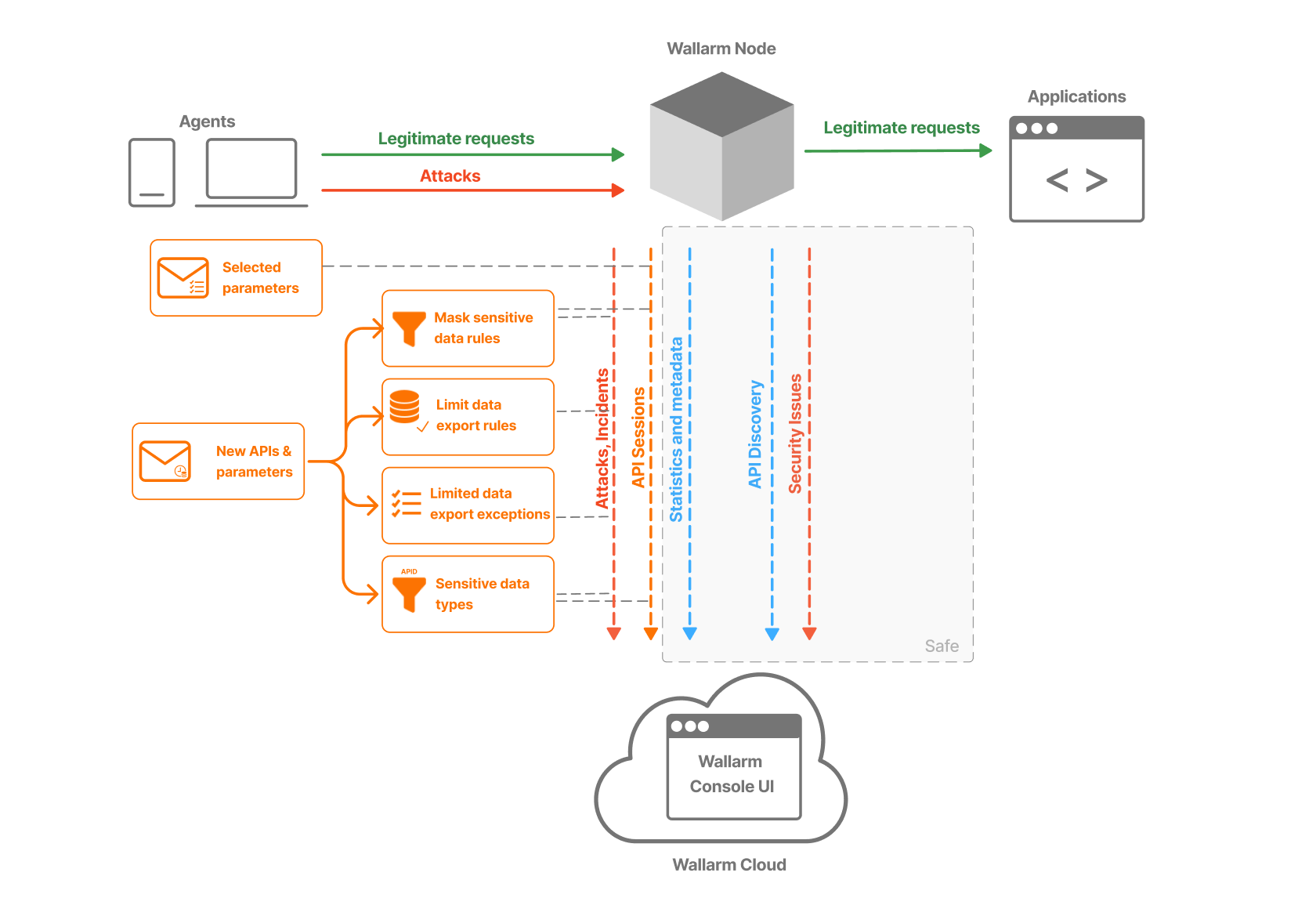
| Where to | What for | What data | How to control |
|---|---|---|---|
| Statistics and metadata | To see your traffic - normal and malicious. | Number of requests, their sources and targets. No sensitive data ever. |
|
| Attacks, Incidents | To analyze security event and apply measures. | Full HTTP data of malicious request. |
|
| API Sessions | To see full sequence of connected actions (session). | Request metadata + what you chose (context parameters). |
|
| API Discovery | To see your actual and complete API inventory. | Endpoint, parameter names and statistics on them. | No need, it is safe. Details... |
| Security Issues | To see security flaws in your infrastructure. | Host name and endpoint address (URL) and parameter name with vulnerability. | No need, it is safe. Details... |
f This feature is currently under construction, arriving soon.
Statistics and metadata
What the data from Wallarm node is sent for: for you to see your traffic and Wallarm node activity on it:
-
On the dashboards (statistics for normal vs. malicious traffic)
-
Via the statistics service (statistics for traffic and node activity)
-
All user activities (requests) in API Sessions (metadata only)
What data is sent and how to control
-
As statistics, the info on number of requests, attacks, blocked requests, per-application information etc. is sent. It is metadata and always safe. However, you can still limit IP addresses allowed to request statistics.
-
In API Sessions, metadata of all user activities (requests) is sent to the Cloud by default. It is metadata (time, source IP, target endpoint, response code, etc.) and is always safe. What actual data is sent additionally, you decide yourself.
Attacks, Incidents
What the data from Wallarm node is sent for: for you to have all necessary information for analysis of the security event.
What data is sent and how to control
-
In Attacks, you see information on all malicious requests (input validation attacks) and malicious behavior (behavioral attacks) registered by Wallarm, except:
- Incidents - displayed separately
- Attacks displayed exclusively in API Sessions
-
Incidents are attacks that successfully exploited the security issue (vulnerability) previously detected by Wallarm. These attacks were detected, but not blocked by Wallarm due to the current settings (
monitoringfiltration mode or others). Information on incident is the same as for attack plus link to security issue. -
For input validation attacks, full HTTP data of malicious request is sent.
To control:
-
Mask sensitive data: create rules of this type for your endpoints or applications to set which request point values should be cut before sending - values will never leave your security perimeter.
-
Limit data export (arriving soon): create rules of this type for your endpoints or applications to switch for them from full malicious request data to metadata only. When full export is disabled, the node sends only the request method, URI, IP address, HTTP status code, request time, and the
Hostheader. The body, query parameters, and other headers are excluded from both requests and responses. "Keep headers" mode is available. -
Limited data export exceptions: if you forbade export to the Cloud with one of more Limit data export rules (for all traffic or for specific endpoints), add parameters-exceptions here - they will be exported in spite of restrictions.
-
Sensitive data types: Wallarm's API Discovery can by default detect different types of sensitive data transferred by endpoints/parameters. You can modify the default rules, add your own, and enable automatic masking (not available yet) for found sensitive data.
-
Combining methods: for Attacks and Incidents, Wallarm never transmits parameter values except the ones of malicious requests. Even this can be disabled by Limit data export rules for all traffic or specific endpoints. If these restrictions make needed data unavailable, explicitly specify limited data export exceptions - parameters that you allow to export in spite of restrictions. This gives you necessary data and you stay in control: even if new sensitive parameters appear with time, they will never be exported until you allow that.
Examples:
- No rules or settings - parameter values are exported only for input validation attacks.
- Limit data export for all traffic - nothing will be exported ever (only metadata).
- Limit data export for
example.com/customers/- nothing will be exported for this endpoint (including all sub-endpoints). - Limit data export for
example.com/customers/butPOST > JSON_DOC > HASH > users > nameparameter is in Limited data export exceptions - only value of this parameter will be exported forexample.com/customers/; for all other traffic, all parameter values for for input validation attacks will be exported. - Limit data export for
example.com/customers/butPOST > JSON_DOC > HASH > users > nameparameter is in Limited data export exceptions, and new parameter appears at this endpoint - its value will not be exported unless you add it to the exceptions explicitly. - There is no sense in adding anything in Limited data export exceptions unless you limit something with Limit data export.
API Sessions
What the data from Wallarm node is sent for: for you to see full sequence of connected actions (session) targeting your applications.
What data is sent and how to control
-
In API Sessions, you see all requests (both legitimate and malicious) going through Wallarm Node to your applications.
-
However, for each request, only its metadata is send by default (time, source IP, target endpoint, response code).
-
Additionally, parameters used for grouping request into this session along with their values, will be displayed.
-
As all that info may be non-informative enough, you add extra parameters to be displayed. With them, you'll be able to understand what is happening. They will be sent to the Cloud along with values.
To control:
-
Session context parameters: add only parameters you really need. Note that some mitigation controls rely on session data and need some parameter values, such controls can themselves add extra parameters to session.
-
Use hashing for the parameter values. Note that hashing will transform the actual value into unreadable - the presence of parameter and particular but unknown value will provide the limited information for the analysis.
API Discovery
What the data from Wallarm node is sent for: for you to see your actual and complete API inventory.
What data is sent and how to control
-
Metadata of requests, on which base API Discovery builds and automatically updates the list of your API hosts and endpoints endpoints, for each endpoint - list of its request and response parameters.
-
Wallarm does not send the values that are specified in the parameters to the Cloud. Only the endpoint, parameter names and statistics on them are sent.
Security issues
What the data from Wallarm node is sent for: for you to see security flaws in your infrastructure that may be exploited by attackers.
What data is sent and how to control
-
Security issues can be detected by different methods. Most of them (such as AASM or any type of security testing) do not have an access to the traffic, so they don't export any data to the Cloud by design. Passive detection, on the other hand, sends entire request & response (including PII and other sensitive data) to the Cloud. Passive vulnerability detection can be disabled.
-
All the other information related to security issues are calculated and formed on the Cloud side: problem description and mitigation recommendations, status history etc.