Wallarm eBPF-Based Solution (Beta)
Beta
The eBPF-based solution is currently in beta. Your feedback helps improve it — contact sales@wallarm.com with questions or suggestions.
Wallarm offers an eBPF-based security solution that leverages the power of the Linux kernel and seamlessly integrates with Kubernetes environments. The solution requires no changes to your application code and provides fast time-to-value for API Discovery — automatically building your API inventory based on real traffic. This article explains how to use and deploy the solution using the Helm chart.
Traffic flow
Traffic flow with Wallarm eBPF-based solution:
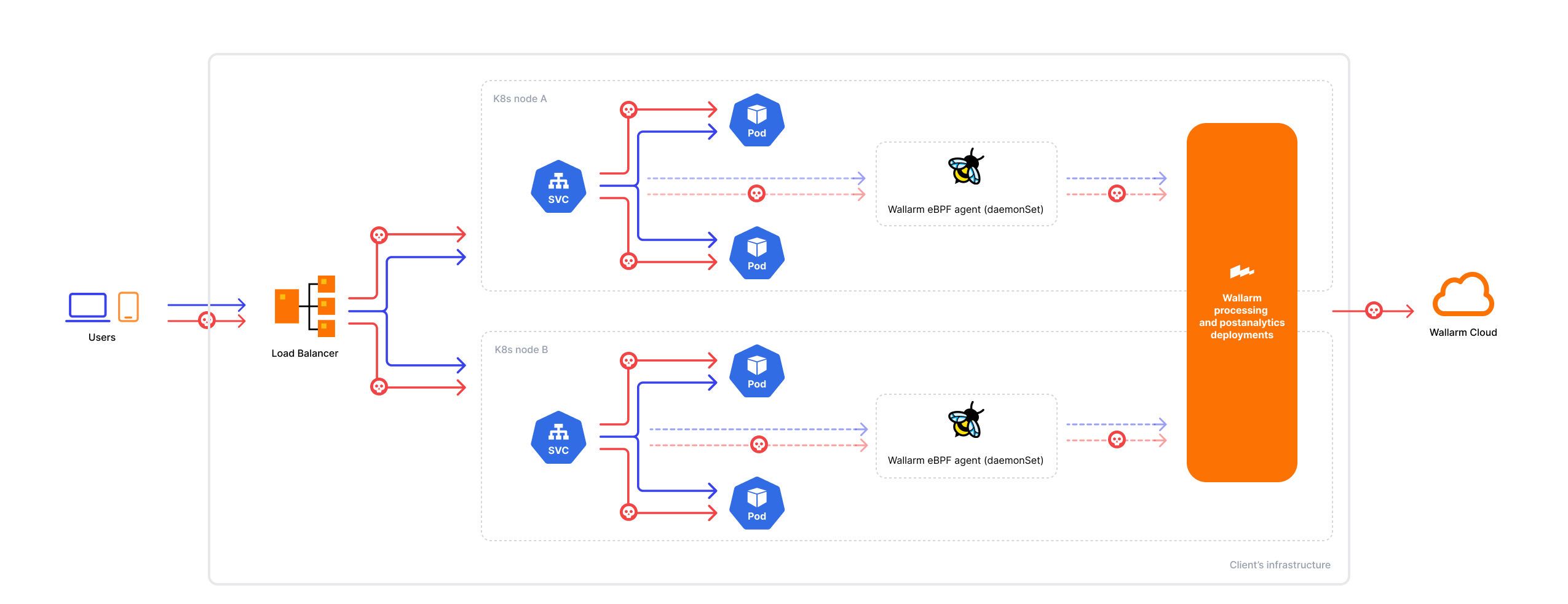
The eBPF solution is designed to monitor traffic using the following protocols:
-
HTTP 1.x or HTTP 2
-
Proxy v1 or Proxy v2
TLS/SSL visibility
Traffic may utilize TLS/SSL encryption or plain text data transfer. The eBPF agent intercepts traffic data from process memory after it has been decrypted, so visibility depends on the TLS implementation used by the application:
-
Supported: Applications using the shared OpenSSL library (e.g., NGINX, HAProxy) — the agent can observe decrypted traffic.
-
Not supported: Applications using other TLS/SSL implementations (e.g., Envoy with BoringSSL, Go's native
crypto/tls, Java's built-in TLS) — traffic from these applications will not be visible to the agent.
For mTLS scenarios in Kubernetes, visibility depends on where TLS is terminated:
-
If mTLS is terminated at a proxy that uses OpenSSL (e.g., NGINX Ingress), the agent can observe the decrypted traffic at that point.
-
If mTLS is terminated within the application itself using an unsupported TLS library, the traffic will be invisible to the agent.
How it works
The Linux operating system comprises the kernel and the user space, where the kernel manages hardware resources and critical tasks, while applications operate in the user space. Within this environment, eBPF (Extended Berkeley Packet Filter) enables the execution of custom programs within the Linux kernel, including those focused on security. Read more about eBPF
As Kubernetes utilizes the capabilities of the Linux kernel for crucial tasks like process isolation, resource management, and networking, it creates a conducive environment for integrating eBPF-based security solutions. In line with this, Wallarm offers an eBPF-based security solution that seamlessly integrates with Kubernetes, leveraging the kernel's functionalities.
Architecture
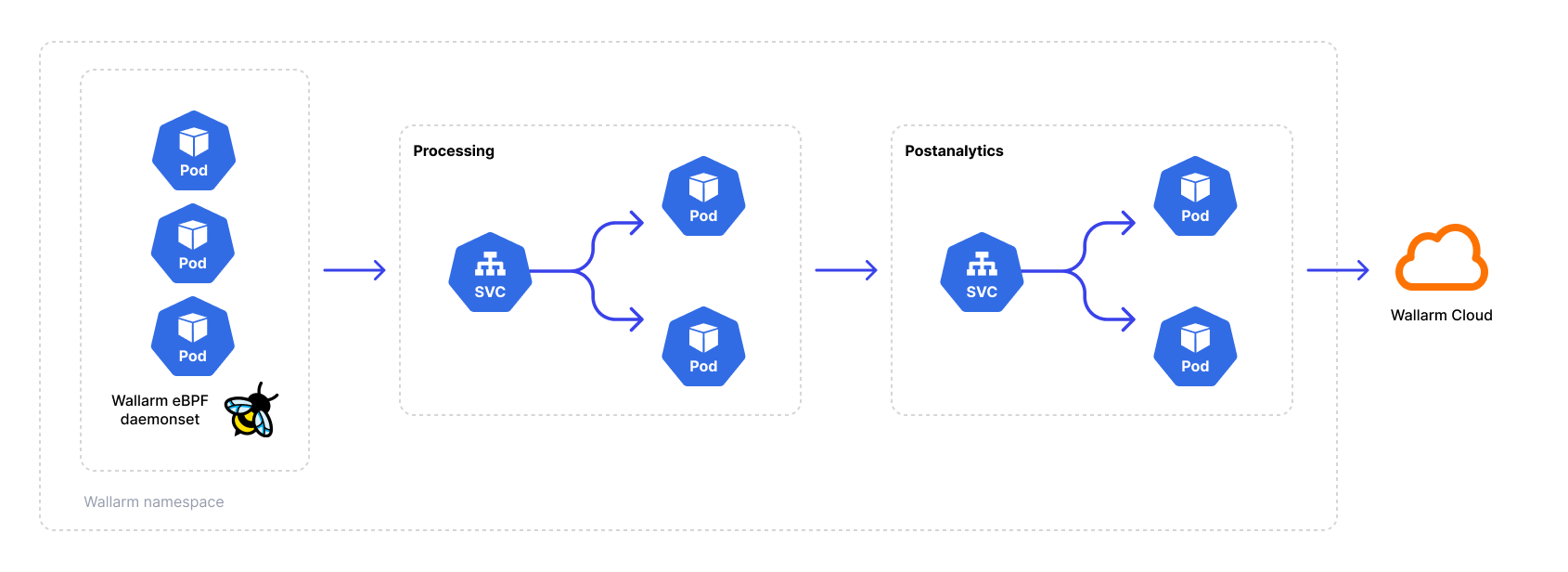
The eBPF agent is deployed as a DaemonSet on every Kubernetes worker node. The agent attaches eBPF hooks to processes and memory of containers in target namespaces, extracting protocol-level data without modifying the application code or injecting sidecars. The Helm chart automatically configures the agent pod with hostPID: true (access to the host process namespace) and runs the agent container in privileged mode with the SYS_PTRACE and SYS_ADMIN capabilities — these settings are required for eBPF hooks to function and are applied by default during deployment. Ensure your cluster security policies allow privileged DaemonSets.
The agent monitors inbound connections to pods, outbound traffic from those pods is not captured.
The agent generates a traffic mirror and forwards it to the Wallarm Native Node. The Native Node analyzes the mirrored traffic to discover API endpoints and send the data to the Wallarm Cloud. Visibility into the API inventory is provided through the Wallarm Console UI.
The following diagram demonstrates the solution components:
API Discovery
The solution empowers Wallarm's core API Discovery module to identify your API endpoints, construct your API inventory, and ensure it remains up-to-date.
Because the eBPF agent operates at the node level, it can observe service-to-service traffic within the Kubernetes cluster. This allows API Discovery to map internal microservice communications and identify APIs that services expose to each other — providing visibility into internal API surface that is typically invisible to perimeter-level security tools.
RBAC
The Helm chart automatically creates the following RBAC resources for the eBPF agent:
-
ServiceAccount for the agent pod (created by default)
-
ClusterRole granting
get,list,watchpermissions onpods,nodes, andnamespaces— required for the agent to resolve namespace labels and pod annotations for traffic filtering -
ClusterRoleBinding linking the ServiceAccount to the ClusterRole
Processing and aggregation pods use optional ServiceAccounts (disabled by default). Review these RBAC resources if your cluster has strict security policies.
Use cases
The eBPF-based solution enables API Discovery in Kubernetes without impacting production — it operates out-of-band, introduces no latency, and requires no changes to application code.
Based on real traffic, API Discovery builds your API inventory — including internal service-to-service endpoints invisible at the perimeter — and provides sensitive data detection, risk scoring, and change tracking.
Use this solution to audit your APIs and the sensitive data they process, map internal microservice communications, or evaluate Wallarm on real traffic out-of-band.
Technical requirements
Ensure the following technical prerequisites are met for a successful deployment of the eBPF solution:
-
Supported Kubernetes version:
- AWS - Kubernetes 1.24 and above
- Azure - Kubernetes 1.26 and above
- GCP - any Kubernetes version
- Bare-metal server - Kubernetes 1.22 and above
-
(Optional) Installed cert-manager — required only if you enable certificate provisioning via cert-manager for secure communication between the agent and the Native Node. Alternatively, you can use a pre-existing secret or provide certificates manually. See certificate configuration for details.
-
Helm v3 package manager.
-
Linux kernel version 5.15 or higher with BTF (BPF Type Format) on Ubuntu, Debian, RedHat, Google COS, and Amazon Linux.
-
Processor with the x86_64 architecture.
-
Applications must use the shared OpenSSL library for TLS — this is required for the eBPF agent to observe encrypted traffic. Applications using other TLS implementations (BoringSSL, Go
crypto/tls, Java built-in TLS) will not be visible. See TLS/SSL visibility for details. -
Your user account should have Administrator access to the Wallarm Console.
If your use case differs from the listed requirements, contact our sales engineers providing detailed technical information about your environment to explore potential adjustments to meet your specific needs.
External outbound access
To ensure the solution functions correctly in environments with restricted outbound traffic, configure network access to allow the following external resources:
-
https://charts.wallarm.comto add the Wallarm Helm charts. -
https://hub.docker.com/r/wallarmto retrieve Wallarm Docker images from Docker Hub. -
For users working with the US Wallarm Cloud, access
https://us1.api.wallarm.com. For those using the EU Wallarm Cloud, accesshttps://api.wallarm.com. -
IP addresses and their corresponding hostnames (if any) listed below. This is needed for downloading updates to attack detection rules and API specifications, as well as retrieving precise IPs for your allowlisted, denylisted, or graylisted countries, regions, or data centers.
Internal network communication
If you use Kubernetes NetworkPolicies or similar network restrictions, ensure the following inter‑component communication is allowed. These ports are hardcoded in the Helm chart and cannot be changed via values.yaml:
| Source | Destination | Port | Protocol | Description |
|---|---|---|---|---|
| Agent (DaemonSet) | Processing (Deployment) | 18443 | TCP | Mirrored traffic delivery |
| Processing (Deployment) | Aggregation (Deployment) | 3313 | TCP | Findings and statistics |
| Processing (Deployment) | Processing (Deployment) | 9009 | TCP | Mesh discovery (multi-replica) |
Deployment
To deploy the Wallarm eBPF solution:
-
Create the Wallarm node.
-
Deploy the Wallarm Helm chart.
-
Enable traffic mirroring.
-
Test the Wallarm eBPF operation.
Step 1: Generate a filtering node token
Generate an API token for a Wallarm filtering node to connect to the Wallarm Cloud:
-
Open Wallarm Console → Settings → API tokens in the US Cloud or EU Cloud.
-
Create API token with the
Node deployment/Deploymentusage type.
Step 2: Deploy the Wallarm Helm chart
-
Make sure that your environment meets the requirements listed above.
-
Add the Wallarm chart repository:
-
Create the
values.yamlfile with the Wallarm eBPF solution configuration.Example of the file with the minimum configuration:
<NODE_TOKEN>is the token of the Wallarm node to be run in Kubernetes.Using one token for several installations
You can use one token in several installations regardless of the selected platform. It allows logical grouping of node instances in the Wallarm Console UI. Example: you deploy several Wallarm nodes to a development environment, each node is on its own machine owned by a certain developer.
-
Deploy the Wallarm Helm chart:
helm install --version 0.25.1 <RELEASE_NAME> wallarm/wallarm-oob --wait -n wallarm-ebpf --create-namespace -f <PATH_TO_VALUES><RELEASE_NAME>is the name for the Helm release of the Wallarm eBPF chartwallarm-ebpfis the new namespace to deploy the Helm release with the Wallarm eBPF chart, it is recommended to deploy it to a separate namespace<PATH_TO_VALUES>is the path to thevalues.yamlfile
Step 3: Enable traffic mirroring
By default, the deployed solution does not analyze any traffic. To enable traffic analysis, you need to enable traffic mirroring at the desired level, which can be:
-
For a namespace
-
For a pod
-
For a node name or a container
There are two ways to enable traffic mirroring: using dynamic filters as namespace labels or pod annotations, or controlling it through the config.agent.mirror.filters block in the values.yaml file. You can also combine these approaches. More details
For a namespace using a label
To enable mirroring for a namespace, set the namespace label wallarm-mirror to enabled:
For a pod using an annotation
To enable mirroring for a pod, set the mirror.wallarm.com/enabled annotation to true:
kubectl patch deployment <DEPLOYMENT_NAME> -n <NAMESPACE> -p '{"spec": {"template":{"metadata":{"annotations":{"mirror.wallarm.com/enabled":"true"}}}} }'
For a namespace, pod, container, or node using values.yaml
For more granular control, you can use the config.agent.mirror.filters block in the values.yaml file of the Wallarm eBPF to specify the mirroring level. Read the article on how to configure filters and how they interact with Wallarm namespace labels and pod annotations.
Step 4: Test the Wallarm eBPF operation
To test that the Wallarm eBPF operates correctly:
-
Get the Wallarm pod details to check they have been successfully started:
Each pod should display the following: READY: N/N and STATUS: Running, e.g.:
-
Send several test requests to your application endpoints to generate traffic for API Discovery. Replace
<LOAD_BALANCER_IP_OR_HOSTNAME>with the actual IP address or DNS name of the load balancer directing traffic to your application:curl -X GET https://<LOAD_BALANCER_IP_OR_HOSTNAME>/api/v1/users curl -X POST https://<LOAD_BALANCER_IP_OR_HOSTNAME>/api/v1/users -H "Content-Type: application/json" -d '{"name": "test"}' curl -X GET https://<LOAD_BALANCER_IP_OR_HOSTNAME>/api/v1/healthSend a variety of requests to different endpoints to help the node build a more complete picture of your API structure.
-
Wait a few minutes for the data to be processed and sent to the Wallarm Cloud, then open Wallarm Console → API Discovery to verify that the endpoints have been discovered and are displayed in your API inventory.
Limitations
Intended for API Discovery only
This solution is designed for API Discovery and should not be used as a primary tool for attack detection or protection.
Response data limitations
As server response bodies are not mirrored:
-
Vulnerability detection based on passive detection is not supported.
-
Displaying API endpoint response structure in API Discovery is not supported.
TLS/SSL visibility limitations
The eBPF agent can only observe traffic from applications that use the shared OpenSSL library for TLS/SSL encryption. Traffic from applications using other TLS implementations is not visible to the agent:
-
Envoy with BoringSSL
-
Go applications using native
crypto/tls -
Java applications using built-in TLS
-
Other non-OpenSSL TLS libraries
For mTLS environments, visibility depends on where TLS is terminated — if terminated at a proxy using OpenSSL (e.g., NGINX Ingress), traffic is visible; if terminated within the application using an unsupported library, it is not. See TLS/SSL visibility for details.