Tracking changes in API and MCP  

If changes occur in your API or MCP servers, API Discovery updates the built API inventory, highlights the changes and gives you information on when and what has changed. This applies to both REST/GraphQL/SOAP/gRPC endpoints and MCP primitives (tools, resources, prompts).
Overview
The company may have several teams, disparate programming languages, and a variety of language frameworks. Thus changes can come to the API at any time from different sources, which makes them difficult to control. For security officers it is important to detect changes as soon as possible and analyze them. If missed, such changes may hold some risks, for example:
-
The development team can start using a third-party library with a separate API and they do not notify the security specialists about that. This way the company gets endpoints that are not monitored and not checked for vulnerabilities. They can be potential attack directions.
-
PII data begins to be transferred to the endpoint. An unplanned transfer of PII can lead to a violation of compliance with the requirements of regulators, as well as lead to reputational risks.
-
An endpoint important for the business logic (for example,
/login,/order/{order_id}/payment/) is no longer called. -
Other parameters that should not be transferred, for example
is_admin(someone accesses the endpoint and tries to do it with administrator rights) begin to be transferred to the endpoint. -
A new MCP tool or resource appears on an MCP server without the security team's knowledge, potentially exposing sensitive data or operations to AI agents.
Highlighting changes in API
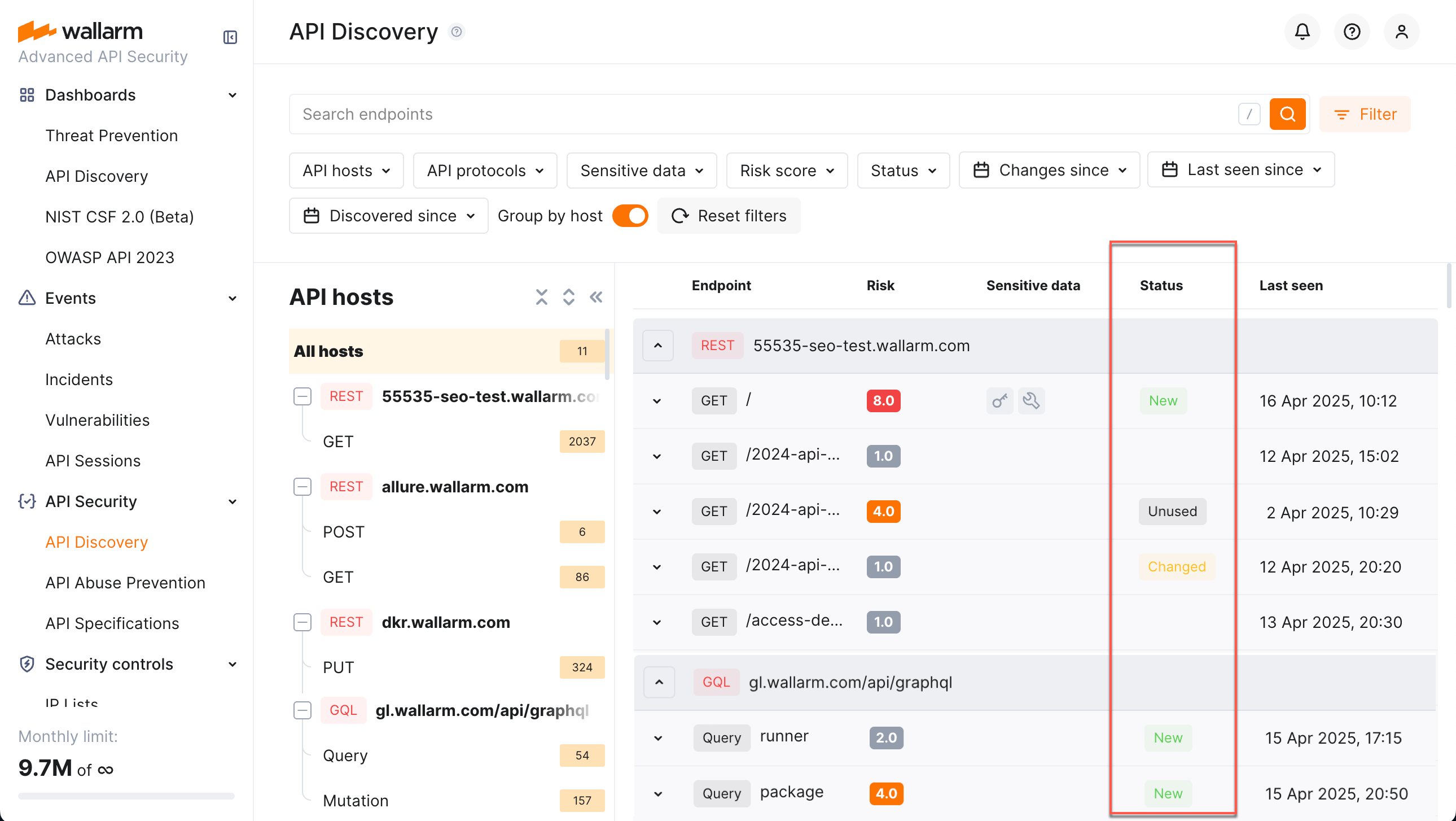
In the Status column for endpoints, MCP primitives, and their parameters, API Discovery provides data about changes for the last week:
-
New for the endpoints or MCP primitives discovered within a week.
-
Changed for the endpoints or MCP primitives that have newly discovered parameters or parameters that obtained the
Unusedstatus within the period. In the details of the endpoint or primitive, such parameters will have a corresponding mark.- A parameter gets the
Newstatus if it is discovered within the last week. - A parameter gets the
Unusedstatus if it does not pass any data for a week. - If later the parameter in the
Unusedstatus passes data again it will lose theUnusedstatus.
- A parameter gets the
-
Unused for the endpoints or MCP primitives not requested (with the code 200 in response) within the last week or longer.
- If later the endpoint or primitive in the
Unusedstatus is requested (with the code 200 in response) again it will lose theUnusedstatus.
- If later the endpoint or primitive in the
Unused endpoints are removed after 30 days
Endpoints that receive no qualifying requests for 30 days since their last update are automatically removed from your API inventory, together with their parameters, sensitive-data history, authentication coverage, and risk-score evolution. Removed entries cannot be restored. If traffic to such an endpoint resumes later, the endpoint reappears as New and discovery starts over from scratch — past parameter information and history are not recovered.
Use Changed since filter to only see endpoints or MCP primitives changed in a specific time period, for example, today.
Notifications
API Discovery can notify you about endpoint changes in two ways:
-
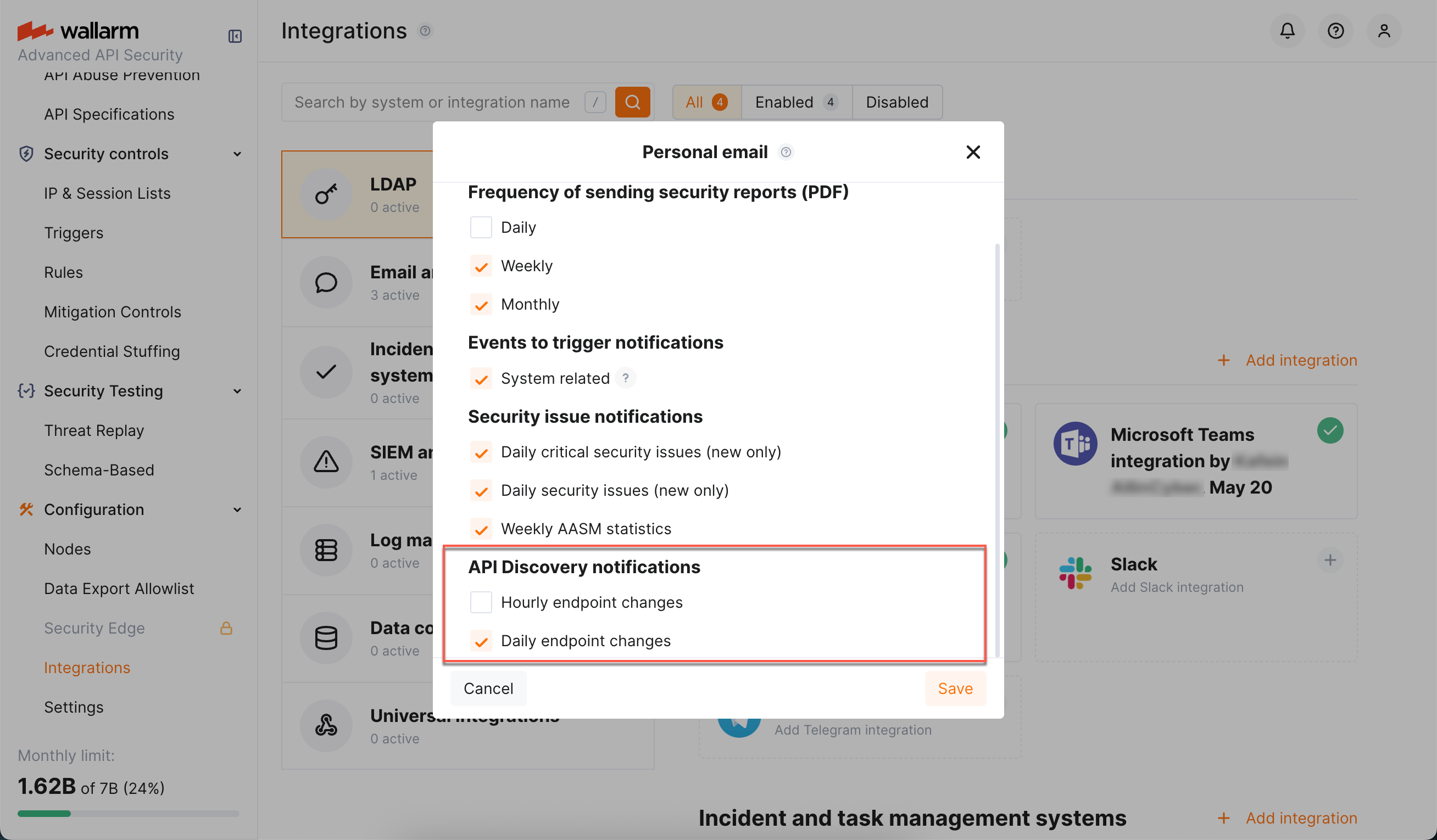
Email digests — daily or hourly summaries of new and changed endpoints, delivered to your account email and any additional addresses.
-
Per-endpoint alerts via triggers — one notification per changed endpoint, delivered through any configured integration (Slack, webhook, SIEM, PagerDuty, Microsoft Teams, Telegram, and others) using the Changes in API trigger condition.
Email notifications
You can configure API Discovery email notifications to be sent to your personal email address (used to log in) and to additional email recipients.
Available notifications:
-
Daily endpoint changes
-
Hourly endpoint changes
Notifications include both newly discovered and changed endpoints. Email notifications are disabled by default.
-
In Wallarm Console, go to Configuration → Integrations → Email and messengers:
- Personal email – configure notifications for your login email address
-
Email report – configure notifications for additional email recipients
For details, see email integrations.
-
In the API Discovery notifications section, select the notifications you want to receive (hourly or daily notifications about new and changed endpoints).
Per-endpoint alerts via triggers
To receive a notification for every endpoint that changes — and to deliver these notifications through any integration configured in your account — configure a Wallarm trigger with the Changes in API condition.
How it works
-
Every hour, API Discovery evaluates endpoints that changed since the previous run against all enabled Changes in API triggers for your account.
-
For every REST endpoint whose status matches the trigger filters (New, Changed, or Unused), one event is sent to the integrations selected in the trigger's actions.
-
Each event includes the endpoint's HTTP method, host, path, application, change type, and the list of parameters with their detected sensitive data types — so the receiving system has the full context without needing to open Wallarm Console.
REST only
Currently, the Changes in API trigger evaluates only REST endpoints. Changes in GraphQL, SOAP, gRPC, and MCP primitives are not yet delivered through this trigger.
Filters
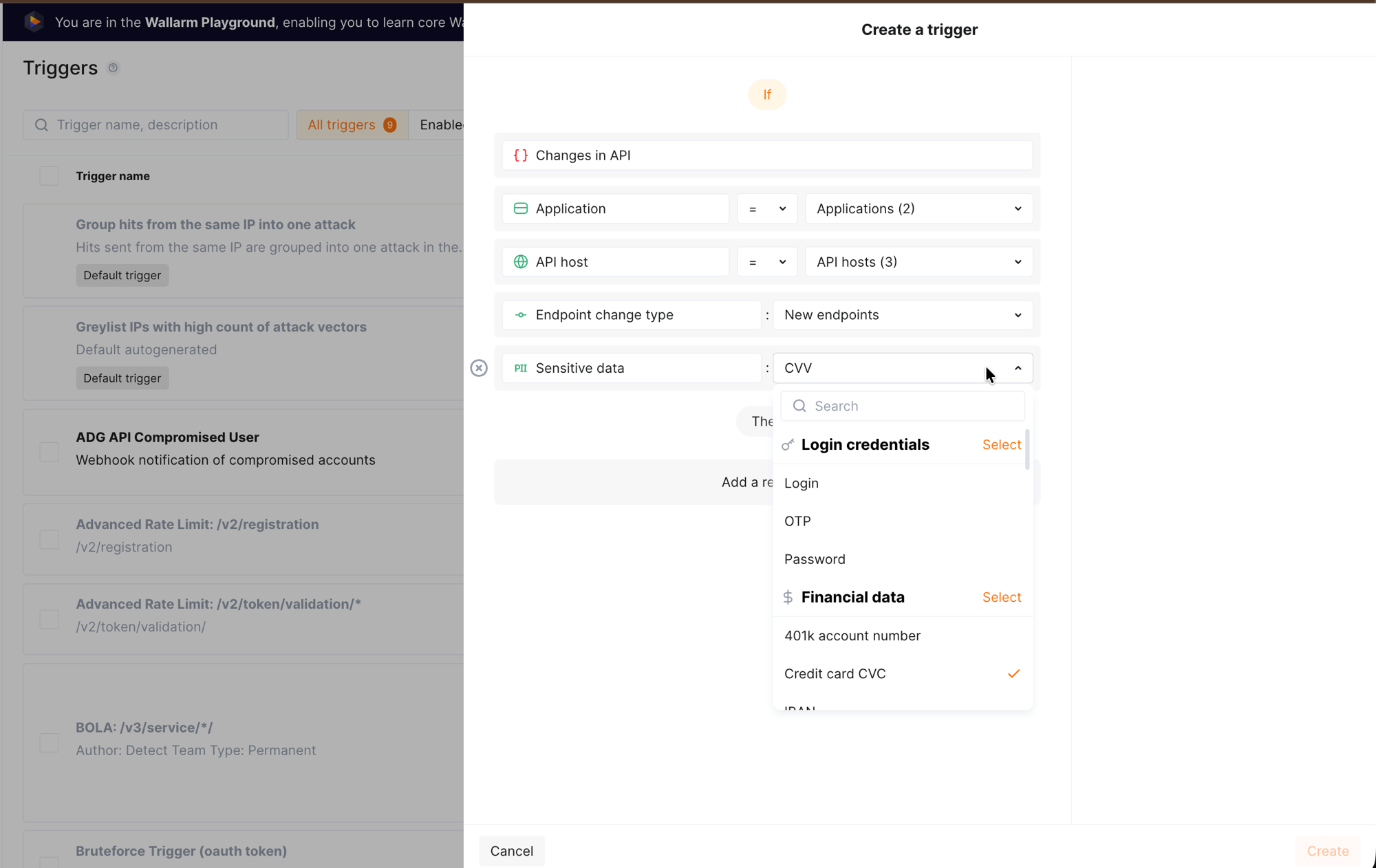
When creating the trigger, you can narrow notifications using filters specific to the Changes in API condition:
| Filter | Values | Purpose |
|---|---|---|
| Application | One or more applications | Notify only about changes in selected applications. |
| API host | One or more hostnames | Notify only about changes on selected hosts. |
| Endpoint change type | New endpoints, Changed endpoints, Unused endpoints |
Notify only about a specific kind of change. |
| Sensitive data | One or more sensitive data types | Notify only when the changed endpoint carries the selected sensitive data types — useful for monitoring PCI- or PII-scoped APIs. |
All filters accept multiple values. If you set several filters, they are combined with AND — all conditions must match for the notification to be sent.
Event data points
Each event represents one changed endpoint. The table below lists the maximum set of data points the event can carry; the actual content that reaches the receiving system depends on the integration (delivery) type selected in the trigger's action. Structured channels (webhook, SIEM) typically receive the full payload, while message-oriented channels (Slack, Microsoft Teams, Telegram, email) render a condensed summary built from the same data.
| Data point | Description |
|---|---|
| Headline | Short headline of the event, used by message-oriented integrations as the message title. |
| Summary | Human-readable summary describing what changed. |
| Application | Name of the application the endpoint belongs to. |
| Domain | Hostname on which the endpoint was discovered. |
| Endpoint path | Path of the endpoint. |
| HTTP method | GET, POST, PUT, PATCH, DELETE, and so on. |
| Change type | Kind of change detected on the endpoint: added, changed, or unused. |
| Parameters | List of endpoint parameters that caused or accompanied the change. For each parameter, the event carries: |
| — Path-like location | Where the parameter sits inside the request or response — for example, ["header", "ACCEPT"] for a request header named ACCEPT, or ["response_header", "CONTENT-TYPE"] for a response header. |
| — Parameter name | Name of the parameter. |
| — Parameter class | Where the parameter is carried — for example, header, response_header, request_body. |
| — Parameter change type | Whether the parameter itself is new or changed. |
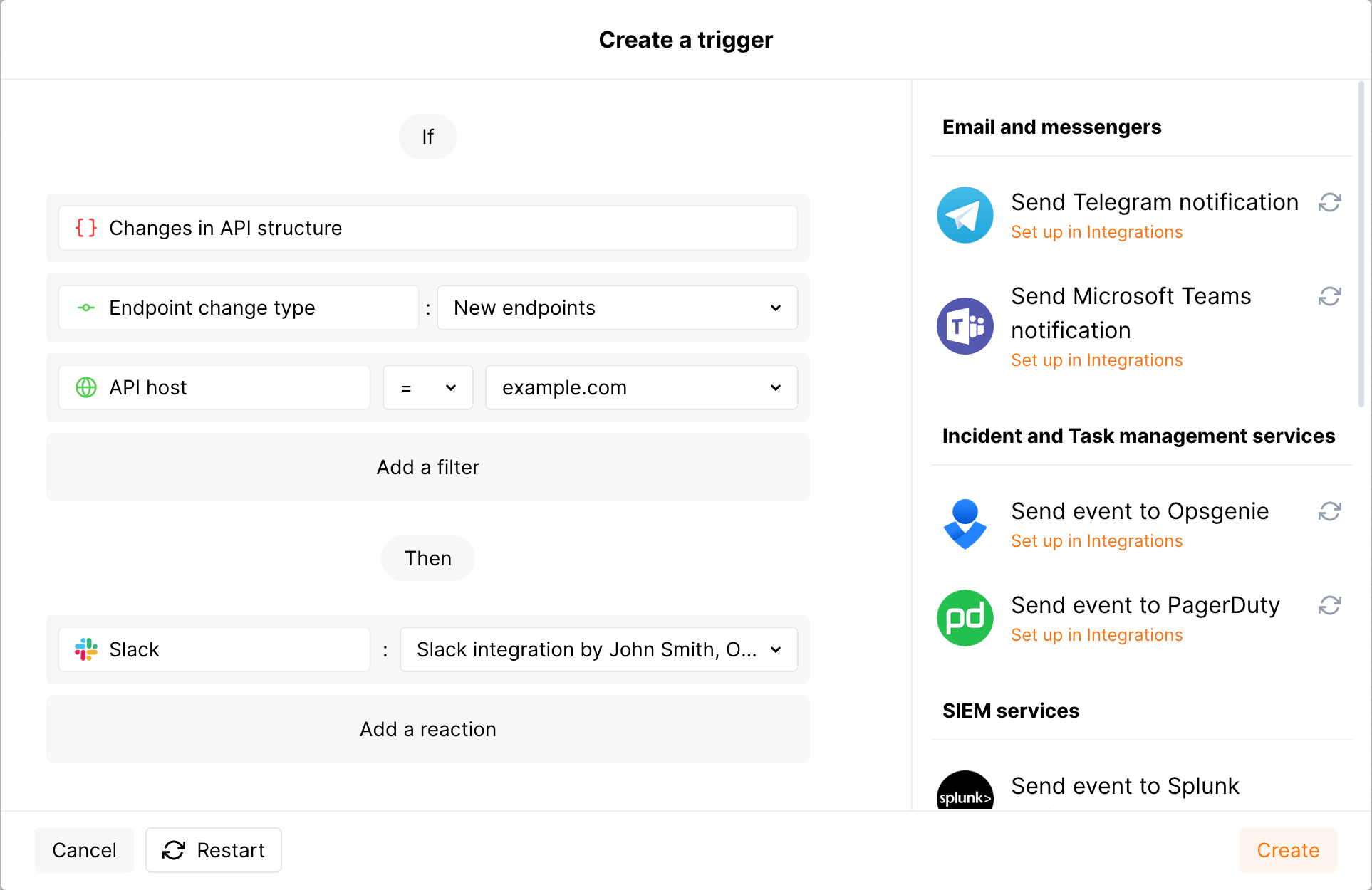
Example: notify in Slack when new endpoints appear on example.com
-
Configure a Slack integration in Wallarm Console → Integrations in the US or EU cloud.
-
Go to the Triggers section and create a trigger with the Changes in API condition. Set the API host filter to
example.comand the Endpoint change type filter toNew endpoints. Select the Slack integration as the action. -
Send several requests to
example.com/usersto receive the200(OK) response. -
In the API Discovery section, verify that the endpoint appears with the New mark.
-
Within an hour, a message summarizing the new endpoint and any sensitive data it carries arrives in your Slack channel.
The message will look similar to the following:
[wallarm] A new endpoint has been discovered in your API

Notification type: api_structure_changed

The new GET example.com/users endpoint has been discovered in your API.

    Client: Client 001
    Cloud: US

    Details:

      application: Application 1802
      domain: example.com
      endpoint_path: /users
      http_method: GET
      change_type: added
      link: https://my.wallarm.com/api-discovery?instance=1802&method=GET&q=example.com%2Fusers