Authentication Flow Detection  

API Discovery analyzes HTTP headers and request parameters in the traffic to automatically identify the authentication flow used by each endpoint. This helps you find endpoints that lack proper authentication — the #1 API security risk.
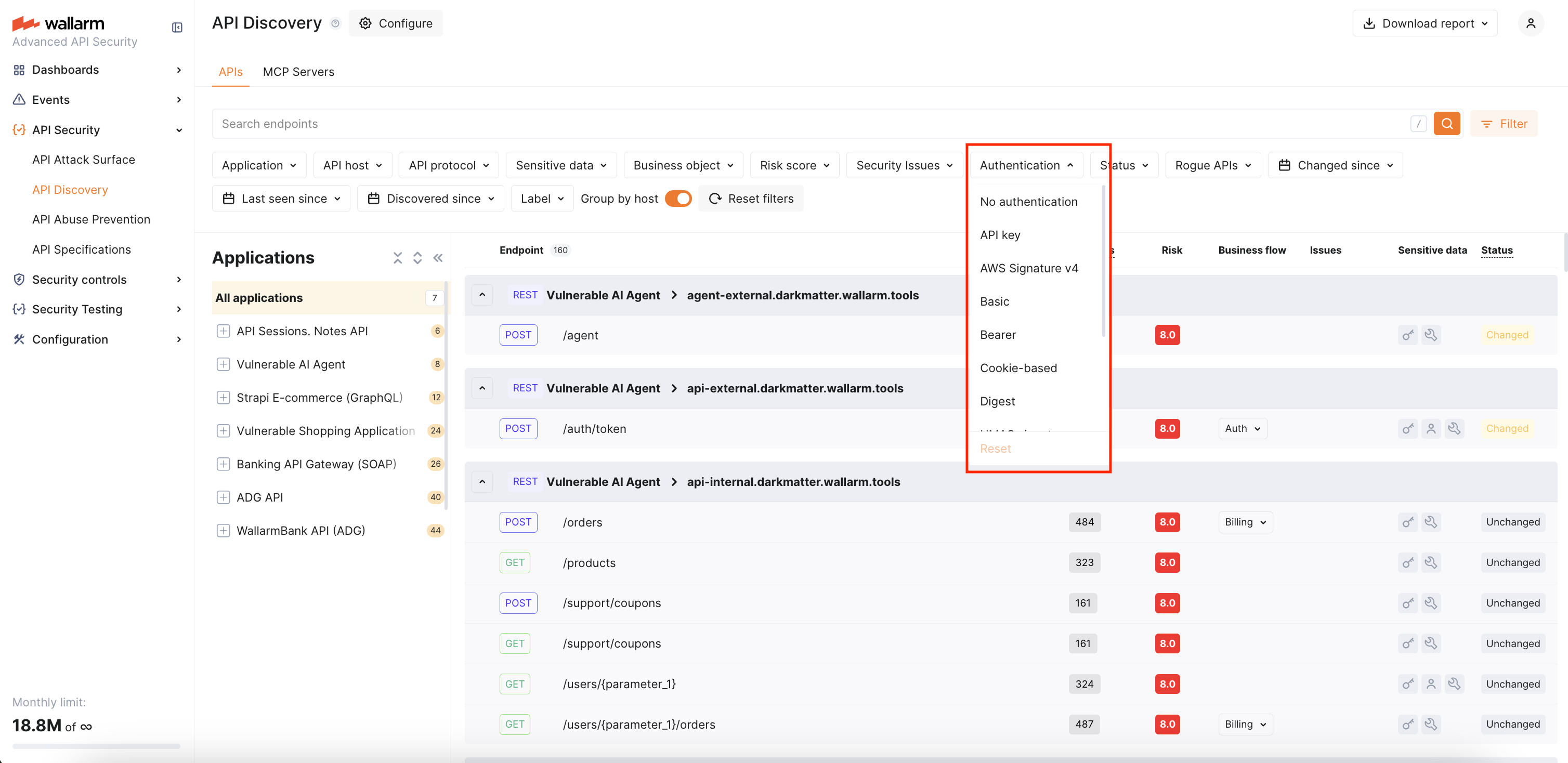
You can use the Authentication filter in the API Discovery inventory to quickly find unauthenticated endpoints or endpoints using a specific authentication type.
Requirements
Authentication flow detection is supported starting from NGINX Node 6.11.0 and Native Node 0.24.0.
Default authentication types
Wallarm recognizes the following authentication types:
| Authentication flow | Description |
|---|---|
| API key | API key in headers (e.g., x-api-key) or query parameters. |
| AWS Signature v4 | AWS request signing (AWS4-HMAC-SHA256 in Authorization header). |
| Basic | HTTP Basic authentication. |
| Bearer | Bearer token in Authorization header. |
| Cookie-based | Session-based authentication using cookies (cookie / set-cookie headers). |
| Digest | HTTP Digest authentication. |
| Hawk | Hawk authentication scheme. |
| HMAC signature | HMAC-based request signing. |
| Negotiate | SPNEGO/Kerberos authentication. |
| NTLM | NTLM authentication. |
| SCRAM | Salted Challenge Response Authentication Mechanism. |
An endpoint can have multiple authentication types if different requests use different authentication mechanisms.
Default authentication parameters
In addition to the recognized authentication types above, Wallarm ships a curated list of common authentication parameter names that are detected automatically — no configuration needed.
The defaults cover the following request points grouped by request location:
| Location | Parameter names |
|---|---|
| HTTP headers | APIKEY, CLIENT_SECRET, JWT, OCP-APIM-SUBSCRIPTION-KEY, X-SECRET, X-TOKEN |
| Cookies | access-token, access_token, auth-token, Authorization, jwt, KEYCLOAK_IDENTITY, refresh_token, session-token |
| Query string | access_token, api_key, apiKey, apikey, Authorization, authorization, client_secret, refresh_token |
Form-encoded body (application/x-www-form-urlencoded) |
access_token, api_key, apiKey, Authorization, authorization, client_secret, refresh_token |
JSON body (application/json) |
access_token, api_key, apiKey, client_secret, refresh_token |
Header names are matched case-insensitively. Cookie, query, and body parameter names are matched as written — different casings (apiKey, apikey, APIKEY) are listed separately because real APIs use them inconsistently.
If your APIs use parameter names that fall outside this list, you can extend the per-tenant configuration.
Authentication status
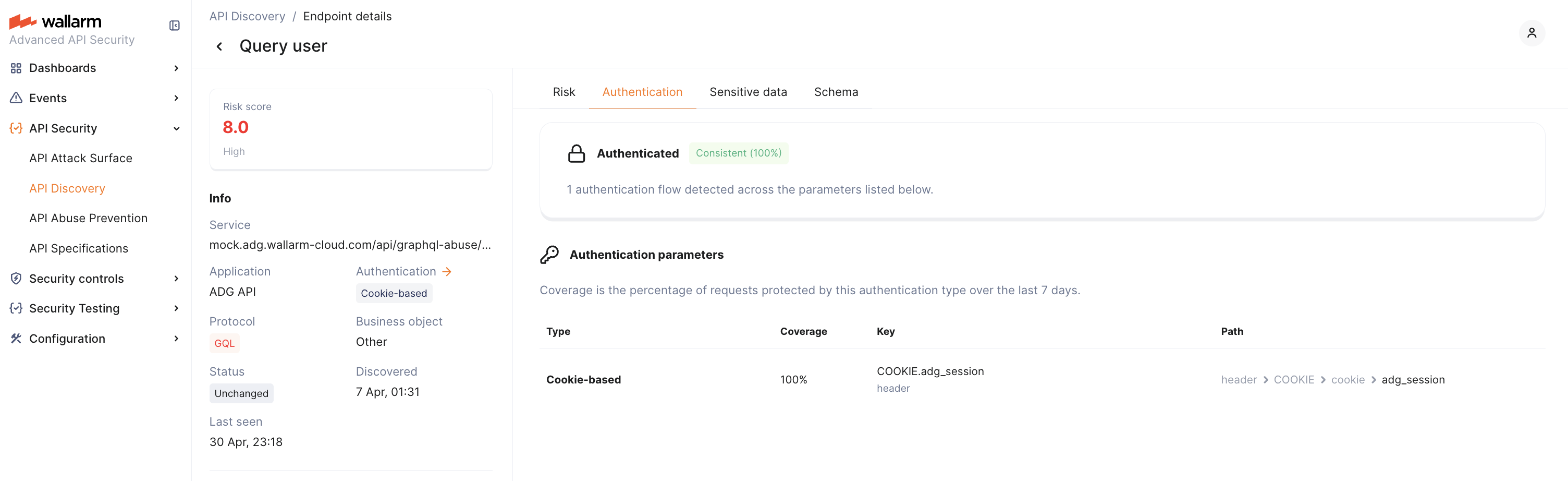
In the Authentication tab of the endpoint details, Wallarm displays the overall authentication status for the endpoint. The status is based on the last 7 days of traffic and reflects what percentage of requests contained authentication parameters with valid values:
| Status | Condition | Description |
|---|---|---|
| Consistent | 95%+ of requests authenticated | The endpoint is reliably protected by authentication. |
| Partial | 0–95% of requests authenticated | Some requests reach the endpoint without valid authentication. This may indicate recently added authentication that has not yet reached full coverage, or a misconfiguration. |
| Missing | 0% of requests authenticated | No valid authentication was detected in any requests to this endpoint over the observation period. |
7-day observation window
Authentication status and coverage are calculated based on the last 7 days of traffic. When authentication is newly added to an endpoint, it initially appears as Partial and gradually moves to Consistent as the 7-day window fills with authenticated requests.
Authentication parameters
In the Authentication tab of the endpoint details, Wallarm lists every detected authentication parameter with the following details:
| Column | Description |
|---|---|
| Type | Authentication type (e.g., Bearer, Cookie, API key). |
| Coverage | Percentage of requests where this parameter contained a valid authentication value over the last 7 days. |
| Key | Parameter name and its context — header, cookie, or body field. |
| Path | Hierarchical location of the parameter within the request structure. |
A single endpoint can have multiple authentication parameters. For example, one endpoint might use a Bearer token in the Authorization header for 80% of requests and an API key in the body for 5%. Each parameter's coverage is calculated independently — coverages may not add up to 100%.
Customizing detected authentication parameters
If your APIs use authentication parameters that are not part of the default parameters — for example, a custom header, a non-standard cookie name, or a token field in the request body — you can extend the per-tenant detection list through the Wallarm API. After a parameter is added, requests carrying it are counted as authenticated when calculating endpoint authentication status, coverage, and the Authentication filter.
The configuration is per client (tenant). Changes affect only the client whose ID is in the request path.
Reviewing the current configuration
To retrieve the parameters currently in effect for a client, send a GET request:
Learn how to get an API token.
The response lists every authentication parameter that the tenant currently treats as a valid authentication signal — the recognized defaults plus any custom entries previously added.
Adding a new authentication parameter
To register a parameter, send a POST request describing where the parameter sits in a request. The location is described by a point array — a hierarchical path that mirrors how Wallarm parses a request:
| Location | point shape |
Example |
|---|---|---|
| HTTP header | ["header", "<HEADER_NAME>"] |
["header", "X-API-KEY"] |
| Cookie | ["header", "COOKIE", "cookie", "<COOKIE_NAME>"] |
["header", "COOKIE", "cookie", "session"] |
| Query string | ["get", "<PARAM_NAME>"] |
["get", "access_token"] |
| Form-encoded body field | ["post", "form_urlencoded", "<FIELD_NAME>"] |
["post", "form_urlencoded", "client_secret"] |
| JSON body field | ["post", "json_doc", "json_obj", "<FIELD_NAME>"] |
["post", "json_doc", "json_obj", "refresh_token"] |
Header names in the point array are written in uppercase and are matched case-insensitively against incoming requests. Query and body field names preserve case as written.
Learn how to get an API token.
The endpoint accepts one parameter per request. To register multiple parameters, send a separate POST for each one. Use the GET call above to review the current list and avoid duplicates.
After a parameter is added, authentication coverage is recalculated for new traffic. Existing endpoints transition between authentication statuses on the same 7-day observation window.
The authentication type for a custom parameter is determined by analyzing the parameter value.