AI Hypervisor Overview  

AI Hypervisor is the runtime governance layer for every LLM call, agent action, and MCP tool invocation in your environment.
A Wallarm scanner attaches to your AI workloads using Extended Berkeley Packet Filter (eBPF) and patented non-invasive memory analysis (US Patent 12,505,228). It builds a live inventory of the agents, model providers, MCP servers, and data sources your applications use, and attributes every call to the user who triggered it across internal service hops.
No SDK, no code changes, no pod restarts. You label a workload, and the scanner attaches to it.
Where the scanner runs
The scanner runs where your AI applications run: on Kubernetes (for example, Amazon EKS) as a DaemonSet, on AWS ECS on EC2 as a DAEMON service, on AWS Fargate as extra containers in your task, and on macOS endpoints. The subscription is procured through AWS Marketplace. See Scanner Installation.
The problem AI Hypervisor solves
AI agents in production are a security blind spot. Engineering teams ship support bots, RAG systems, and agentic workflows that call OpenAI, Bedrock, and Anthropic, hit internal databases, and act on behalf of users. Security has no current picture of what runs, what each agent sends where, what data leaks, or who triggered any given call.
AI Hypervisor closes that gap as a Discover → Observe → Enforce → Govern arc:
| Pillar | What you get | Where in the product |
|---|---|---|
| Discover (know what AI is running) | Inventory of every LLM provider, agent, MCP server, and tool, built from observed traffic. Anthropic, OpenAI, AWS Bedrock, Azure OpenAI, Gemini, Cohere, Mistral, and Together are recognized out of the box. Shadow AI surfaces alongside approved providers. | Findings, Registry, Topology, Supply Chain, Infrastructure, Code, Discovery |
| Observe (know who triggered it) | Every model call, agent step, and tool invocation attributed to the originating end user across service hops. Replay prompts, reconstruct incident timelines, attribute LLM cost by user and team. | Traffic, Traffic Flow Map, Heatmap, Egress, AI Spend |
| Enforce (stop the bad ones) | Kernel-level session termination for active misbehavior, plus pattern-match policies that block, redact, or alert on outbound calls before they reach the model provider. The enforcement engine ships in every scanner; the operator-facing controls are enabled per tenant by Wallarm. | Enforcement, Data Governor, A2AS, driven from Shadow AI and Traffic |
| Govern (prove it to auditors) | PII flow records, AI-SBOM with CVE enrichment, full session replay. Mapped to EU AI Act, SOC 2, and NIST AI RMF controls. | Compliance, Audit Log |
Who AI Hypervisor is for
-
Security leaders who own AI risk. They need visibility, attribution, and audit posture for AI traffic on par with the rest of their workload portfolio.
-
Platform and AI infrastructure leaders running mixed-language workloads (Python, Node, Go, Java, Ruby). They want one consistent answer to what is calling what, and is it safe without operating a separate tool per language.
-
Compliance and audit owners who need to prove what data went to which model provider, on whose behalf, on demand, without rebuilding the evidence from spreadsheets.
AI Hypervisor sits next to your APM, log pipeline, and SIEM rather than replacing them. The scanner runs inside your own environment, and it sends the results only to your tenant.
How it works
AI Hypervisor splits into two pieces with a clean boundary between them: a scanner you run, and a tenant Wallarm hosts.
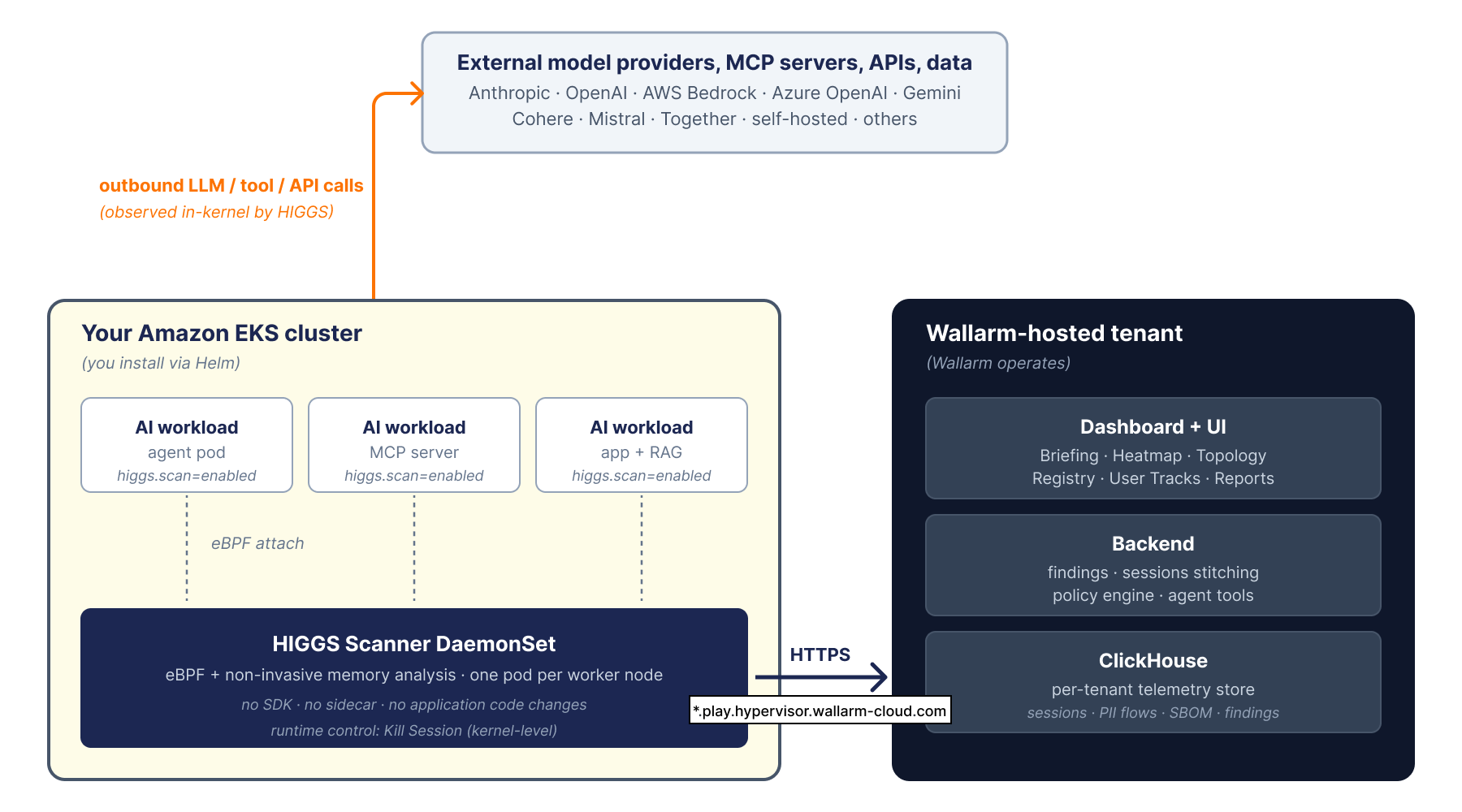
On your side, where your AI applications run:
-
The scanner runs as a Kubernetes DaemonSet (one pod per worker node, installed through Helm), an ECS DAEMON service, extra containers in a Fargate task, or a macOS system extension. It is the only AI Hypervisor component you install yourself. See Scanner Installation.
-
The scanner attaches to your AI workload processes using eBPF and non-invasive memory analysis, without any SDK, sidecar, or code change. Observation happens at the connection level inside the kernel, before the outbound call reaches the network stack.
-
Supported runtimes for in-process introspection: Python, Node.js, Go, Java, Ruby. Workloads in other runtimes are still discovered at the network layer.
-
The scanner uploads observations over HTTPS to your hosted tenant.
On Wallarm's side, your tenant:
-
The dashboard, backend, and telemetry store (ClickHouse) are hosted by Wallarm at
<your-tenant>.play.hypervisor.wallarm-cloud.com. Nothing to operate. Updates roll out without an upgrade window on your side. -
The platform inventories every commercial provider (Anthropic, OpenAI, AWS Bedrock, Azure OpenAI, Gemini, Cohere, Mistral, Together; see Supported Model Providers) and every self-hosted inference endpoint your agents call.
-
Sessions, prompts, tool calls, PII flows, and compliance evidence are stitched together per tenant and exposed through the UI surfaces listed in the pillar table above.
Cross-hop user attribution
When a browser request enters service A which calls service B which calls an LLM, AI Hypervisor attributes the LLM call to the original user. Stitching uses the W3C traceparent header when intermediate services propagate it, and kernel thread-ID correlation when they do not.
The in-tenant agent
A built-in conversational agent appears as the chat strip on the Briefing view. It answers questions about findings ("explain this", "why does it matter", "what should I do") and produces tailored remediation suggestions. See Briefing → Ask the Agent.
Key concepts
Application. A logical group of workloads under one governance boundary. A tenant typically defines one application per Kubernetes namespace or per business domain (checkout-api, support-bot, internal-rag).
Asset. Anything AI Hypervisor observes: an agent process, an MCP server, an LLM provider endpoint, a data source, an API. Every asset belongs to one of seven asset domains (Agents, API, Data, LLM, MCP, Runtime, Supply).
Finding. A discrete record of something worth attention on a specific asset. Every finding carries one of seven risk categories (Access, Authentication, Compliance, CVE, Injection, PII, Shadow). Findings roll up into per-asset and per-application risk scores. See Findings.
Session. A request-to-response chain initiated by a single user or upstream caller, traced across every service hop the request triggers. Sessions are the unit of evidence in Traffic.
Governance state. Every asset is sanctioned (approved into the baseline), tolerated (discovered but not yet approved), or unsanctioned (seen only via external signals; that is, shadow AI). You move assets between states from Registry.
Subscription
AI Hypervisor is a standalone annual subscription, separate from Wallarm API Security. It is procured exclusively through the AWS Marketplace listing as a private offer, and appears as a line item on your AWS bill. No separate invoice from Wallarm.
The subscription covers:
-
The Wallarm-hosted tenant: dashboard, backend, and telemetry store.
-
The scanner (Helm chart, ECS and Fargate definitions, macOS package), plus version upgrades.
-
Wallarm product support.
AWS resources the scanner runs on (worker-node compute and egress) stay on your standard AWS bill.
For pricing and a private offer, contact Wallarm sales.
Next steps
-
Follow Getting Started, then install the scanner where your AI applications run.
-
Tour the Briefing, the post-login landing.
-
Inventory your assets in Registry and promote tolerated entities into the sanctioned baseline.
-
Generate your first compliance artifact from Compliance.