# Schema-Based Testing Setup  This article describes how to enable and configure Wallarm's [Schema-Based Testing](https://docs.wallarm.com/vulnerability-detection/schema-based-testing/overview.md).
## Enable
Schema-Based Testing is disabled by default. To enable:
1. Contact sales@wallarm.com to activate the [**Security Testing** subscription plan](https://docs.wallarm.com/about-wallarm/subscription-plans.md#core-subscription-plans) for your account.
1. Go to the **Security Testing** → **Schema-Based** → **Test policies** tab and create [at least one policy](#test-policy-types).
## Prerequisites
### Token
Schema-Based Testing requires a [token](https://docs.wallarm.com/user-guides/settings/api-tokens.md) for authorizing data exchange between running Docker container and Wallarm Cloud. The token can be created in two ways:
* **Automatically** - Schema-Based Testing will create it automatically and include into the `docker run` command on first attempt to copy Docker command from any policy. Other policies will re-use already existing token.
* **Manually** - in Wallarm Console, go to **Settings** → **API Tokens**, click **New token**; on creation, set **Token usage** to `Schema-Based Testing agent`. All policies will use this token.
### Whitelist
When you are planning to run Wallarm's Schema-Based Testing against domains protected by some security tools, it is recommended to add the client IP (IP from where the Docker command is being run) to the allowlist, otherwise majority of requests will be blocked and the vulnerabilities will not be found.
This includes the case when Wallarm itself is used as the protection tool for these domains - see details on Wallarm's allowlist [here](https://docs.wallarm.com/user-guides/ip-lists/overview.md).
## Test policy types
You can configure test policy [based](https://docs.wallarm.com/vulnerability-detection/schema-based-testing/overview.md#test-basis) on OpenAPI specification (OAS), RAML specification, or Postman collection. Note that one test policy is aimed at only one type of testing.
* OAS and RAML are more focused on input validation, injection, misconfiguration detection
* Postman - on complex business logic and access control vulnerabilities
## OAS-based test policies
OpenAPI specification (OAS)-based test policy defines persistently:
* Application's **OpenAPI specification**
* Tests to run
Besides persistent parameters that are the same for any test run, each test policy may optionally include parameters that can be overridden during each next test run (**Runtime parameters**). Re-defining the runtime parameters can be useful for embedding of Docker into the CI/CD pipelines:
* Application's **Target URL**
(although can be redefined during each run, some initial value is required)
* Authentication parameters
To configure test policy:
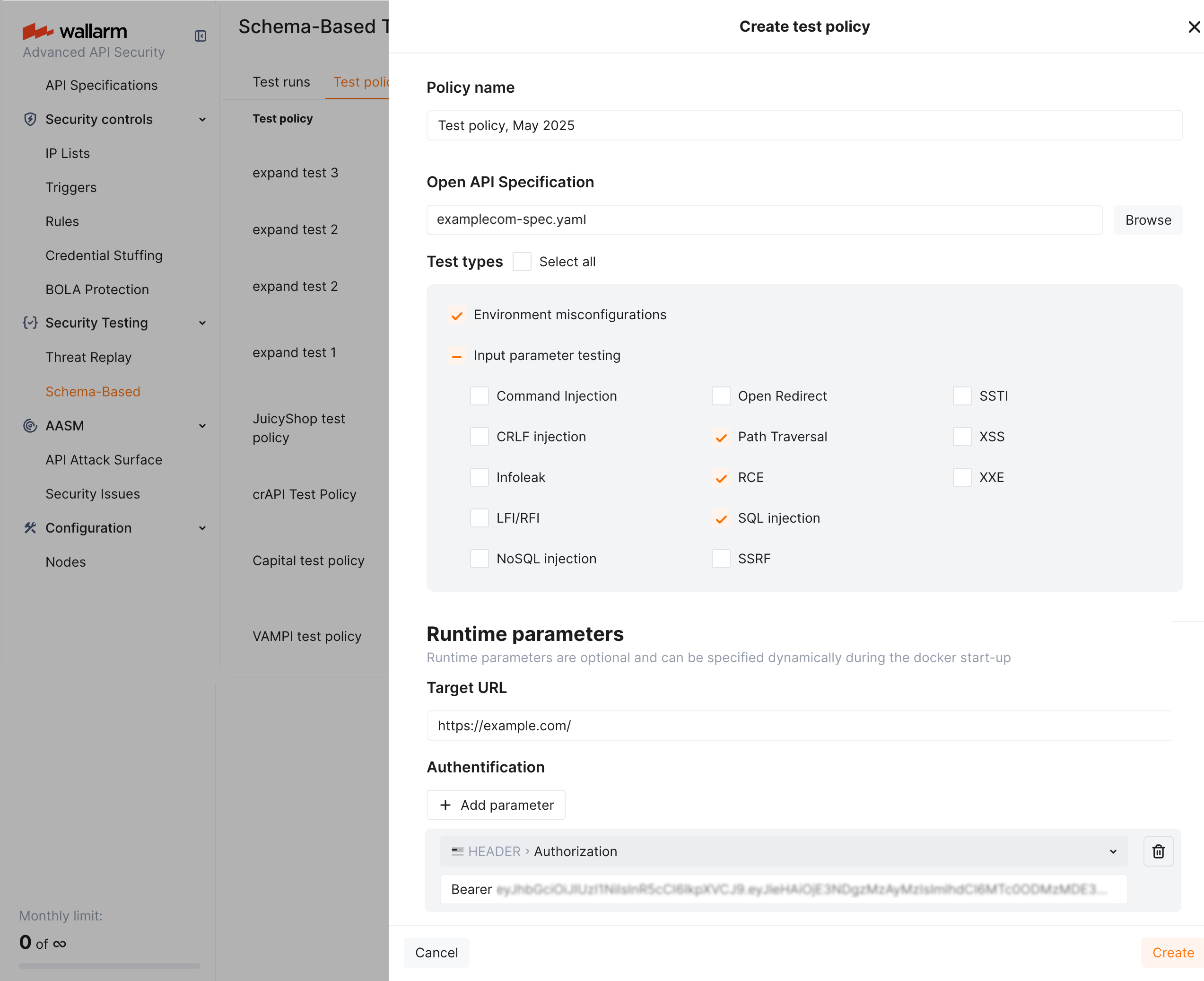
1. Go to Wallarm Console → **Security Testing** → **Schema-Based** → **Test policies**.
1. Click **Add policy**, attach OpenAPI specification file.
!!! info "Using OAS from API Discovery"
You can use an OpenAPI specification exported from [API Discovery](https://docs.wallarm.com/api-discovery/exploring.md#openapi-oas-export). In **API Discovery**, select a host, click **Download report** → **OpenAPI (OAS 3.1, JSON)** → **Generate OAS**, then attach the downloaded file when creating the test policy.
1. Select [test types](https://docs.wallarm.com/vulnerability-detection/schema-based-testing/overview.md#test-types) to run.
1. Set **Target URL** (can be overridden dynamically during each test run).
1. Optionally, add authentication **Runtime parameters**.
## RAML-based test policies
If your API is documented using RAML (RESTful API Modeling Language), you can create test policies directly from RAML specifications. Wallarm automatically converts RAML files to OpenAPI specifications internally, enabling the same comprehensive security testing available for OAS-based policies.
RAML-based test policy defines persistently:
* Application's **RAML specification**
* Tests to run
Besides persistent parameters, each test policy may include **Runtime parameters** that can be overridden during each test run:
* Application's **Target URL** (although can be redefined during each run, some initial value is required)
* Authentication parameters
To configure test policy:
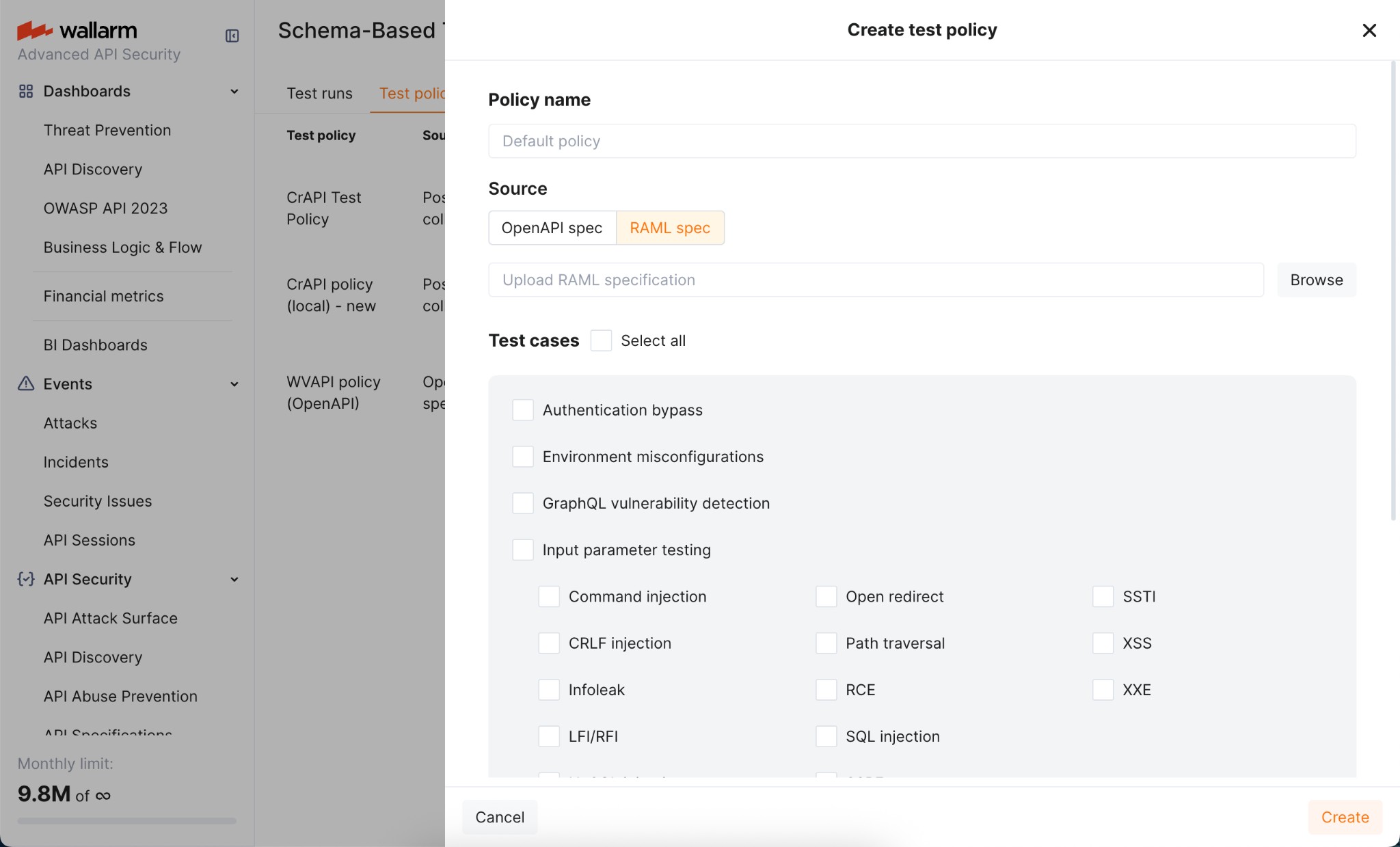
1. Go to Wallarm Console → **Security Testing** → **Schema-Based** → **Test policies**.
1. Click **Add policy**, select **RAML spec** as the source, and upload your RAML specification file.
1. Select [test types](https://docs.wallarm.com/vulnerability-detection/schema-based-testing/overview.md#test-types) to run.
1. Set **Target URL** (can be overridden dynamically during each test run).
1. Optionally, add authentication **Runtime parameters**.
## Postman collection-based test policies
!!! warning "Temporary limitation"
Creating new policies based on Postman collections is temporarily not available. Existing policies that were previously created using Postman collections continue to work as expected - only the creation of new Postman-based policies is currently disabled.
With Postman-based security testing you can automate security scans alongside your regular API tests, ensuring that each API run is thoroughly tested for vulnerabilities.
!!! info "API functional tests as basis"
Wallarm's schema-based testing leverages your functional tests to generate security tests. The more complete your functional tests are, the broader the security coverage Wallarm can provide. More APIs, users, and requests mean richer and more effective security testing.
### Pre-check of Postman collection
Before using Postman data for schema-based security testing:
1. Ensure that you collection and environment files contain:
* Functional tests for API endpoints
* Location of the target application
* All environment variables set
* Necessary credentials to authenticate in the target application
1. (Recommended) Check whether the Postman collection is working. For example, this can be done by running the command:
```
newman run my_collection.json -e my_environment.json
```
This can tell you in advance whether there are any problems, for example, related to the quality of the Postman collection, the availability of the target URL, or that all the necessary variables are specified.
!!! warning "Valid Postman collection"
If the Postman collection itself cannot work, then the schema-based security testing will not work either.
### Configuring test policy in Wallarm
In Wallarm, Postman collection-based test policy defines:
* Application's **Postman collection**.
* **Postman environment file(s)** (optional if all configuration is stored in the main collection file).
!!! info "Target URL and authentication"
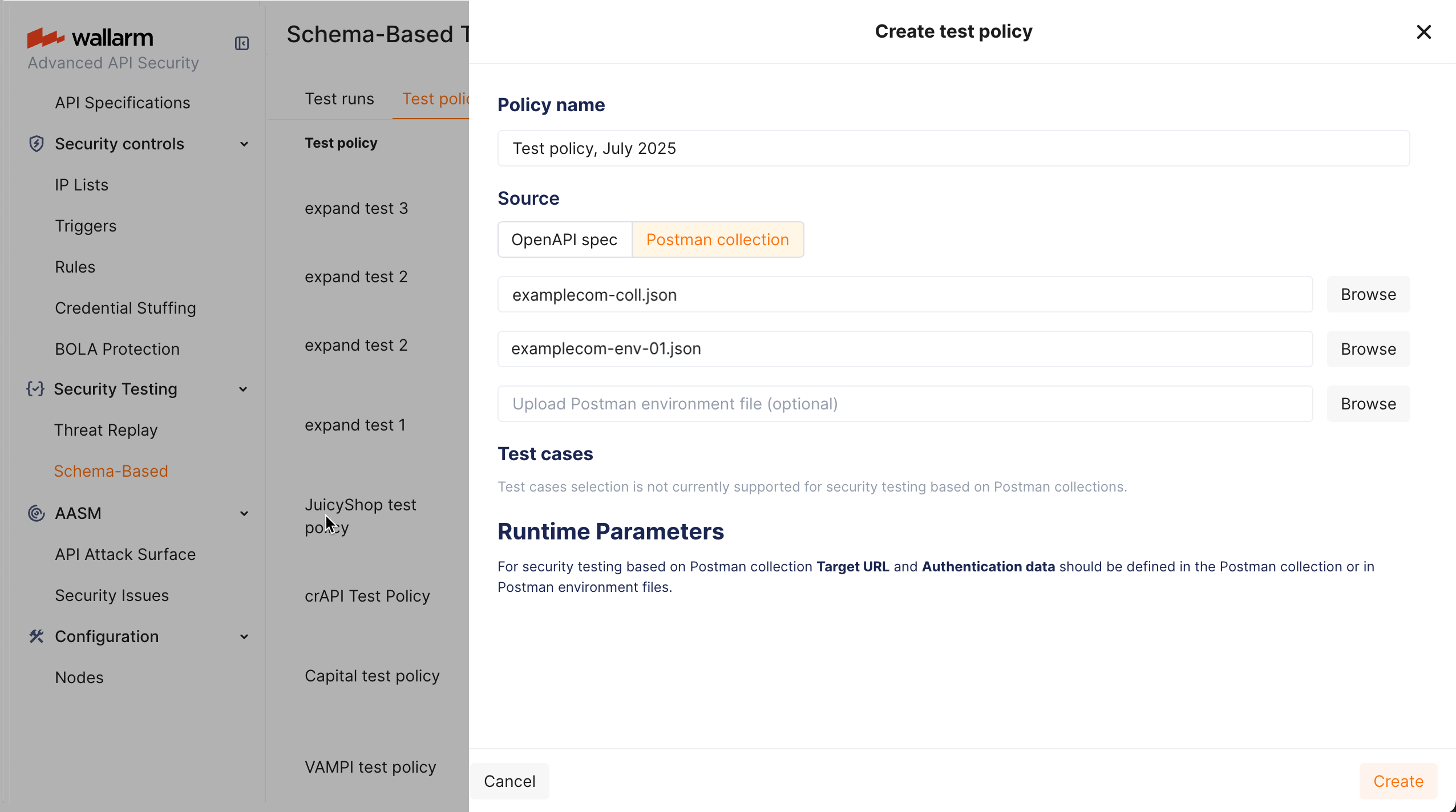
Application's **Target URL** and authentication parameters are defined in the Postman collection or environment files.
* Test case selection is not currently supported for security testing based on Postman collections.
To configure test policy:
1. Go to Wallarm Console → **Security Testing** → **Schema-Based** → **Test policies**.
1. Click **Add policy**, set **Source** to **Postman collection**.
1. Attach Postman collection file.
1. Optionally, attach Postman environment file(s). Attaching 2 files allows running testing twice with different variable values (for example, different credentials) and then comparing results.
### Business logic security testing
For business logic testing ([OWASP API1:2023 Broken Object Level Authorization (BOLA)](https://github.com/OWASP/API-Security/blob/master/editions/2023/en/0xa1-broken-object-level-authorization.md) and [OWASP API5:2023 Broken Function Level Authorization (BFLA)](https://github.com/OWASP/API-Security/blob/master/editions/2023/en/0xa5-broken-function-level-authorization.md)) Wallarm's Schema-Based Security Testing requires API traffic from at least two different authenticated users, preferably with varying privileges (e.g., admin and regular users). This diversity enables more effective business logic security tests and provides a more thorough assessment.
| Business logic vulnerability | Input requirements |
| ---- | ---- |
| [OWASP API1:2023 Broken Object Level Authorization (BOLA)](https://github.com/OWASP/API-Security/blob/master/editions/2023/en/0xa1-broken-object-level-authorization.md) | Testing for this vulnerability requires multiple authenticated users to demonstrate whether proper object-level authorization checks are in place. |
| [OWASP API5:2023 Broken Function Level Authorization (BFLA)](https://github.com/OWASP/API-Security/blob/master/editions/2023/en/0xa5-broken-function-level-authorization.md) | Testing for this vulnerability requires requests from users with different privilege levels to evaluate whether function-level authorization is enforced consistently. |
#### Example 1: Using Postman collections with requests from two users
Do the following:
1. Create a Postman collection containing requests from two authenticated users. For example, in the target application, include login and activity requests from `User A` and `User B` in the same collection.
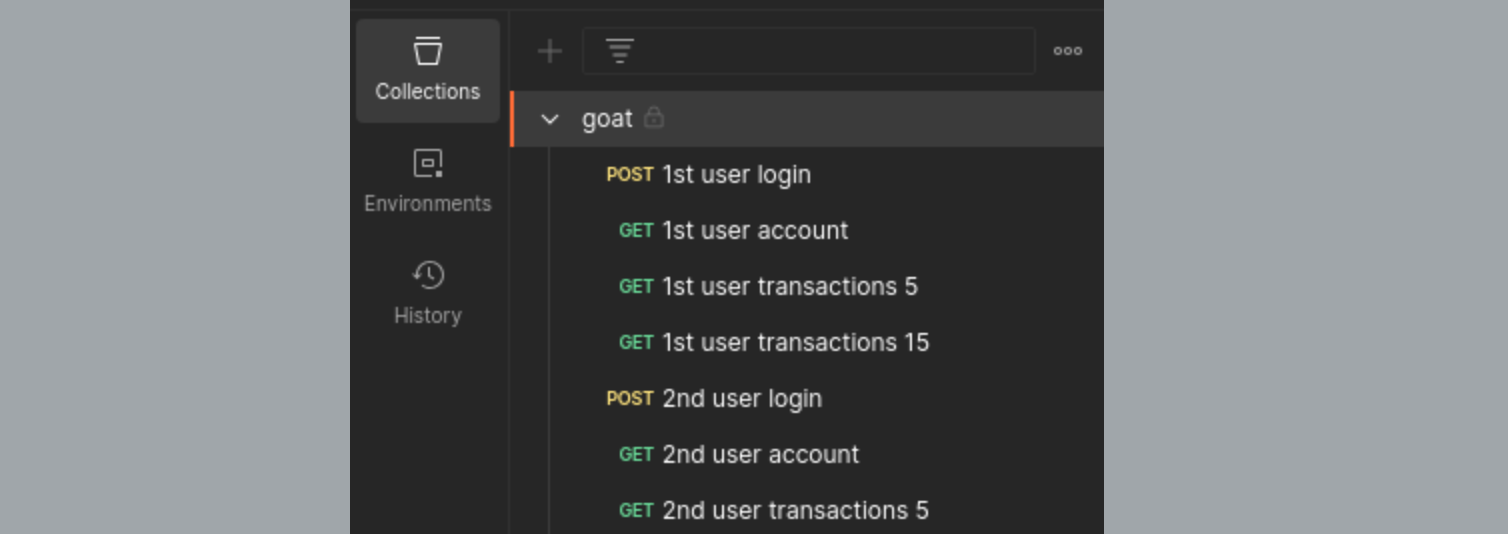
1. Verify that all requests are executed correctly.
1. Create a test policy with the created Postman collection.
#### Example 2: Using Postman environments for multiple users
Do the following:
1. Create two Postman environment files, each holding the credentials for a different authenticated user, e.g.:
* `env1.json` for `User A`
* `env2.json` for `User B`
1. Create a test policy that uses your Postman collection and both environment files.
In this setup, the collection is executed twice - once with `env1.json` (`User A`) and once with `env2.json` (`User B`) - so each request runs under both user contexts.
## Editing existing policy
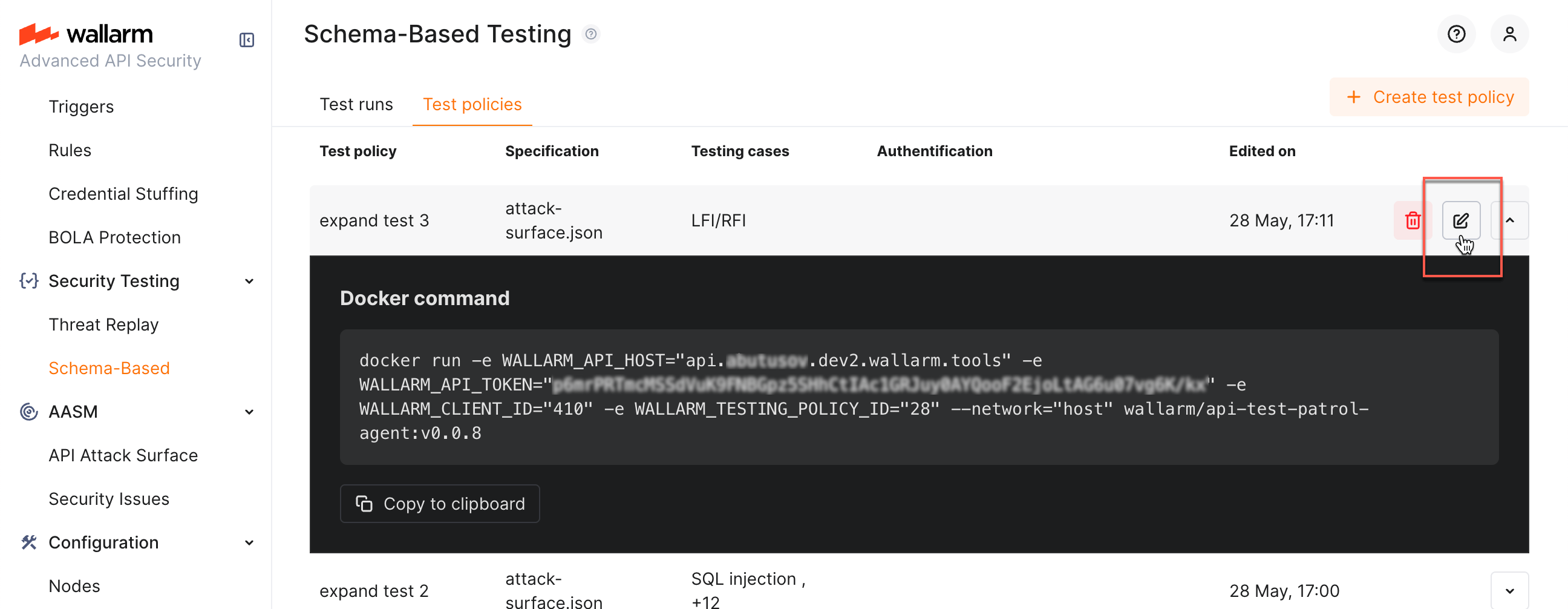
You can edit previously created policies: while clicking policy itself opens its Docker command info, you can click the edit button to access the edit dialog:
## Docker run
### Requirements
The Docker container should have network connectivity:
* To the API being tested
* To the Wallarm Cloud (US or EU):
!!! info "Wallarm Cloud IP addresses"
To provide Wallarm Cloud access to your system, you may need a list of its public IP addresses:
**US Cloud:**
```
34.102.90.100
34.94.156.115
35.235.115.105
34.94.85.217
34.94.51.234
34.102.59.122
34.94.238.72
35.235.100.79
34.102.45.38
34.94.241.21
34.94.203.193
34.94.238.221
34.94.9.235
34.94.118.150
34.94.193.9
```
**EU Cloud:**
```
34.141.230.156
34.91.138.113
34.90.114.134
35.204.127.78
34.90.24.155
34.7.147.149
```
**ME Cloud:**
```
34.166.215.174
```
### Running with test policy
As test policy is [created](#test-policy-types), it provides you with the Docker run command which allows you start tests for your application:
1. Go to Wallarm Console → **Security Testing** → **Schema-Based** → **Test policies**.
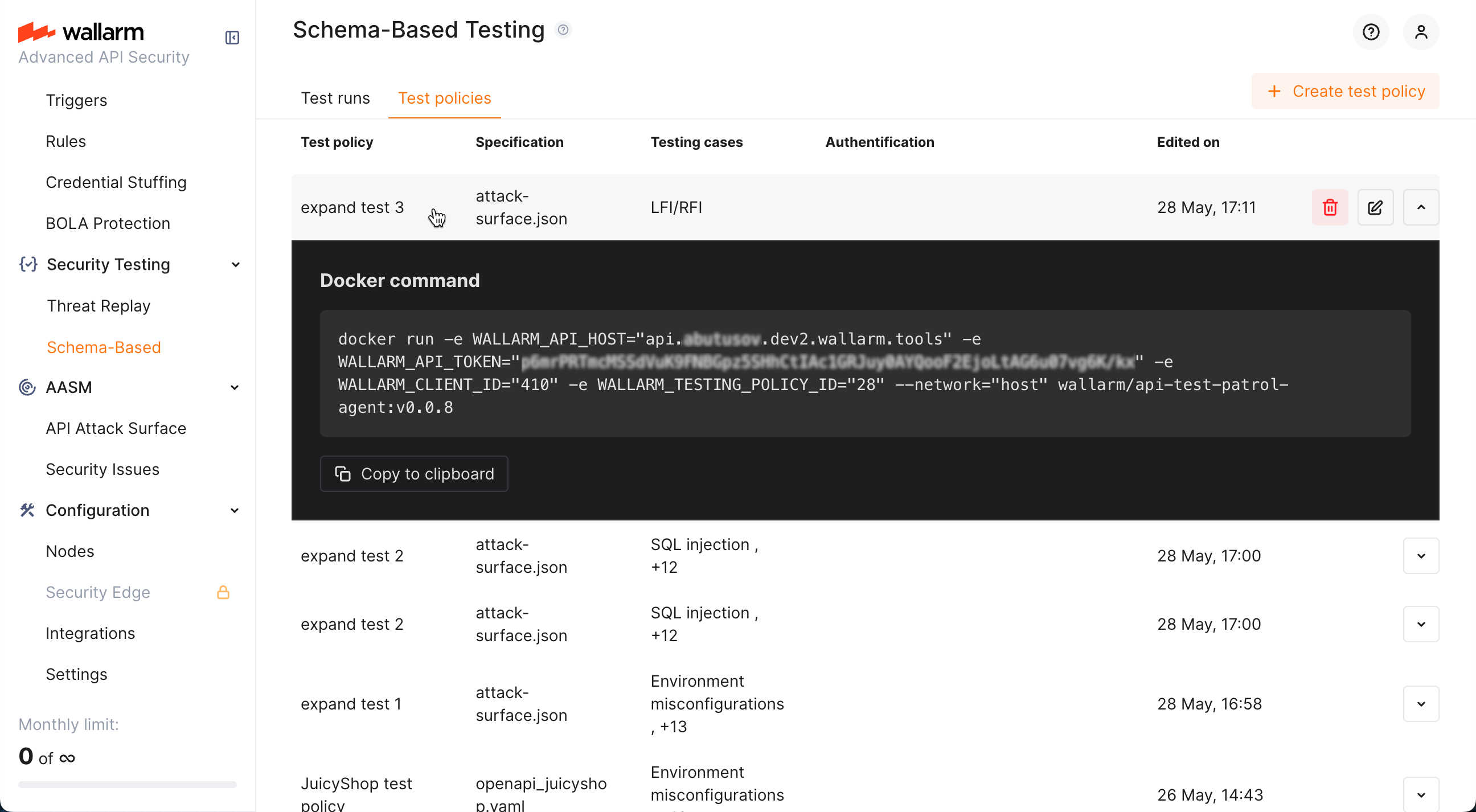
1. Click you policy. The policy's Docker command will be displayed.
1. If necessary, redefine Docker log level and format, and [test run success criteria](#test-run-success-criteria). This adds extra [variables](#environment-variables) to the command.
1. Copy command and run it or embed into your CI/CD pipeline. This will run security tests selected in the policy for your application.
Remember that, for OAS-based run, you can override the policy's **Runtime parameters** on each run by adding the corresponding `-e` parameters to the Docker `run` command, for example:
```
-e TARGET_URL="http://dvapi.st.wallarm.tools"
-e AUTH_HEADER="Authorization: Bearer "
```
You can simplify re-defining these parameters by selecting the **Rewrite authentication data** and/or **Rewrite target URL** checkboxes that add to the command:
```
-e AUTH_HEADER="${AUTH_HEADER}" -e TARGET_URL="${TARGET_URL}"
```
1. View run statistics and [test run results](https://docs.wallarm.com/vulnerability-detection/schema-based-testing/explore.md) on the **Test runs** tab.
### Running without test policy
Having token, you can form Docker run command yourself defining all parameters locally. Note that you can still use Wallarm's wizard to help you with that.
To use wizard:
1. Go to **Schema-Based Testing** section.
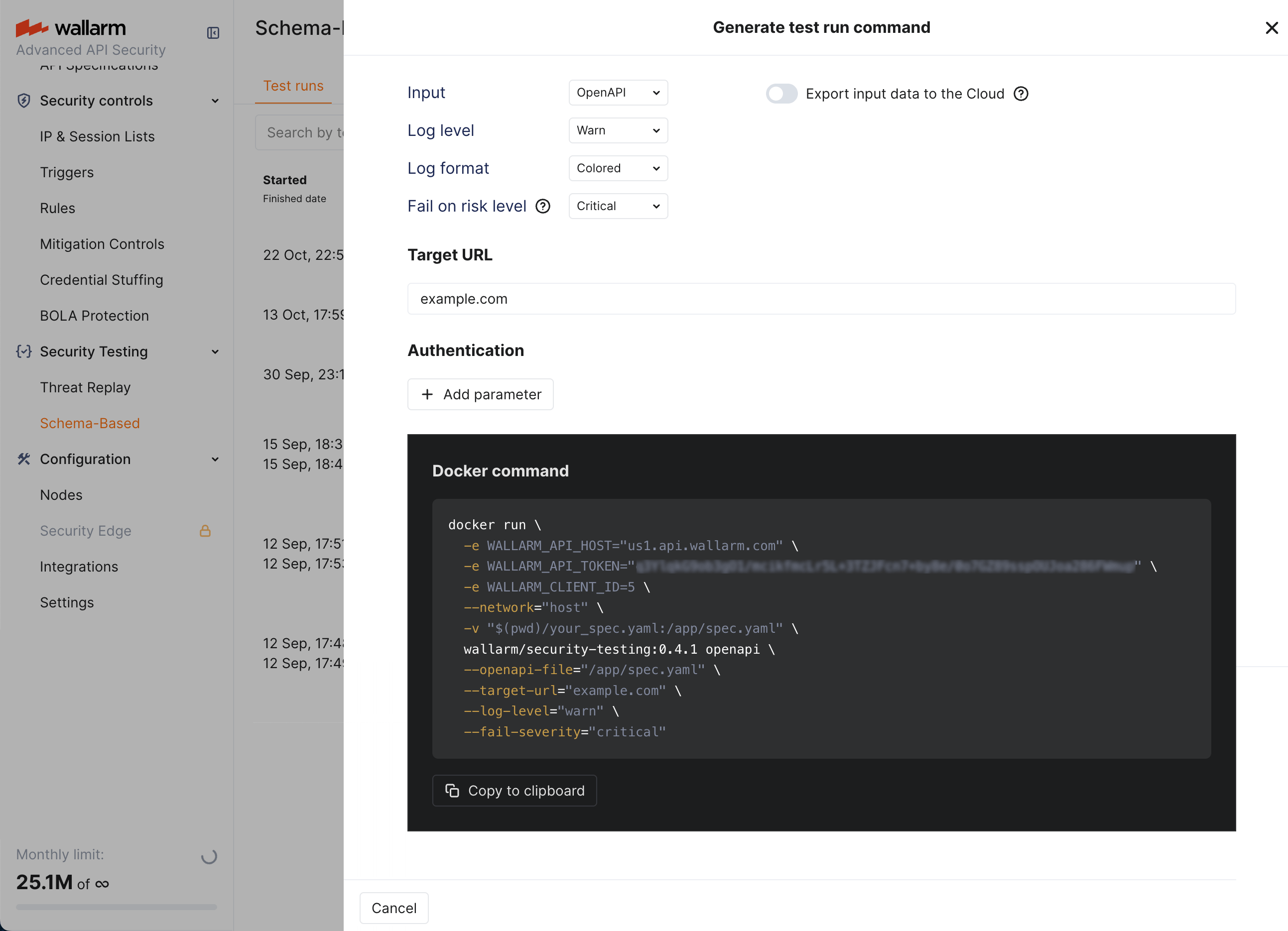
1. Click the **Generate test run command** button.
1. Select appropriate parameters, the wizard will compose the Docker run command correspondingly.
1. Copy the command.
1. Replace the placeholders with actual values.
1. You have the command.
Note that:
* If wizard is left with default values, it does not add anything additional to Docker command.
* **Export input data to the Cloud** if you use this, OAS or Postman collection file that you use locally to run tests, will be uploaded to **Test runs** for improved debugging if needed later.
### Running combination
You create test policy in Wallarm that will contains token, your schema and all testing parameters and provide you a Docker run command linked to it, but **in this linked** command you **override** any parameters, like use local file instead of the one attached to the policy. What is not overridden, is taken from the policy.
See details on how to use the policy with local override in the Docker [`--help`](#available-flags).
### Environment variables
When you create and save a test policy in Wallarm, it automatically creates a Docker run command, adds all required `-e` variables and sets values for them. Generally, variables aim to tell Docker container to which account in Wallarm Cloud to connect and which test policy to take as the basis for testing of your application:
Environment variable | Description| Required
--- | ---- | ----
`WALLARM_API_HOST` | Wallarm API server:
This article describes how to enable and configure Wallarm's [Schema-Based Testing](https://docs.wallarm.com/vulnerability-detection/schema-based-testing/overview.md).
## Enable
Schema-Based Testing is disabled by default. To enable:
1. Contact sales@wallarm.com to activate the [**Security Testing** subscription plan](https://docs.wallarm.com/about-wallarm/subscription-plans.md#core-subscription-plans) for your account.
1. Go to the **Security Testing** → **Schema-Based** → **Test policies** tab and create [at least one policy](#test-policy-types).
## Prerequisites
### Token
Schema-Based Testing requires a [token](https://docs.wallarm.com/user-guides/settings/api-tokens.md) for authorizing data exchange between running Docker container and Wallarm Cloud. The token can be created in two ways:
* **Automatically** - Schema-Based Testing will create it automatically and include into the `docker run` command on first attempt to copy Docker command from any policy. Other policies will re-use already existing token.
* **Manually** - in Wallarm Console, go to **Settings** → **API Tokens**, click **New token**; on creation, set **Token usage** to `Schema-Based Testing agent`. All policies will use this token.
### Whitelist
When you are planning to run Wallarm's Schema-Based Testing against domains protected by some security tools, it is recommended to add the client IP (IP from where the Docker command is being run) to the allowlist, otherwise majority of requests will be blocked and the vulnerabilities will not be found.
This includes the case when Wallarm itself is used as the protection tool for these domains - see details on Wallarm's allowlist [here](https://docs.wallarm.com/user-guides/ip-lists/overview.md).
## Test policy types
You can configure test policy [based](https://docs.wallarm.com/vulnerability-detection/schema-based-testing/overview.md#test-basis) on OpenAPI specification (OAS), RAML specification, or Postman collection. Note that one test policy is aimed at only one type of testing.
* OAS and RAML are more focused on input validation, injection, misconfiguration detection
* Postman - on complex business logic and access control vulnerabilities
## OAS-based test policies
OpenAPI specification (OAS)-based test policy defines persistently:
* Application's **OpenAPI specification**
* Tests to run
Besides persistent parameters that are the same for any test run, each test policy may optionally include parameters that can be overridden during each next test run (**Runtime parameters**). Re-defining the runtime parameters can be useful for embedding of Docker into the CI/CD pipelines:
* Application's **Target URL**
(although can be redefined during each run, some initial value is required)
* Authentication parameters
To configure test policy:
1. Go to Wallarm Console → **Security Testing** → **Schema-Based** → **Test policies**.
1. Click **Add policy**, attach OpenAPI specification file.
!!! info "Using OAS from API Discovery"
You can use an OpenAPI specification exported from [API Discovery](https://docs.wallarm.com/api-discovery/exploring.md#openapi-oas-export). In **API Discovery**, select a host, click **Download report** → **OpenAPI (OAS 3.1, JSON)** → **Generate OAS**, then attach the downloaded file when creating the test policy.
1. Select [test types](https://docs.wallarm.com/vulnerability-detection/schema-based-testing/overview.md#test-types) to run.
1. Set **Target URL** (can be overridden dynamically during each test run).
1. Optionally, add authentication **Runtime parameters**.

## RAML-based test policies
If your API is documented using RAML (RESTful API Modeling Language), you can create test policies directly from RAML specifications. Wallarm automatically converts RAML files to OpenAPI specifications internally, enabling the same comprehensive security testing available for OAS-based policies.
RAML-based test policy defines persistently:
* Application's **RAML specification**
* Tests to run
Besides persistent parameters, each test policy may include **Runtime parameters** that can be overridden during each test run:
* Application's **Target URL** (although can be redefined during each run, some initial value is required)
* Authentication parameters
To configure test policy:
1. Go to Wallarm Console → **Security Testing** → **Schema-Based** → **Test policies**.
1. Click **Add policy**, select **RAML spec** as the source, and upload your RAML specification file.
1. Select [test types](https://docs.wallarm.com/vulnerability-detection/schema-based-testing/overview.md#test-types) to run.
1. Set **Target URL** (can be overridden dynamically during each test run).
1. Optionally, add authentication **Runtime parameters**.

## Postman collection-based test policies
!!! warning "Temporary limitation"
Creating new policies based on Postman collections is temporarily not available. Existing policies that were previously created using Postman collections continue to work as expected - only the creation of new Postman-based policies is currently disabled.
With Postman-based security testing you can automate security scans alongside your regular API tests, ensuring that each API run is thoroughly tested for vulnerabilities.
!!! info "API functional tests as basis"
Wallarm's schema-based testing leverages your functional tests to generate security tests. The more complete your functional tests are, the broader the security coverage Wallarm can provide. More APIs, users, and requests mean richer and more effective security testing.
### Pre-check of Postman collection
Before using Postman data for schema-based security testing:
1. Ensure that you collection and environment files contain:
* Functional tests for API endpoints
* Location of the target application
* All environment variables set
* Necessary credentials to authenticate in the target application
1. (Recommended) Check whether the Postman collection is working. For example, this can be done by running the command:
```
newman run my_collection.json -e my_environment.json
```
This can tell you in advance whether there are any problems, for example, related to the quality of the Postman collection, the availability of the target URL, or that all the necessary variables are specified.
!!! warning "Valid Postman collection"
If the Postman collection itself cannot work, then the schema-based security testing will not work either.
### Configuring test policy in Wallarm
In Wallarm, Postman collection-based test policy defines:
* Application's **Postman collection**.
* **Postman environment file(s)** (optional if all configuration is stored in the main collection file).
!!! info "Target URL and authentication"
Application's **Target URL** and authentication parameters are defined in the Postman collection or environment files.
* Test case selection is not currently supported for security testing based on Postman collections.
To configure test policy:
1. Go to Wallarm Console → **Security Testing** → **Schema-Based** → **Test policies**.
1. Click **Add policy**, set **Source** to **Postman collection**.
1. Attach Postman collection file.
1. Optionally, attach Postman environment file(s). Attaching 2 files allows running testing twice with different variable values (for example, different credentials) and then comparing results.

### Business logic security testing
For business logic testing ([OWASP API1:2023 Broken Object Level Authorization (BOLA)](https://github.com/OWASP/API-Security/blob/master/editions/2023/en/0xa1-broken-object-level-authorization.md) and [OWASP API5:2023 Broken Function Level Authorization (BFLA)](https://github.com/OWASP/API-Security/blob/master/editions/2023/en/0xa5-broken-function-level-authorization.md)) Wallarm's Schema-Based Security Testing requires API traffic from at least two different authenticated users, preferably with varying privileges (e.g., admin and regular users). This diversity enables more effective business logic security tests and provides a more thorough assessment.
| Business logic vulnerability | Input requirements |
| ---- | ---- |
| [OWASP API1:2023 Broken Object Level Authorization (BOLA)](https://github.com/OWASP/API-Security/blob/master/editions/2023/en/0xa1-broken-object-level-authorization.md) | Testing for this vulnerability requires multiple authenticated users to demonstrate whether proper object-level authorization checks are in place. |
| [OWASP API5:2023 Broken Function Level Authorization (BFLA)](https://github.com/OWASP/API-Security/blob/master/editions/2023/en/0xa5-broken-function-level-authorization.md) | Testing for this vulnerability requires requests from users with different privilege levels to evaluate whether function-level authorization is enforced consistently. |
#### Example 1: Using Postman collections with requests from two users
Do the following:
1. Create a Postman collection containing requests from two authenticated users. For example, in the target application, include login and activity requests from `User A` and `User B` in the same collection.

1. Verify that all requests are executed correctly.
1. Create a test policy with the created Postman collection.
#### Example 2: Using Postman environments for multiple users
Do the following:
1. Create two Postman environment files, each holding the credentials for a different authenticated user, e.g.:
* `env1.json` for `User A`
* `env2.json` for `User B`
1. Create a test policy that uses your Postman collection and both environment files.
In this setup, the collection is executed twice - once with `env1.json` (`User A`) and once with `env2.json` (`User B`) - so each request runs under both user contexts.
## Editing existing policy
You can edit previously created policies: while clicking policy itself opens its Docker command info, you can click the edit button to access the edit dialog:

## Docker run
### Requirements
The Docker container should have network connectivity:
* To the API being tested
* To the Wallarm Cloud (US or EU):
!!! info "Wallarm Cloud IP addresses"
To provide Wallarm Cloud access to your system, you may need a list of its public IP addresses:
**US Cloud:**
```
34.102.90.100
34.94.156.115
35.235.115.105
34.94.85.217
34.94.51.234
34.102.59.122
34.94.238.72
35.235.100.79
34.102.45.38
34.94.241.21
34.94.203.193
34.94.238.221
34.94.9.235
34.94.118.150
34.94.193.9
```
**EU Cloud:**
```
34.141.230.156
34.91.138.113
34.90.114.134
35.204.127.78
34.90.24.155
34.7.147.149
```
**ME Cloud:**
```
34.166.215.174
```
### Running with test policy
As test policy is [created](#test-policy-types), it provides you with the Docker run command which allows you start tests for your application:
1. Go to Wallarm Console → **Security Testing** → **Schema-Based** → **Test policies**.
1. Click you policy. The policy's Docker command will be displayed.
1. If necessary, redefine Docker log level and format, and [test run success criteria](#test-run-success-criteria). This adds extra [variables](#environment-variables) to the command.

1. Copy command and run it or embed into your CI/CD pipeline. This will run security tests selected in the policy for your application.
Remember that, for OAS-based run, you can override the policy's **Runtime parameters** on each run by adding the corresponding `-e` parameters to the Docker `run` command, for example:
```
-e TARGET_URL="http://dvapi.st.wallarm.tools"
-e AUTH_HEADER="Authorization: Bearer "
```
You can simplify re-defining these parameters by selecting the **Rewrite authentication data** and/or **Rewrite target URL** checkboxes that add to the command:
```
-e AUTH_HEADER="${AUTH_HEADER}" -e TARGET_URL="${TARGET_URL}"
```
1. View run statistics and [test run results](https://docs.wallarm.com/vulnerability-detection/schema-based-testing/explore.md) on the **Test runs** tab.
### Running without test policy
Having token, you can form Docker run command yourself defining all parameters locally. Note that you can still use Wallarm's wizard to help you with that.
To use wizard:
1. Go to **Schema-Based Testing** section.
1. Click the **Generate test run command** button.
1. Select appropriate parameters, the wizard will compose the Docker run command correspondingly.

1. Copy the command.
1. Replace the placeholders with actual values.
1. You have the command.
Note that:
* If wizard is left with default values, it does not add anything additional to Docker command.
* **Export input data to the Cloud** if you use this, OAS or Postman collection file that you use locally to run tests, will be uploaded to **Test runs** for improved debugging if needed later.
### Running combination
You create test policy in Wallarm that will contains token, your schema and all testing parameters and provide you a Docker run command linked to it, but **in this linked** command you **override** any parameters, like use local file instead of the one attached to the policy. What is not overridden, is taken from the policy.
See details on how to use the policy with local override in the Docker [`--help`](#available-flags).
### Environment variables
When you create and save a test policy in Wallarm, it automatically creates a Docker run command, adds all required `-e` variables and sets values for them. Generally, variables aim to tell Docker container to which account in Wallarm Cloud to connect and which test policy to take as the basis for testing of your application:
Environment variable | Description| Required
--- | ---- | ----
`WALLARM_API_HOST` | Wallarm API server:- `us1.api.wallarm.com` for the US Cloud
- `api.wallarm.com` for the EU Cloud
- `me1.api.wallarm.com` for the ME Cloud
| Yes
`WALLARM_API_TOKEN` | Wallarm's `Schema-Based Testing agent` API token. See details [here](#token). | Yes
`WALLARM_TESTING_POLICY_ID` | ID of [test policy](#test-policy-types) containing all testing configuration. | Yes
`FAIL_SEVERITY` | Defines [test run success criteria](#test-run-success-criteria) used when running tests as a part of a specific CI/CD pipeline. | No
`TARGET_URL` | For OAS-based run only. If set, overrides the target URL specified in test policy itself. | No
`AUTH_HEADER` | For OAS-based run only. If set, overrides the authentication data specified in test policy itself. | No
### Available flags
You can use flags to modify behavior of Wallarm's Schema-Based Testing running as Docker container. To see the full list of available flags, use:
```
--help
```
The outup will be something like:
**OpenAPI specification (OAS)-based:**
```
Run OpenAPI security testing workflow.
This command performs automated API security testing using OpenAPI specifications,
executing comprehensive security tests against the target API and reporting vulnerabilities.
OPERATING MODES:
Standalone Mode:
Use local OpenAPI specification file without Wallarm platform integration.
Requires: --openapi-file and --target-url flags
Example:
docker run -v "$(pwd)/api-spec.yaml:/app/api-spec.yaml" \
-e WALLARM_API_HOST="https://api.wallarm.com" \
-e WALLARM_API_TOKEN="..." \
wallarm/security-testing:v0.11.0 openapi \
--openapi-file /app/api-spec.yaml \
--target-url https://api.example.com
Cloud Mode:
Integrate with Wallarm platform using Test Policy.
Requires: WALLARM_TESTING_POLICY_ID environment variable or --testing-policy-id flag
Example (with local file override):
docker run -v "$(pwd)/api-spec.yaml:/app/api-spec.yaml" \
-e WALLARM_API_HOST="..." \
-e WALLARM_API_TOKEN="..." \
-e WALLARM_TESTING_POLICY_ID="..." \
wallarm/security-testing:v0.11.0 openapi \
--openapi-file /app/api-spec.yaml
Example (uses specification from Test Policy):
docker run \
-e WALLARM_API_HOST="..." \
-e WALLARM_API_TOKEN="..." \
-e WALLARM_TESTING_POLICY_ID="..." \
wallarm/security-testing:v0.11.0 openapi
Configuration priority: CLI flags > Environment variables > Test Policy > Defaults
Usage:
security-testing openapi [flags]
Flags:
--auth-header string Authentication header in 'Name: Value' format (can be provided by Test Policy)
-h, --help help for openapi
--openapi-file string Path to local OpenAPI specification file (JSON or YAML)
--target-url string Target application URL (can be provided by Test Policy)
--test-types stringSlice Comma-separated list of test types to run (environment_misconfiguration, sql_injection, command_injection, ssrf, xxe, open_redirect, xss, path_traversal, ssti, lfi_rfi, crlf_injection, infoleak, nosql_injection, rce, graphql_vulnerability_detection, auth_bypass, input_validation)
Global Flags:
API:
--send-logs Send logs to Wallarm API (default true)
--testing-policy-id string Wallarm testing policy ID (optional, enables Test Policy integration)
--wallarm-api-host string Wallarm API host URL (required)
--wallarm-api-token string Wallarm API authentication token (required)
GENERAL:
--export-files Upload local files (--openapi-file, --postman-collection-file, --postman-environment-files) to Wallarm cloud
--fail-severity string Set fail severity level (critical, high, medium, low, info) (default "high")
--insecure Turn off SSL verification checks, and allow self-signed SSL certificates
--test-run-title string Custom title for the test run
PREFLIGHT-CHECKS:
--preflight-check-timeout int Timeout in seconds for target URL connectivity checks (minimum: 10) (default "75")
--skip-target-url-connectivity-check
Skip checking target URL connectivity
REPORTS:
--no-summary Disable summary output to stdout
-r, --report Enable report generation
--report-format string Report format (json, csv, junit) (default "json")
--report-output string Report output file path (default extension matches format: .json for JSON, .csv for CSV) (default "report/results.json")
--report-pretty Pretty-print JSON output (default true)
REQUEST-LOG:
--request-log-output string Output file path for HAR request log (default "./results/request_log.har")
--send-request-logs Send request logs to Wallarm API (default true)
LOGGING:
-f, --log-format string Set log format (json, colored, text) (default "colored")
-l, --log-level string Set log level (debug, info, warn, error) (default "info")
MTLS:
--mtls-ca-cert string Path to CA certificate for server validation (PEM format)
--mtls-client-cert string Path to client certificate file (PEM format)
--mtls-client-key string Path to client private key file (PEM format, unencrypted)
```
**Postman collection-based:**
```
Run Postman security testing workflow.
This command performs automated API security testing using Postman collections,
executing comprehensive security tests against the target API and reporting vulnerabilities.
OPERATING MODES:
Standalone Mode:
Use local Postman collection without Wallarm platform integration.
Requires: --postman-collection-file flag
Example:
docker run -v "$(pwd)/collection.json:/app/collection.json" \
-e WALLARM_API_HOST="https://api.wallarm.com" \
-e WALLARM_API_TOKEN="..." \
wallarm/security-testing:v0.11.0 postman \
--postman-collection-file /app/collection.json
Cloud Mode:
Integrate with Wallarm platform using Test Policy.
Requires: WALLARM_TESTING_POLICY_ID environment variable or --testing-policy-id flag
Example (with local files override):
docker run -v "$(pwd)/collection.json:/app/collection.json" \
-v "$(pwd)/env.json:/app/env.json" \
-e WALLARM_API_HOST="..." \
-e WALLARM_API_TOKEN="..." \
-e WALLARM_TESTING_POLICY_ID="..." \
wallarm/security-testing:v0.11.0 postman \
--postman-collection-file /app/collection.json \
--postman-environment-files /app/env.json
Example (uses collection from Test Policy):
docker run \
-e WALLARM_API_HOST="..." \
-e WALLARM_API_TOKEN="..." \
-e WALLARM_TESTING_POLICY_ID="..." \
wallarm/security-testing:v0.11.0 postman
Configuration priority: CLI flags > Environment variables > Test Policy > Defaults
Usage:
security-testing postman [flags]
Flags:
-h, --help help for postman
--postman-collection-file string Path to local Postman collection file (JSON)
--postman-environment-files stringSlice
Path(s) to Postman environment file(s) (JSON, supports multiple files)
Global Flags:
API:
--send-logs Send logs to Wallarm API (default true)
--testing-policy-id string Wallarm testing policy ID (optional, enables Test Policy integration)
--wallarm-api-host string Wallarm API host URL (required)
--wallarm-api-token string Wallarm API authentication token (required)
GENERAL:
--export-files Upload local files (--openapi-file, --postman-collection-file, --postman-environment-files) to Wallarm cloud
--fail-severity string Set fail severity level (critical, high, medium, low, info) (default "high")
--insecure Turn off SSL verification checks, and allow self-signed SSL certificates
--test-run-title string Custom title for the test run
PREFLIGHT-CHECKS:
--preflight-check-timeout int Timeout in seconds for target URL connectivity checks (minimum: 10) (default "75")
--skip-target-url-connectivity-check
Skip checking target URL connectivity
REPORTS:
--no-summary Disable summary output to stdout
-r, --report Enable report generation
--report-format string Report format (json, csv, junit) (default "json")
--report-output string Report output file path (default extension matches format: .json for JSON, .csv for CSV) (default "report/results.json")
--report-pretty Pretty-print JSON output (default true)
REQUEST-LOG:
--request-log-output string Output file path for HAR request log (default "./results/request_log.har")
--send-request-logs Send request logs to Wallarm API (default true)
LOGGING:
-f, --log-format string Set log format (json, colored, text) (default "colored")
-l, --log-level string Set log level (debug, info, warn, error) (default "info")
MTLS:
--mtls-ca-cert string Path to CA certificate for server validation (PEM format)
--mtls-client-cert string Path to client certificate file (PEM format)
--mtls-client-key string Path to client private key file (PEM format, unencrypted)
```
See the explanation for the `-fail-severity` flag in the next section.
### Test run success criteria
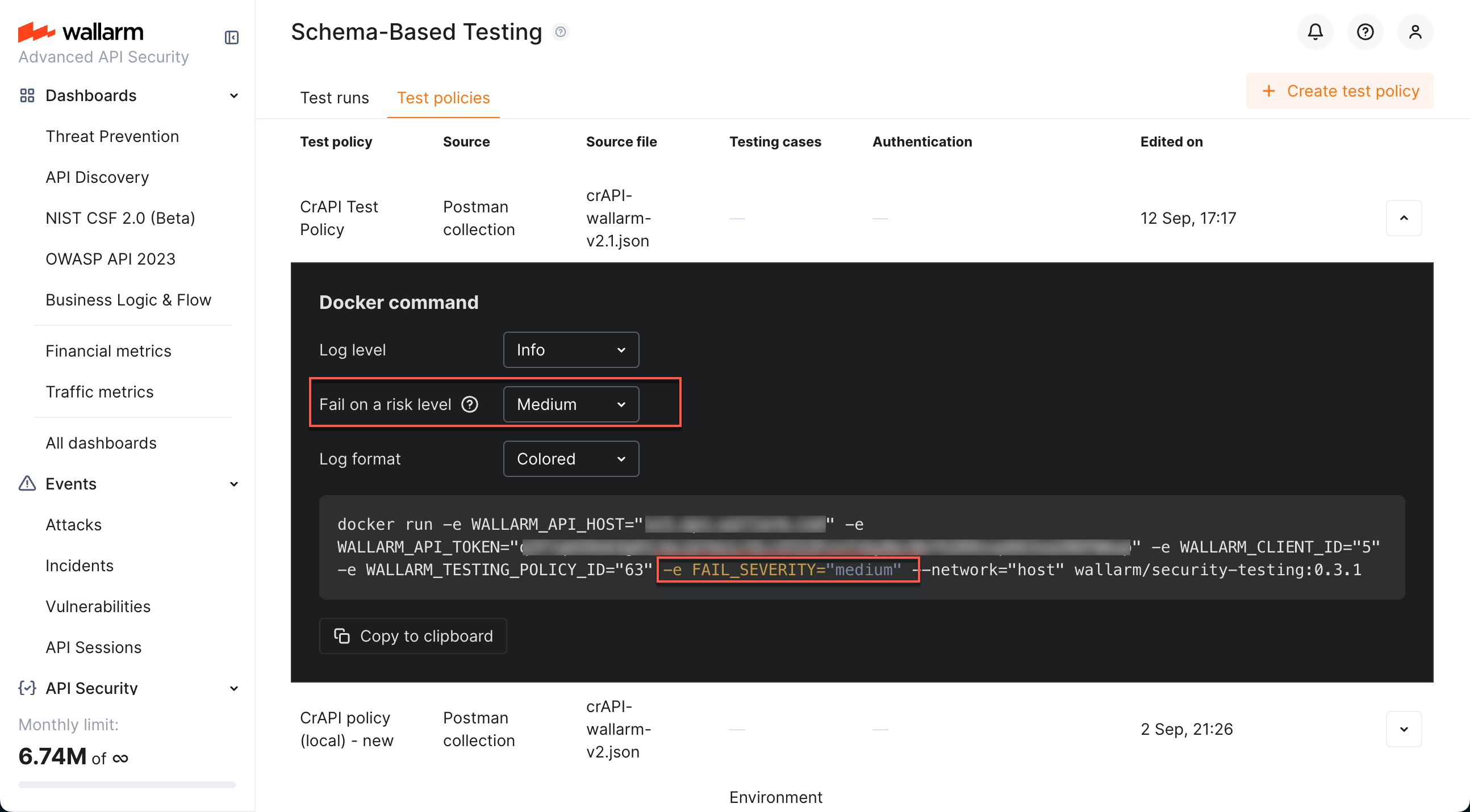
If your include Wallarm's Schema-Based test runs into your CI/CD pipeline, it is important to define the criteria of test run success. You can do that in the test policy details by setting
the **Fail on a risk level** to one of the values:
* critical
* high (default)
* medium
* low
* info
Selecting any value different from default adds the `FAIL_SEVERITY` environment variable to the Docker run command.
Example:
```
docker run -e WALLARM_API_HOST="us1.api.wallarm.com" -e WALLARM_API_TOKEN="" -e WALLARM_TESTING_POLICY_ID="" -e FAIL_SEVERITY="medium" --network="host" wallarm/security-testing:0.11.0
```
You can also set test run success criteria with the `-fail-severity` flag, for example:
```
docker run -e WALLARM_API_HOST="us1.api.wallarm.com" -e WALLARM_API_TOKEN="" -e WALLARM_TESTING_POLICY_ID="" --network="host" wallarm/security-testing:0.11.0 --fail-severity medium
```
...will lead to the following: if testing finds at least 1 medium (or high or critical) security issue, the test run will exit with code 1 ("test failed").
### Report generation
Schema-Based Testing can generate reports in multiple formats for integration with various tools and CI/CD pipelines.
To enable report generation, use the `--report` flag along with `--report-format` and `--report-output`:
```
docker run -v "$(pwd)/reports:/app/report" \
-e WALLARM_API_HOST="us1.api.wallarm.com" \
-e WALLARM_API_TOKEN="" \
-e WALLARM_TESTING_POLICY_ID="" \
--network="host" wallarm/security-testing:0.11.0 openapi \
--report --report-format json --report-output /app/report/results.json
```
Available report formats:
| Format | Description | Use case |
| ------ | ----------- | -------- |
| `json` | JSON format with full vulnerability details | Custom integrations, detailed analysis |
| `csv` | Comma-separated values | Spreadsheet analysis, data processing |
| `junit` | JUnit XML format | CI/CD pipeline integration (Jenkins, GitLab CI, GitHub Actions, etc.) |
#### JUnit reports for CI/CD
JUnit format is particularly useful for CI/CD integration as most CI/CD platforms natively support JUnit test reports for visualizing test results.
Example for CI/CD pipeline:
```
docker run -v "$(pwd)/reports:/app/report" \
-e WALLARM_API_HOST="us1.api.wallarm.com" \
-e WALLARM_API_TOKEN="" \
-e WALLARM_TESTING_POLICY_ID="" \
--network="host" wallarm/security-testing:0.11.0 openapi \
--report --report-format junit --report-output /app/report/security-tests.xml \
--fail-severity high
```
This generates a JUnit XML report that can be consumed by CI/CD tools to display test results and track security issues over time.
### Request/response log export
Schema-Based Testing can export full HTTP request and response logs in HAR (HTTP Archive) format. This is useful for debugging, compliance, and detailed analysis of the security tests performed.
By default, request logs are sent to the Wallarm API. You can also export them locally:
```
docker run -v "$(pwd)/logs:/app/results" \
-e WALLARM_API_HOST="us1.api.wallarm.com" \
-e WALLARM_API_TOKEN="" \
-e WALLARM_TESTING_POLICY_ID="" \
--network="host" wallarm/security-testing:0.11.0 openapi \
--request-log-output /app/results/request_log.har
```
Request log flags:
| Flag | Description | Default |
| ---- | ----------- | ------- |
| `--request-log-output` | Output file path for HAR request log | `./results/request_log.har` |
| `--send-request-logs` | Send request logs to Wallarm API | `true` |
The HAR format is widely supported by browser developer tools and API debugging applications, making it easy to analyze the exact requests and responses generated during testing.
### mTLS support
Schema-Based Testing supports mutual TLS (mTLS) authentication for testing APIs that require client certificate authentication.
To use mTLS, provide the client certificate, private key, and optionally the CA certificate:
```
docker run -v "$(pwd)/certs:/app/certs" \
-e WALLARM_API_HOST="us1.api.wallarm.com" \
-e WALLARM_API_TOKEN="" \
-e WALLARM_TESTING_POLICY_ID="" \
--network="host" wallarm/security-testing:0.11.0 openapi \
--mtls-client-cert /app/certs/client.crt \
--mtls-client-key /app/certs/client.key \
--mtls-ca-cert /app/certs/ca.crt
```
mTLS flags:
| Flag | Description | Format |
| ---- | ----------- | ------ |
| `--mtls-client-cert` | Path to client certificate file | PEM format |
| `--mtls-client-key` | Path to client private key file | PEM format, unencrypted |
| `--mtls-ca-cert` | Path to CA certificate for server validation | PEM format |
!!! note "Self-signed certificates"
If your target API uses self-signed certificates without mTLS, you can use the `--insecure` flag to skip SSL verification checks.
## Deleting policies
You can delete a test policy. If you do so:
* Information on previous test runs will remain untouched
* You will not be able to run Docker's command based on the deleted policy
* If policy's Docker containers are running, they will continue to do so and the testing will continue
* When policy's Docker containers stop, you will not be able to re-run them