Masking Sensitive Data
Wallarm provides the Mask sensitive data rules to configure data masking so that sensitive data does not leak outside the trusted environment. These rules cut the original value of the specified request point before sending the request to the postanalytics module and Wallarm Cloud. This article describes how to use these rules.
Overview
In the hybrid Wallarm installations, when you manage the Wallarm filtering nodes in your infrastructure, and Wallarm manages the Wallarm Cloud component, it is crucial that sensitive data in your requests remains secure within your infrastructure and is not transmitted to any third-party service including Wallarm Cloud.
This goal is achieved using the shared responsibility model: from its side, Wallarm never transmits data exceeding the protection goal and stores all the obtained data securely - to your side, Wallarm provides full visibility of what data is sent from node to Cloud and a set of tools to shape this transfer to your needs - masking of sensitive data is one of these tools.
Other deployment forms
In security edge installations, data is outside your security perimeter; you can still use masking rules to restrict access to the sensitive data by the users of Wallarm Console.
Side effects
Consider that using Mask sensitive data rules can affect:
-
The display of attacks
-
The API Sessions grouping and display of context parameters
Creating and applying rule
To set and apply data mask:
-
Proceed to Wallarm Console:
- Rules WAF → Add rule or your branch → Add rule.
- Attacks / Incidents → attack/incident → hit → Rule.
- API Discovery (if enabled) → your endpoint → Create rule.
-
Choose Change requests/responses → Mask sensitive data.
-
In If request is, describe the scope to apply the rule to.
-
In In this part of request, specify request points for which the original value should be cut.
-
Wait for the rule compilation and uploading to the filtering node to complete.
Example: masking of a cookie value
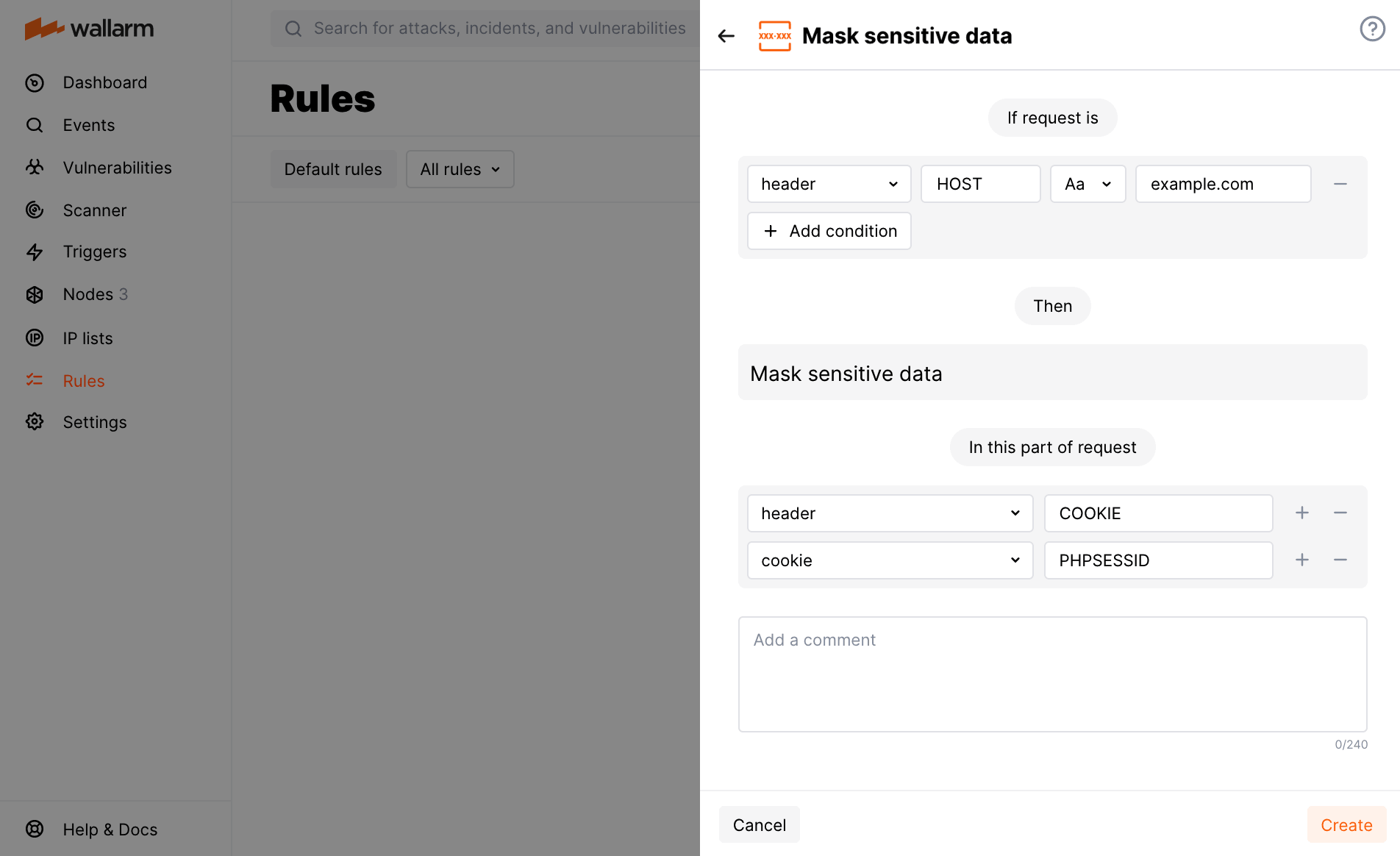
Let us say your application accessible at the example.com domain uses the PHPSESSID cookie for user authentication and you want to deny access to this information for employees using Wallarm.
To do so, set the Mask sensitive data rule as displayed on the screenshot.
Note that options you add to In this part of request should go in a particular order to reflect in which order Wallarm will apply parsers to read the required request element.