# Rules
Rules are used to fine-tune the [default](https://docs.wallarm.com/about-wallarm/protecting-against-attacks.md#tools-for-attack-detection) Wallarm behavior during the analysis of requests and their further processing. Thus, using rules you can change how the system detects malicious requests and acts when such malicious requests are detected.
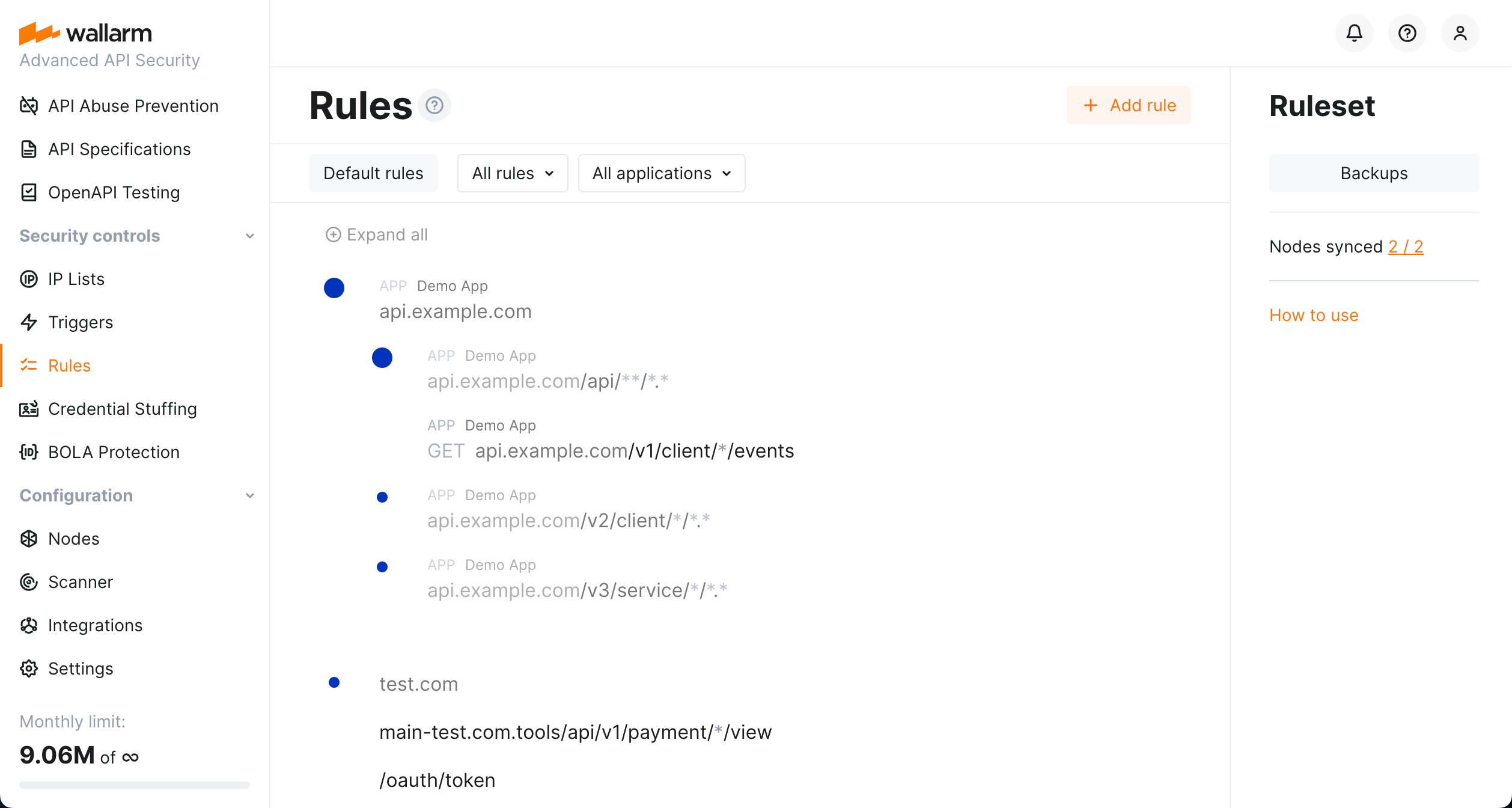
Rules are configured in the **Rules** section in the [US](https://us1.my.wallarm.com/rules) or [EU](https://my.wallarm.com/rules), or [ME](https://me1.my.wallarm.com/rules) Cloud.
!!! warning "Rule application delay"
When you make changes to the rules, they don't take effect immediately as it takes some time to [compile the rules](#ruleset-lifecycle) and upload them to the filtering nodes.
## What you can do with rules
Using rules, you can control how Wallarm mitigates attacks on your applications and APIs, fine tune attack detection, and change request/responses:
* Mitigation controls:
* [Advanced rate limiting](https://docs.wallarm.com/user-guides/rules/rate-limiting.md)
* [Virtual patches](https://docs.wallarm.com/user-guides/rules/vpatch-rule.md)
* [Custom attack detectors](https://docs.wallarm.com/user-guides/rules/regex-rule.md)
* [File upload restrictions](https://docs.wallarm.com/api-protection/file-upload-restriction.md#rule-based-protection)
* Fine-tuning attack detection:
* [Override filtration mode](https://docs.wallarm.com/admin-en/configure-wallarm-mode.md#conditioned-filtration-mode) for particular domains/endpoints
* [Ignore certain attacks](https://docs.wallarm.com/about-wallarm/protecting-against-attacks.md#ignoring-certain-attack-types)
* [Disable custom attack detectors](https://docs.wallarm.com/user-guides/rules/regex-rule.md#partial-disabling) for particular domains/endpoints or request parts
* Configure [binary data processing](https://docs.wallarm.com/about-wallarm/protecting-against-attacks.md#ignoring-certain-attack-signs-in-the-binary-data)
* Fine tune request processing by [configuring parsers](https://docs.wallarm.com/user-guides/rules/request-processing.md#managing-parsers)
* [Disable API Abuse Prevention](https://docs.wallarm.com/api-abuse-prevention/exceptions.md#exceptions-for-target-urls-and-specific-requests) for specific domains/endpoints and requests
* Fine tune node functioning by [limiting the request processing time](https://docs.wallarm.com/user-guides/rules/configure-overlimit-res-detection.md)
* Change requests/responses:
* [Mask sensitive data](https://docs.wallarm.com/user-guides/rules/sensitive-data-rule.md)
* Configure the additional layer of the application security by [changing response headers](https://docs.wallarm.com/user-guides/rules/add-replace-response-header.md)
## Rule branches
Rules are automatically grouped into nested branches by endpoint URIs and other conditions. This builds a tree-like structure in which rules are inherited down. Principles:
* All branches inherit [default](#default-rules) rules.
* In a branch, child endpoints inherit rules from the parent.
* Distinct has priority over inherited.
* Directly specified has priority over [regex](https://docs.wallarm.com/user-guides/rules/rules.md#condition-type-regex).
* Case [sensitive](https://docs.wallarm.com/user-guides/rules/rules.md#condition-type-equal) has priority over [insensitive](https://docs.wallarm.com/user-guides/rules/rules.md#condition-type-iequal-aa).
!!! info "No inheritance for parameters/points of request"
Inheritance [does not work for rules](https://docs.wallarm.com/user-guides/rules/rules.md#rule-branches) with **In this part of request** part specified, for example, [rate limiting](https://docs.wallarm.com/user-guides/rules/rate-limiting.md), [virtual patches](https://docs.wallarm.com/user-guides/rules/vpatch-rule.md) and others. If in these rules, **In this part of request** is not used, the inheritance will work as usually.
### Default rules
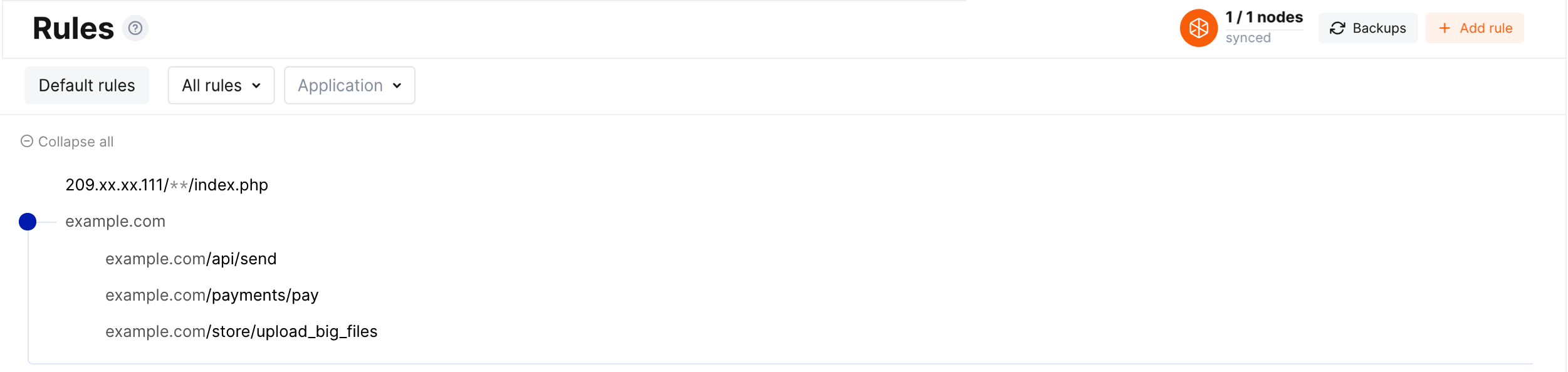
You can create rules with specified action but not linked to any endpoint - they are called **default rules**. Such rules are applied to all endpoints.
* To create default rule, follow the [standard procedure](#configuring) but leave URI blank. The new rule not linked to any endpoint will be created.
* To view the list of created default rules, click the **Default rules** button.
* Default rules are inherited by all branches.
!!! info "Traffic filtration mode default rule"
Wallarm automatically creates the `Set filtration mode` default rule for all clients and sets its value on the basis of [general filtration mode](https://docs.wallarm.com/admin-en/configure-wallarm-mode.md#general-filtration-mode) setting.
### Viewing branch rules
Here are some details of how to work with the rule branches:
* To expand the endpoint, click the blue circle.
* Endpoints that do not have distinct rules are greyed out and not clickable.
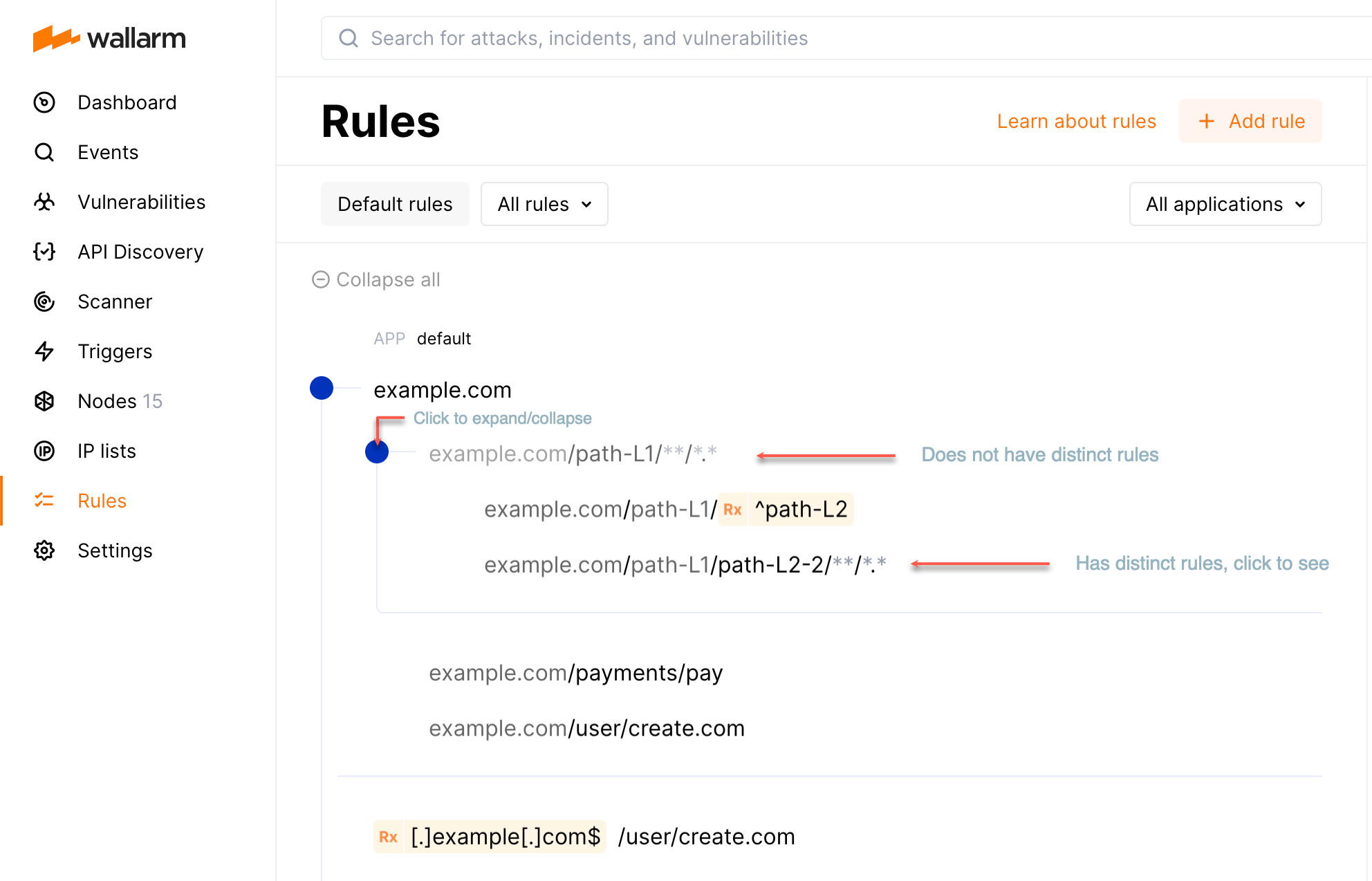
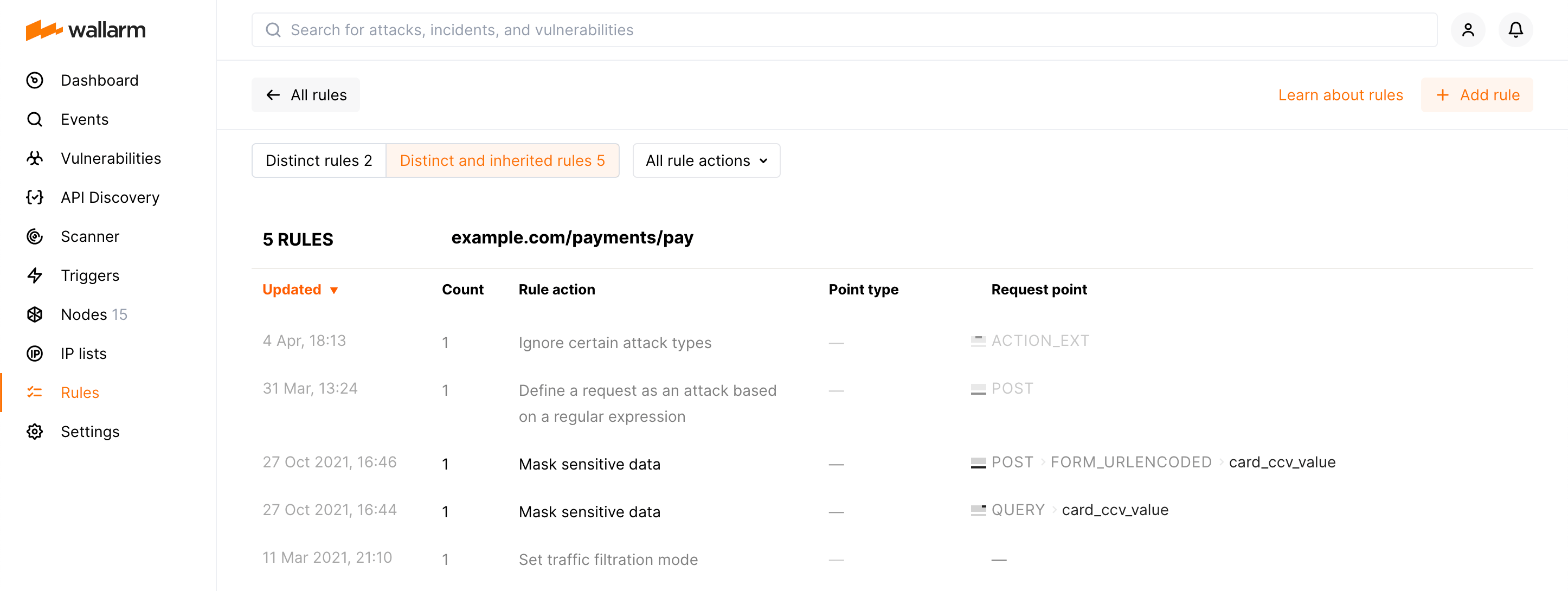
* To view rules for the endpoint, click it. First, distinct rules for this endpoint will be displayed.
* When viewing the rule list for the specific endpoint, click **Distinct and inherited rules** to display the inherited ones. Inherited rules will be displayed together with the distinct; they will be greyed out compared to distinct.
## Configuring
To add a new rule, go to the **Rules** section in the [US](https://us1.my.wallarm.com/rules) or [EU](https://my.wallarm.com/rules), or [ME](https://me1.my.wallarm.com/rules) Cloud. Rules can be added to both existing [branches](#rule-branches) and from scratch which will create a new branch if one does not exist.
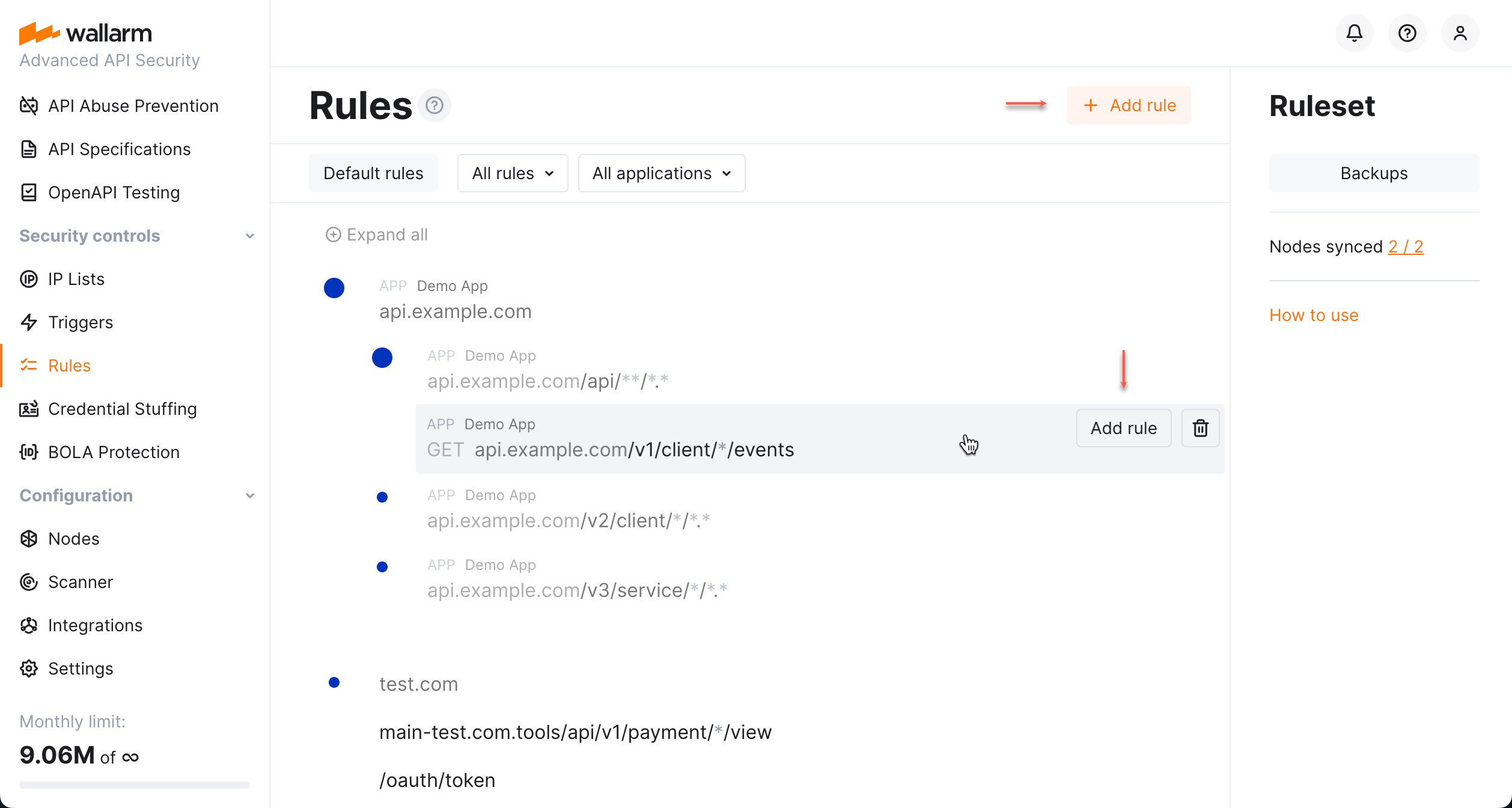
Note that a rule is applied to the request only if some conditions are met (like target endpoint, method, presence of some parameters or values, etc.). Also, it is often applied only to some request parts. For a better understanding of request structure interaction with the rules, it is advisable to learn how the filtering node [analyzes the requests](https://docs.wallarm.com/user-guides/rules/request-processing.md).
Rule conditions may be defined using:
* [URI constructor](#uri-constructor) - allows configuring the rule conditions by specifying the request method and endpoint in only one string.
* [Advanced edit form](#advanced-edit-form) - expands URI constructor to allow configuring both method/endpoint and additional rule conditions, such as application, headers, query string parameters and others.
### URI constructor
URI constructor allows configuring the rule conditions by specifying the request method and endpoint in only one string.
#### General usage
URI constructor provides:
* Selector for the request method. If the method is not selected, the rule will be applied to requests with any method.
* Field for the request endpoint which accepts the following value formats:
| Format | Example |
| ------ | ------ |
| Full URI including the following components:- Scheme (the value is ignored, you can explicitly specify the scheme by using the advanced form)
- Domain or an IP address
- Port
- Path
- Query string parameters
| `https://example.com:3000/api/user.php?q=action&w=delete`
- `[header, 'HOST']` - `example.com:3000`
- `[path, 0]` - `api`
- `[path, 1]` - `∅`
- `[action_name]` - `user`
- `[action_ext]` - `php`
- `[query, 'q']` - `action`
- `[query, 'w']` - `delete`
|
| URI with some components omitted | `example.com/api/user`
- `[header, 'HOST']` - `example.com`
- `[path, 0]` - `api`
- `[path, 1]` - `∅`
- `[action_name]` - `user`
- `[action_ext]` - `∅`
`http://example.com/api/clients/user/?q=action&w=delete`
- `[header, 'HOST']` - `example.com`
- `[path, 0]` - `api`
- `[path, 1]` - `clients`
- `[path, 2]` - `∅`
- `[action_name]` - `user`
- `[query, 'q']` - `action`
- `[query, 'w']` - `delete`
`/api/user`
- ``[header, 'HOST']` - any value
- `[path, 0]` - `api`
- `[path, 1]` - `∅`
- `[action_name]` - `user`
- `[action_ext]` - `∅`
|
| URI with `*` meaning any non‑empty value of the component | `example.com/*/create/*.*`
- `[header, 'HOST']` - `example.com`
- `[path, 0]` - any non‑empty value (hidden in the advanced edit form)
- `[path, 1]` - `create`
- `[path, 2]` - `∅`
- `[action_name]` - any non‑empty value (hidden in the advanced edit form)
- `[action_ext]` - any non‑empty value (hidden in the advanced edit form)
The value matches `example.com/api/create/user.php`
and does not match `example.com/create/user.php` and `example.com/api/create`.
|
| URI with `**` meaning any number of components including its absence | `example.com/**/user`
- `[header, 'HOST']` - `example.com`
- `[action_name]` - `user`
- `[action_ext]` - `∅`
The value matches `example.com/api/create/user` and `example.com/api/user`.
The value does not match `example.com/user`, `example.com/api/user/index.php` and `example.com/api/user/?w=delete`.
`example.com/api/**/*.*`
- `[header, 'HOST']` - `example.com`
- `[path, 0]` - `api`
- `[action_name]` - any non‑empty value (hidden in the advanced edit form)
- `[action_ext]` - any non‑empty value (hidden in the advanced edit form)
The value matches `example.com/api/create/user.php` and `example.com/api/user/create/index.php`
and does not match `example.com/api`, `example.com/api/user` and `example.com/api/create/user.php?w=delete`.
|
| URI with the [regular expression](#condition-type-regex) to match certain component values (regexp must be wrapped in `{{}}`) | `example.com/user/{{[0-9]}}`
- `[header, 'HOST']` - `example.com`
- `[path, 0]` - `user`
- `[path, 1]` - `∅`
- `[action_name]` - `[0-9]`
- `[action_ext]` - `∅`
The value matches `example.com/user/3445`
and does not match `example.com/user/3445/888` and `example.com/user/3445/index.php`.
|
The string specified in the URI constructor is automatically parsed into the set of [conditions](#conditions):
* `method`
* `header`. The URI constructor allows specifying only the header `HOST`.
* `path`, `action_name`, `action_ext`. Before confirming the rule creation, please ensure the values of these request parts are parsed in one of the following ways:
* Explicit value of certain `path` number + `action_name` + `action_ext` (optional)
* Explicit value of `action_name` + `action_ext` (optional)
* Explicit value of certain `path` number without `action_name` and without `action_ext`
* `query`
The value specified in the URI constructor can be completed by other conditions available only in the [advanced edit form](#advanced-edit-form).
#### Using wildcards
Can you use wildcards when working with URI constructor in Wallarm? No and yes. "No" means you cannot use them [classically](https://en.wikipedia.org/wiki/Wildcard_character), "yes" means you can achieve the same result acting like this:
* Within parsed components of your URI, instead of wildcards, use regular expressions.
* Place `*` or `**` symbol into the URI field itself to replace one or any number of components (see examples in the section [above](#uri-constructor)).
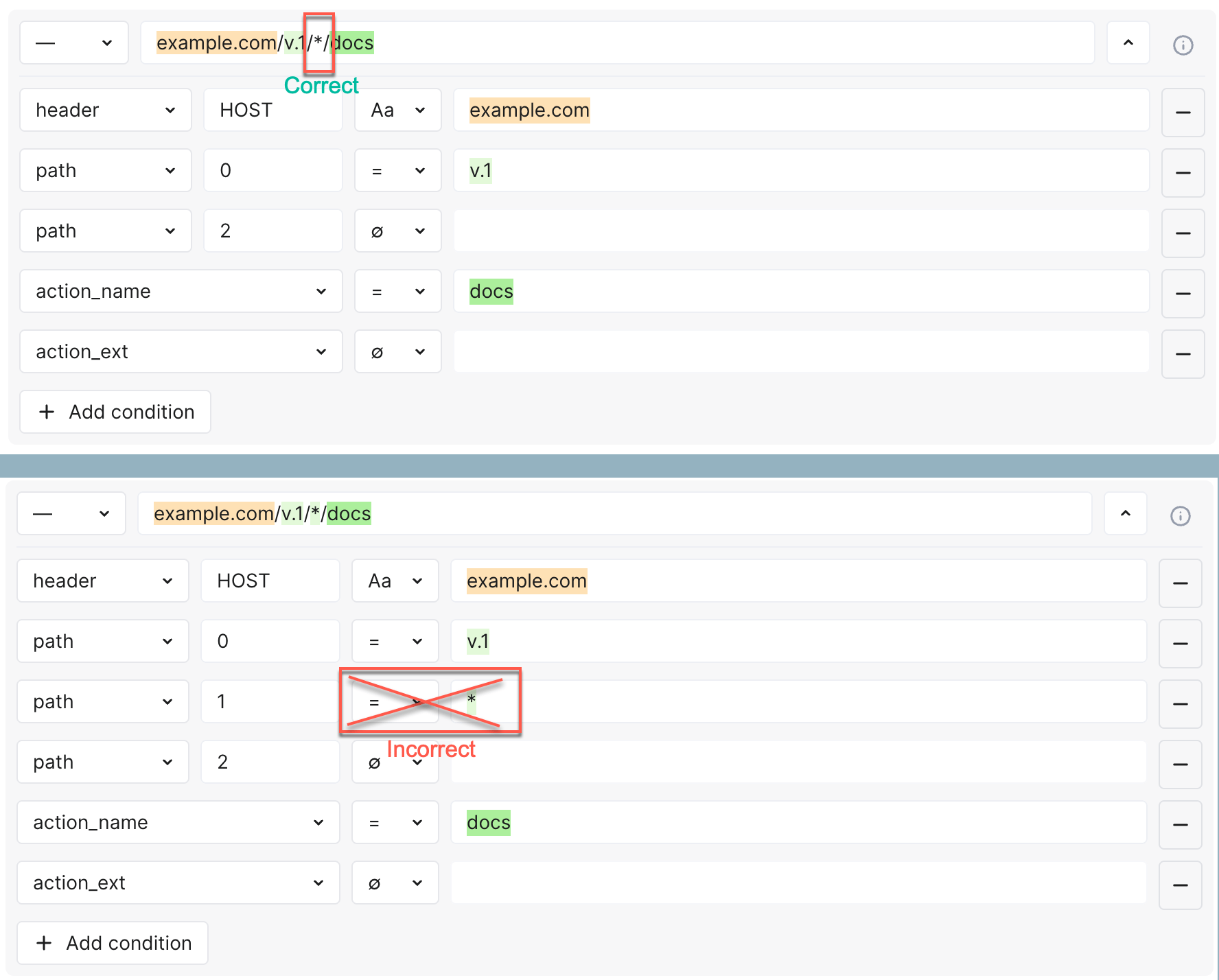
**Some details**
The syntax of the regular expression is different from the classical wildcards, but the same results can be achieved. For example, you want to get a mask corresponding to:
* `something-1.example.com/user/create.com` and
* `anything.something-2.example.com/user/create.com`
...which in classical wildcards you would try to get by typing something like:
* `*.example.com/user/create.com`
But in Wallarm, your `something-1.example.com/user/create.com` will be parsed into:
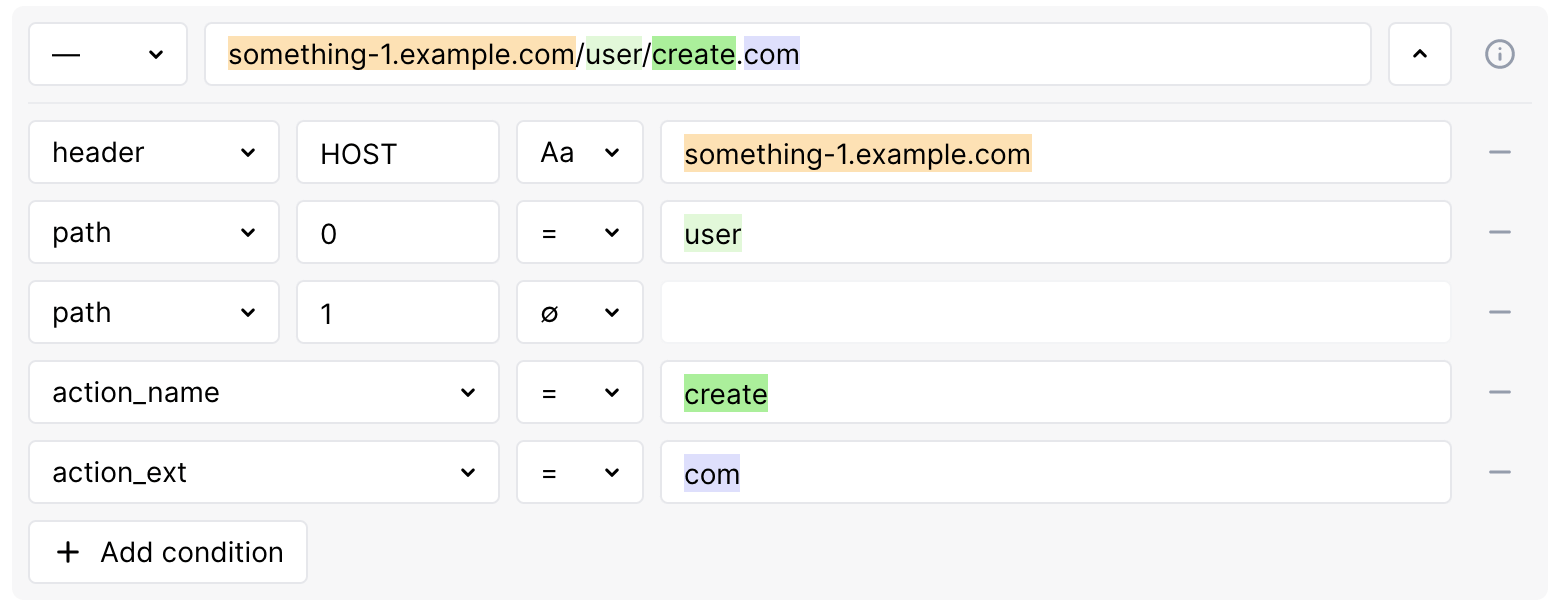
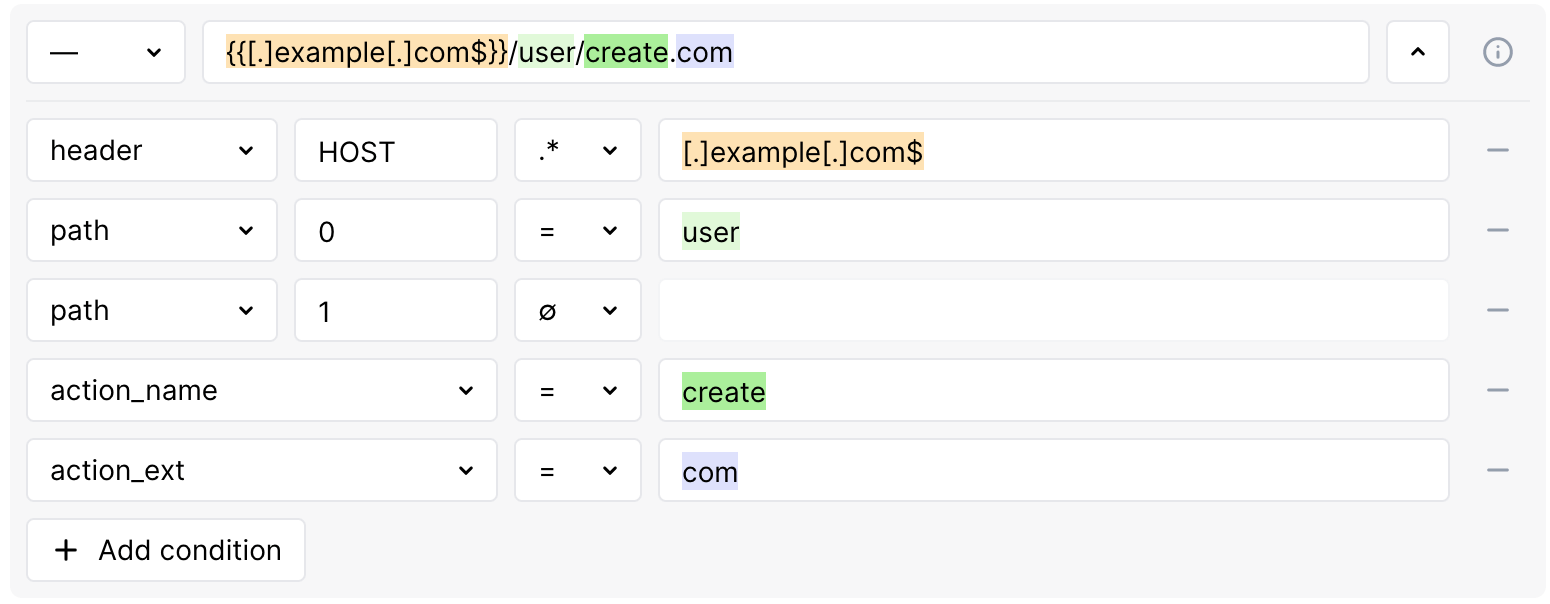
...where `something-1.example.com` is a `header`-`HOST` condition. We mentioned that wildcard cannot be used within the condition, so instead we need to use regular expression: set the condition type to REGEX and then use the regular expression Wallarm [specific syntax](#condition-type-regex):
1. Do not use `*` in a meaning "any number of symbols".
1. Put all the `.` that we want to be interpreted as "actual dots" in square brackets:
`something-1[.]example[.]com`
1. Use `.` without brackets as replacement of "any symbol" and `*` after it as quantifier "0 or more repetitions of the preceding", so `.*` and:
`.*[.]example[.]com`
1. Add `$` in the end of the expression to say that what we created must end our component:
`.*[.]example[.]com$`
!!! info "The simpler way"
You can omit `.*` and leave only `[.]example[.]com$`. In both cases, Wallarm will assume that any character can appear before `[.]example[.]com$` any number of times.
### Advanced edit form
Advanced edit form expands possibilities of [URI constructor](#uri-constructor) (method and URI) to allow configuring both these and additional rule conditions, such as application, headers, query string parameters and others.
#### Conditions
Conditions indicate which values should be presented in which request parts. The rule is applied when all its conditions are met. Conditions are listed in the **If request is** section of the rule.
The following conditions are currently supported:
* **application**: application ID.
* **proto**: HTTP protocol version (1.0, 1.1, 2.0, ...).
* **scheme**: http or https.
* **uri**: part of the request URL without the domain (for example, `/blogs/123/index.php?q=aaa` for the request sent to `http://example.com/blogs/123/index.php?q=aaa`).
* **path**, **action_name**, **action_ext** is hierarchical URI component sequence where:
* **path**: an array with URI parts separated by the `/` symbol (the last URI part is not included in the array). If there is only one part in the URI, the array will be empty.
* **action_name**: the last part of the URI after the `/` symbol and before the first period (`.`). This part of the URI is always presented in the request, even if its value is an empty string.
* **action_ext**: the part of the URI after the last period (`.`). It may be missing in the request.
* **query**: query string parameters.
* **header**: request headers. When you enter a header name, the most common values are displayed in a drop-down list. For example: `HOST`, `USER-AGENT`, `COOKIE`, `X-FORWARDED-FOR`, `AUTHORIZATION`, `REFERER`, `CONTENT-TYPE`.
!!! info "Managing `HOST` header rules for FQDNs and IP addresses"
If the `HOST` header is set to an FQDN, requests targeting its associated IP address will not be affected by the rule. To apply the rule to such requests, set the `HOST` header value to the specific IP in the rule conditions, or create a separate rule for both the FQDN and its IP.
When placed after a load balancer that modifies the `HOST` header, the Wallarm node applies rules based on the updated value, not the original. For example, if the balancer switches the `HOST` from an IP to a domain, the node follows rules for that domain.
* **method**: request methods. If the value is not explicitly specified, the rule will be applied to requests with any method.
#### Condition type: EQUAL (`=`)
The value must match precisely with the comparison argument. For example, only `example` matches with The value `example`.
!!! info "EQUAL condition type for the HOST header value"
To cover more requests with the rules, we have restricted the EQUAL condition type for the HOST header. Instead of the EQUAL type, we recommend using the type IEQUAL that allows parameter values in any register.
If you have previously used the EQUAL type, it will be automatically replaced with the IEQUAL type.
#### Condition type: IEQUAL (`Aa`)
The value must match with the comparison argument in any case. For example: `example`, `ExAmple`, `exampLe` match with the value `example`.
#### Condition type: REGEX (`.*`)
The value must match the regular expression.
**Regular expression syntax**
To match requests with regular expressions, the PIRE library is used. Mostly, the syntax of expressions is standard but has some specifics as described below and in the README file of [PIRE repository](https://github.com/yandex/pire).
??? info "Show regular expression syntax"
Characters that can be used as‑is:
* Lowercase Latin letters: `a b c d e f g h i j k l m n o p q r s t u v w x y z`
* Capital Latin letters: `A B C D E F G H I J K L M N O P Q R S T U V W X Y Z`
* Digits: `0 1 3 4 5 6 7 8 9`
* Special characters: ! " # % ' , - / : ; < = > @ ] _ ` }
* Whitespaces
Characters that must be placed into square brackets `[]` instead of escaping with `\`:
* `. $ ^ { [ ( | ) * + ? \ & ~`
Characters that must be converted to ASCII according to ISO‑8859:
* UTF‑8 characters (for example, the character `ʃ` converted to ASCII is `Ê`)
Character groups:
* `.` for any character except a newline
* `()` for grouping regular expressions, searching symbols present inside `()` or establishing a precedence order
* `[]` for a single character present inside `[]` (case sensitive); the group can be used for the specific cases:
* to ignore case (for example, `[cC]`)
* `[a-z]` to match one of lowercase Latin letters
* `[A-Z]` to match one of capital Latin letters
* `[0-9]` to match one of digits
* `[a-zA-Z0-9[.]]` to match one of lowercase, or capital Latin letters, or digits, or dot
Logic characters:
* `~` is equal to NOT. The inverted expression and the character must be placed into `()`,
for example: `(~(a))`
* `|` is equal to OR
* `&` is equal to AND
Characters to specify string boundaries:
* `^` for the start of the string
* `$` for the end of the string
Quantifiers:
* `*` for 0 or more repetitions of the preceding regular expression
* `+` for 1 or more repetitions of the preceding regular expression
* `?` for 0 or 1 repetitions of the preceding regular expression
* `{m}` for `m` repetitions of the preceding regular expression
* `{m,n}` for `m` to `n` repetitions of the preceding regular expression; omitting `n` specifies an infinite upper bound
Character combinations that work with specifics:
* `^.*$` is equal to `^.+$` (empty values does not match with `^.*$`)
* `^.?$`, `^.{0,}$`, `^.{0,n}$` are equal to `^.+$`
Temporarily not supported:
* Character classes like `\W` for non-alphabetics, `\w` for alphabetics, `\D` for any non-digits, `\d` for any decimals, `\S` for non-whitespaces, `\s` for whitespaces
Not supported syntax:
* Three-digit octal codes `\NNN`, `\oNNN`, `\ONNN`
* `\cN` passing control characters via `\c` (for example, `\cC` for CTRL+C)
* `\A` for the start of the string
* `\z` for the end of the string
* `\b` before or after the whitespace character in the end of the string
* `??`, `*?`, `+?` lazy quantifiers
* Conditionals
* `?=` lookahead assertions
**Testing regular expressions**
To test a regular expression, use the Wallarm **cpire** utility. Install it via the [Wallarm all-in-one installer](https://docs.wallarm.com/installation/nginx/all-in-one.md) on your Linux-based OS, or run it from the [Wallarm NGINX-based Docker image](https://docs.wallarm.com/admin-en/installation-docker-en.md) as follows:
**All-in-one installer:**
1. Download the Wallarm all-in-one installer if it is not downloaded yet:
```
curl -O https://meganode.wallarm.com/6.12/wallarm-6.12.1.x86_64-glibc.sh
```
1. Install the Wallarm modules if they are not installed yet:
```
sudo sh wallarm-6.12.1.x86_64-glibc.sh -- --batch --token
```
1. Run the **cpire** utility:
```bash
/opt/wallarm/usr/bin/cpire-runner -r ''
```
1. Enter the value to check whether it matches with the regular expression.
**NGINX-based Docker image:**
1. Run the **cpire** utility from the Wallarm Docker image:
```
docker run --rm -it wallarm/node:6.12.1 /opt/wallarm/usr/bin/cpire-runner -r ''
```
1. Enter the value to check whether it matches with the regular expression.
The utility will return the result:
* `0` if the value matches with the regular expression
* `FAIL` if the value does not match with the regular expression
* Error message if the regular expression is invalid
!!! warning "Specifics of handling the `\` character"
If the expression includes `\`, please escape it with `[]` and `\` (for example, `[\\]`).
**Examples of regular expressions added via Wallarm Console**
* To match any string that includes /.git
```
/[.]git
```
* To match any string that includes .example.com
```
[.]example[.]com
```
* To match any string ending with /.example.*.com where `*` can be any symbol repeated any number of times
```
/[.]example[.].*[.]com$
```
* To match all IP addresses excluding 1.2.3.4 and 5.6.7.8
```
^(~((1[.]2[.]3[.]4)|(5[.]6[.]7[.]8)))$
```
* To match any string ending with /.example.com.php
```
/[.]example[.]com[.]php$
```
* To match any string that includes sqlmapwith letters in lower and upper case: sqLmAp, SqLMap, etc
```
[sS][qQ][lL][mM][aA][pP]
```
* To match any string that includes one or several values: admin\\.exe, admin\\.bat, admin\\.sh, cmd\\.exe, cmd\\.bat, cmd\\.sh
```
(admin|cmd)[\\].(exe|bat|sh)
```
* To match any string that includes one or several values: onmouse with letters in lower and upper case, onload with letters in lower and upper case, win\\.ini, prompt
```
[oO][nN][mM][oO][uU][sS][eE]|[oO][nN][lL][oO][aA][dD]|win[\\].ini|prompt
```
* To match any string that starts with `Mozilla` but does not contain the string `1aa875F49III`
```
^(Mozilla(~(.*1aa875F49III.*)))$
```
* To match any string with one of the values: `python-requests/`, `PostmanRuntime/`, `okhttp/3.14.0`, `node-fetch/1.0`
```
^(python-requests/|PostmanRuntime/|okhttp/3.14.0|node-fetch/1.0)
```
#### Condition type: ABSENT (`∅`)
The request should not contain the designated part. In this case, the comparison argument is not used.
## Ruleset lifecycle
All created rules and [mitigation controls](https://docs.wallarm.com/about-wallarm/mitigation-controls-overview.md) form a custom ruleset. The Wallarm node relies on the custom ruleset during incoming requests analysis.
Changes of of rules and mitigation controls do NOT take effect instantly. Changes are applied to the request analysis process only after the custom ruleset **building** and **uploading to the filtering node** are finished.
### Custom ruleset building
Adding a new rule/mitigation control, deleting or changing existing ones in the Wallarm Console → **Security Controls** → **Rules** or **Mitigation Controls** launch a custom ruleset build. During the building process, rules and controls are optimized and compiled into a format adopted for the filtering node. The process of building a custom ruleset typically takes from a few seconds for a small number of rules to up to an hour for complex rule trees.
### Uploading to filtering node
Custom ruleset build is uploaded to the filtering node during the filtering node and Wallarm Cloud synchronization. By default, synchronization of the filtering node and Wallarm Cloud is launched every 2‑4 minutes. [More details on the filtering node and Wallarm Cloud synchronization configuration →](https://docs.wallarm.com/admin-en/configure-cloud-node-synchronization-en.md)
The status of uploading a custom ruleset to the filtering node is logged to the `/opt/wallarm/var/log/wallarm/wcli-out.log` file.
All Wallarm nodes connected to the same Wallarm account receive the same set of default and custom rules for traffic filtering. You still can apply different rules for different applications by using proper application IDs or unique HTTP request parameters like headers, query string parameters, etc.
### Backup and restore
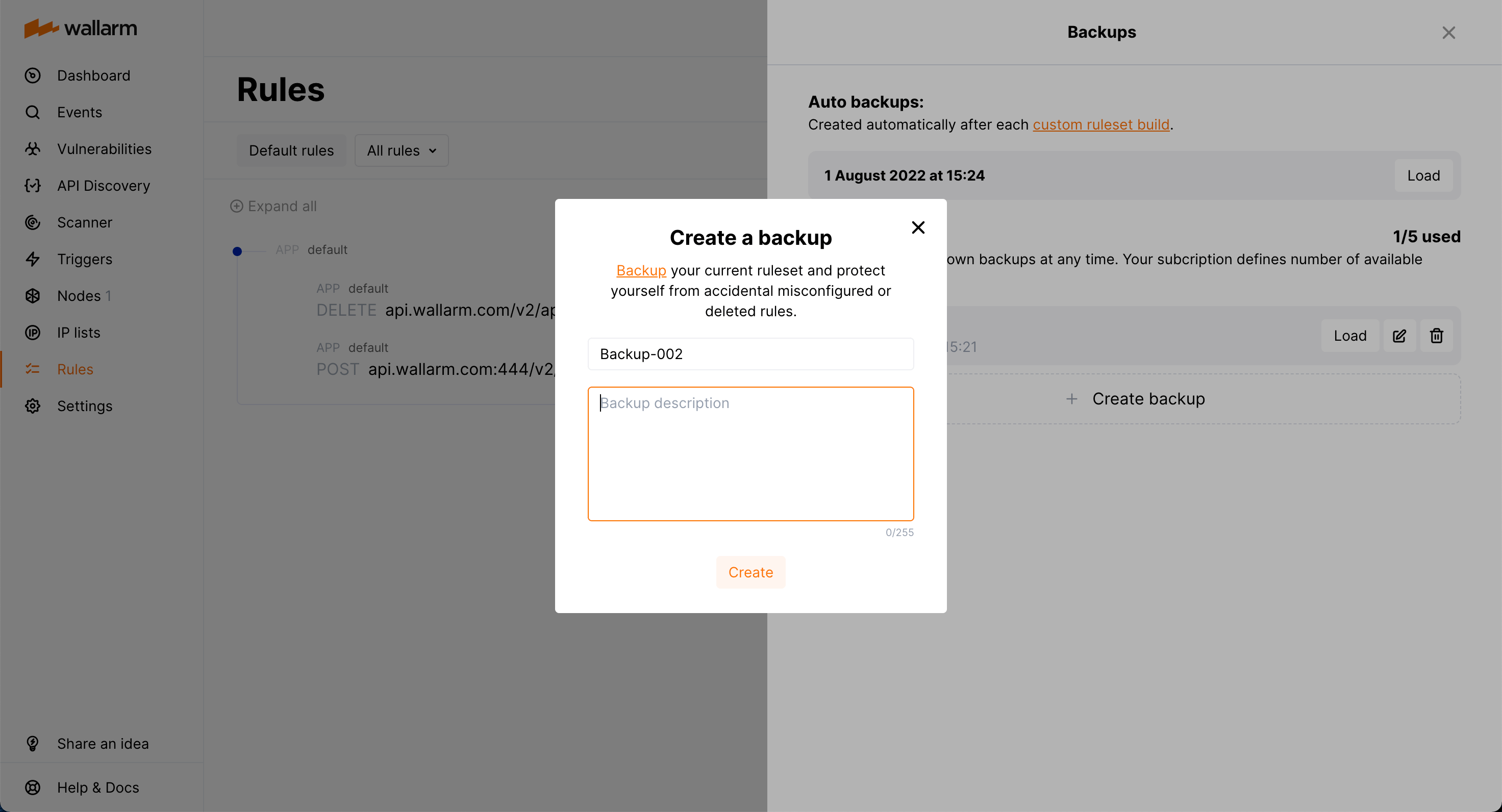
To protect yourself from accidentally misconfigured or deleted rules, you can backup your current custom ruleset.
There are the following rule backup options:
* Automatic backup creation after each [custom ruleset build](#custom-ruleset-building). The number of automatic backups is limited to 7: for each day when you change the rules several times, only the last backup is kept.
* Manual backup creation at any time. The number of manual backups is limited to 5 by default. If you need more, contact the [Wallarm technical support](mailto:support@wallarm.com) team.
You can:
* Access current backups: in the **Rules** section, click **Backups**.
* Create a new backup manually: in the **Backups** window, click **Create backup**.
* Set name and description for the manual backup and edit them at any moment.
!!! info "Naming for automatic backups"
The automatic backups are named by the system and cannot be renamed.
* Load from existing backup: click **Load** for the required backup. When loading from the backup, your current rule configuration is deleted and replaced with the configuration from the backup.
* Delete backup.
!!! warning "Rule modification restrictions"
You cannot create or modify rules or mitigation controls until creating backup or load from backup is complete.
## API calls to get rules
To get custom rules, you can [call the Wallarm API directly](https://docs.wallarm.com/api/request-examples.md#get-all-configured-rules).
## Migrating between tenants
If you have [multiple tenants](https://docs.wallarm.com/installation/multi-tenant/overview.md), you can [migrate](https://docs.wallarm.com/installation/multi-tenant/overview.md#migrating-rules) (copy) rules between them **along with** mitigation controls and Credential Stuffing Detection settings.