# Parsing Requests
When analyzing requests, Wallarm filtering node uses a comprehensive set of parsers. After identifying the request parts, parsers are sequentially applied to each of them to provide request meta parameters further used for attack detection. Available parsers, logic of their usage and possible configurations for this logic are described in this article.
For an effective parsing, Wallarm follows the principles:
* Work with the same data as the protected application. For example:
If an application provides a JSON API, then the processed parameters will be also encoded in JSON format. To get parameter values, Wallarm uses JSON parser. There are also more complex cases where the data is encoded several times — for example, JSON to Base64 to JSON. Such cases require decoding with several parsers.
* Consider the context of data processing. For example:
The parameter `name` can be passed in creation requests both as the product name and as a username. However, the processing code for such requests can be different. To define the method of analyzing such parameters, Wallarm may use the URL from which the requests were sent to or other parameters.
## Identifying and parsing the request parts
Starting from the top level of the HTTP request, the filtering node attempts to sequentially apply each of the suitable parsers to each part. The list of applied parsers depends on the nature of the data and the results of the previous training of the system.
The output from the parsers becomes an additional set of parameters that has to be analyzed in a similar way. Parser output sometimes becomes a complex structure like JSON, array, or associative array.
!!! info "Parser tags"
Each parser has an identifier (tag). For example, `header` for the parser of request headers. The set of tags used in the request analysis is displayed in Wallarm Console within the event details. This data demonstrates the request part with the detected attack and parsers that were used.
For example, if an attack was detected in the `SOAPACTION` header:

### URL
Each HTTP request contains an URL. To find attacks, the filtering node analyzes both the original value and its individual components: **path**, **action_name**, **action_ext**, **query**.
The following tags correspond to the URL parser:
* **uri** for the original URL value without the domain (for example, `/blogs/123/index.php?q=aaa` for the request sent to `http://example.com/blogs/123/index.php?q=aaa`).
* **path** for an array with URL parts separated by the `/` symbol (the last URL part is not included in the array). If there is only one part in the URL, the array will be empty.
* **action_name** for the last part of the URL after the `/` symbol and before the first period (`.`). This part of the URL is always present in the request, even if its value is an empty string.
* **action_ext** for the part of the URL after the last period (`.`). It may be missing in the request.
!!! warning "Boundary between **action_name** and **action_ext** when several periods"
If there are several periods (`.`) in the last part of the URL after the `/` symbol, problems with the boundary between **action_name** and **action_ext** may occur, such as:
* Boundary set based on the **first** period, for example:
`/modern/static/js/cb-common.ffc63abe.chunk.js.map` →
* ...
* `action_name` — `cb-common`
* `action_ext` — `ffc63abe.chunk.js.map`
* Some elements are missing after parsing, for the example above this could be:
* `action_name` — `cb-common`
* `action_ext` — `ffc63abe`
To fix this, manually edit the **action_name** and **action_ext** points in the [advanced edit form](https://docs.wallarm.com/user-guides/rules/rules.md#advanced-edit-form) of the URI constructor.
* **query** for [query string parameters](#query-string-parameters) after the `?` symbol.
Example:
`/blogs/123/index.php?q=aaa`
* `[uri]` — `/blogs/123/index.php?q=aaa`
* `[path, 0]` — `blogs`
* `[path, 1]` — `123`
* `[action_name]` — `index`
* `[action_ext]` — `php`
* `[query, 'q']` — `aaa`
### Query string parameters
Query string parameters are passed to the application in the request URL after the character `?` in the `key=value` format. The **query** tag corresponds to the parser.
Request example | Query string parameters and values
---- | -----
`/?q=some+text&check=yes` | - `[query, 'q']` — `some text`
- `[query, 'check']` — `yes`
`/?p1[x]=1&p1[y]=2&p2[]=aaa&p2[]=bbb` | - `[query, 'p1', hash, 'x']` — `1`
- `[query, 'p1', hash, 'y']` — `2`
- `[query, 'p2', array, 0]` — `aaa`
- `[query, 'p2', array, 1]` — `bbb`
`/?p3=1&p3=2` | - `[query, 'p3', array, 0]` — `1`
- `[query, 'p3', array, 1]` — `2`
- `[query, 'p3', pollution]` — `1,2`
### IP address of a request origin
Request point for an IP address of a request origin in the Wallarm rules is `remote_addr`. This point is used only in the [**Advanced rate limiting**](https://docs.wallarm.com/user-guides/rules/rate-limiting.md) rule to limit requests per IPs.
### Headers
Headers are presented in the HTTP request and some other formats (e.g., **multipart**). The **header** tag corresponds to the parser. Header names are always converted to uppercase.
Example:
```
GET / HTTP/1.1
Host: example.com
X-Test: aaa
X-Test: bbb
```
* `[header, 'HOST']` — `example.com`
* `[header, 'X-TEST', array, 0]` — `aaa`
* `[header, 'X-TEST', array, 1]` — `aaa`
* `[header, 'X-TEST', pollution]` — `aaa,bbb`
### Metadata
The following tags correspond to the parser for HTTP request metadata:
* **post** for the HTTP request body
* **method** for the HTTP request method: `GET`, `POST`, `PUT`, `DELETE`
* **proto** for the HTTP protocol version
* **scheme**: http/https
* **application** for the application ID
### Additional parsers
Complex request parts may require additional parsing (for example, if the data is Base64 encoded or presented in the array format). In such cases, the parsers listed below are applied to request parts additionally.
#### base64
Decodes Base64 encoded data, and can be applied to any part of the request.
#### gzip
Decodes GZIP encoded data, and can be applied to any part of the request.
#### htmljs
Converts HTML and JS symbols to the text format, and can be applied to any part of the request.
Example: `"aaa"` will be converted to `"aaa"`.
#### json_doc
Parses the data in JSON format, and can be applied to any part of the request.
Filters:
* **json_array** or **array** for the value of the array element
* **json_obj** or **hash** for the value of the associative array key (`key:value`)
Example:
```
{"p1":"value","p2":["v1","v2"],"p3":{"somekey":"somevalue"}}
```
* `[..., json_doc, hash, 'p1']` — `value`
* `[..., json_doc, hash, 'p2', array, 0]` — `v1`
* `[..., json_doc, hash, 'p2', array, 1]` — `v2`
* `[..., json_doc, hash, 'p3', hash, 'somekey']` — `somevalue`
#### xml
Parses the data in XML format, and can be applied to any part of the request.
Filters:
* **xml_comment** for an array with comments in the body of an XML document
* **xml_dtd** for the address of the external DTD schema being used
* **xml_dtd_entity** for an array defined in the Entity DTD document
* **xml_pi** for an array of instructions to process
* **xml_tag** or **hash** for an associative array of tags
!!! info "Formatting **xml_tag** with namespaces"
If you specify URI, namespace and tag name together in **xml_tag**, note that the required separator depends on the Wallarm node version:
* `URI|namespace|tag_name` in versions 6.3.0 and later, e.g. `https://www.w3.org/path|xhtml|html`
* `URI:namespace:tag_name` in versions earlier than 6.3.0, e.g., `https://www.w3.org/path:xhtml:html`
* **xml_tag_array** or **array** for an array of tag values
* **xml_attr** for an associative array of attributes; can only be used after the **xml_tag** filter
The XML parser does not differentiate between the contents of the tag and the first element in the array of values for the tag. That is, the parameters `[..., xml, xml_tag, 't1']` and `[..., xml, xml_tag, 't1', array, 0]` are identical and interchangeable.
Example:
```
]>
&xxe;
123
234
```
* `[..., xml, xml_dtd_entity, 0]` — name = `xxe`, value = `aaaa`
* `[..., xml, xml_pi, 0]` — name = `xml-stylesheet`, value = `type="text/xsl" href="style.xsl"`
* `[..., xml, xml_comment, 0]` — ` test `
* `[..., xml, xml_tag, 'methodCall', xml_tag, 'methodName']` — `aaaa`
* `[..., xml, xml_tag, 'methodCall', xml_tag, 'methodArgs']` — `123`
* `[..., xml, xml_tag, 'methodCall', xml_tag, 'methodArgs', xml_attr, 'check']` — `true`
* `[..., xml, xml_tag, 'methodCall', xml_tag, 'methodArgs', array, 1]` — `234`
#### array
Parses data array. Can be applied to any part of the request.
Example:
```
/?p1[x]=1&p1[y]=2&p2[]=aaa&p2[]=bbb
```
* `[query, 'p2', array, 0]` — `aaa`
* `[query, 'p2', array, 1]` — `bbb`
#### hash
Parses the associative data array (`key:value`), and can be applied to any part of the request.
Example:
```
/?p1[x]=1&p1[y]=2&p2[]=aaa&p2[]=bbb
```
* `[query, 'p1', hash, 'x']` — `1`
* `[query, 'p1', hash, 'y']` — `2`
#### pollution
Combines the values of the parameters with the same name, and can be applied to any part of the request in the initial or decoded format.
Example:
```
/?p3=1&p3=2
```
* `[query, 'p3', pollution]` — `1,2`
#### percent
Decodes the URL symbols, and can be applied only to the **uri** component of URL.
#### cookie
Parses the Cookie request parameters, and can be applied only to the request headers.
Example:
```
GET / HTTP/1.1
Cookie: a=1; b=2
```
* `[header, 'COOKIE', cookie, 'a']` = `1`;
* `[header, 'COOKIE', cookie, 'b']` = `2`.
#### form_urlencoded
Parses the request body passed in the `application/x-www-form-urlencoded` format, and can be applied only to the request body.
Example:
```
p1=1&p2[a]=2&p2[b]=3&p3[]=4&p3[]=5&p4=6&p4=7
```
* `[post, form_urlencoded, 'p1']` — `1`
* `[post, form_urlencoded, 'p2', hash, 'a']` — `2`
* `[post, form_urlencoded, 'p2', hash, 'b']` — `3`
* `[post, form_urlencoded, 'p3', array, 0]` — `4`
* `[post, form_urlencoded, 'p3', array, 1]` — `5`
* `[post, form_urlencoded, 'p4', array, 0]` — `6`
* `[post, form_urlencoded, 'p4', array, 1]` — `7`
* `[post, form_urlencoded, 'p4', pollution]` — `6,7`
#### grpc Parses gRPC API requests, and can be applied only to the request body.
Supports the **protobuf** filter for the Protocol Buffers data.
#### multipart
Parses the request body passed in the `multipart` format, and can be applied only to the request body.
Supports the **header** filter for the headers in the request body.
Example:
```
p1=1&p2[a]=2&p2[b]=3&p3[]=4&p3[]=5&p4=6&p4=7
```
* `[post, multipart, 'p1']` — `1`
* `[post, multipart, 'p2', hash, 'a']` — `2`
* `[post, multipart, 'p2', hash, 'b']` — `3`
* `[post, multipart, 'p3', array, 0]` — `4`
* `[post, multipart, 'p3', array, 1]` — `5`
* `[post, multipart, 'p4', array, 0]` — `6`
* `[post, multipart, 'p4', array, 1]` — `7`
* `[post, multipart, 'p4', pollution]` — `6,7`
If a file name is specified in the `Content-Disposition` header, then the file is considered to be loaded in this parameter. The parameter will look like this:
* `[post, multipart, 'someparam', file]` — file contents
#### viewstate
Designed to analyze the session state. The technology is used by Microsoft ASP.NET, and can be applied only to the request body.
Filters:
* **viewstate_array** for an array
* **viewstate_pair** for an array
* **viewstate_triplet** for an array
* **viewstate_dict** for an associative array
* **viewstate_dict_key** for a string
* **viewstate_dict_value** for a string
* **viewstate_sparse_array** for an associative array
#### jwt
Parses JWT tokens and can be applied to any part of the request.
The JWT parser returns the result in the following parameters according to the detected JWT structure:
* `jwt_prefix`: one of the supported JWT value prefixes - lsapi2, mobapp2, bearer. The parser reads the prefix value in any register.
* `jwt_header`: JWT header. Once getting the value, Wallarm also usually applies the [`base64`](#base64) and [`json_doc`](#json_doc) parsers to it.
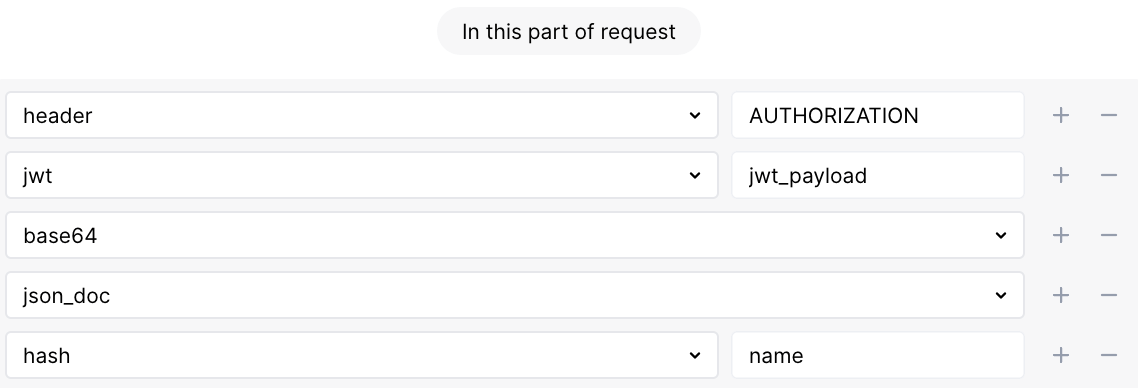
* `jwt_payload`: JWT payload. Once getting the value, Wallarm also usually applies the [`base64`](#base64) and [`json_doc`](#json_doc) parsers to it.
JWTs can be passed in any request part. So, before applying the `jwt` parser Wallarm uses the specific request part parser, e.g. [`query`](#query-string-parameters) or [`header`](#headers).
Example of the JWT passed in the `Authentication` header:
```bash
Authentication: Bearer eyJhbGciOiJIUzI1NiIsInR5cCI6IkpXVCJ9.eyJzdWIiOiIxMjM0NTY3ODkwIiwibmFtZSI6IkpvaG4gRG9lIiwiaWF0IjoxNTE2MjM5MDIyfQ.SflKxwRJSMeKKF2QT4fwpMeJf36POk6yJV_adQssw5c
```
* `[header, AUTHENTICATION, jwt, 'jwt_prefix']` — `Bearer`
* `[header, AUTHENTICATION, jwt, 'jwt_header', base64, json_doc, hash, 'alg']` — `HS256`
* `[header, AUTHENTICATION, jwt, 'jwt_header', base64, json_doc, hash, 'typ']` — `JWT`
* `[header, AUTHENTICATION, jwt, 'jwt_payload', base64, json_doc, hash, 'sub']` — `1234567890`
* `[header, AUTHENTICATION, jwt, 'jwt_payload', base64, json_doc, hash, 'name']` — `John Doe`
* `[header, AUTHENTICATION, jwt, 'jwt_payload', base64, json_doc, hash, 'iat']` — `1516239022`
When defining a request element the [rule](https://docs.wallarm.com/user-guides/rules/rules.md) is applied to:
* Choose the parser of the request part containing JWT first
* Specify one of the listed `jwt_*` parameters as the `jwt` parser value, e.g. for the `name` JWT payload parameter value:
#### gql
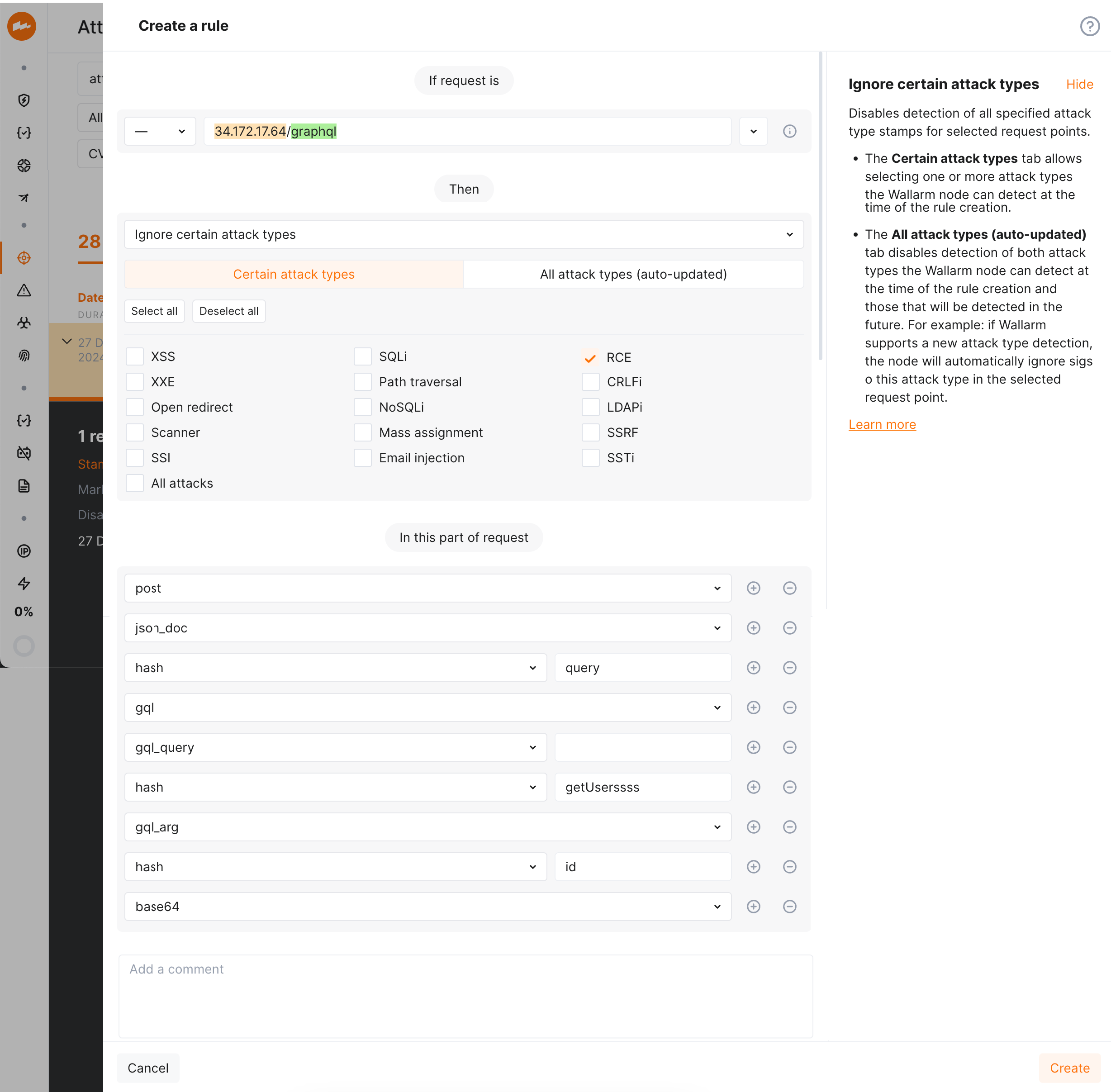
Parses GraphQL executable definitions (queries, mutations, subscriptions and fragments) that enables an improved detection of the [input validation attacks](https://docs.wallarm.com/attacks-vulns-list.md#attack-types) in GraphQL specific request points. Requires NGINX Node 5.3.0 or higher or native node 0.12.0.
Filters:
* **gql_query** for a query operation
* **gql_mutation** for a mutation operation
* **gql_subscription** for a subscription operation
* **gql_alias** for a field alias
* **gql_arg** for field arguments
* **gql_dir** for a directive
* **gql_spread** for a fragment spread
* **gql_fragment** for a fragment definition
* **gql_type** for the named type of a fragment definition or inline fragment
* **gql_inline** for an inline fragment
* **gql_var** for a variable definition
Examples:
```
query GetUser {
user(id: "1") {
...UserFields @include(if: true)
}
}
```
* `[..., gql, gql_query, 'GetUser', hash, 'user', gql_arg, hash, 'id']` — `1`
* `[..., gql, gql_query, 'GetUser', hash, 'user', gql_spread,` `'UserFields', gql_dir, 'include', gql_arg, hash, 'if']` — `true`
```
query GetAllUsers {
users(limit: 10) {
...UserFields @include(if: true)
}
}
```
* `[..., gql, gql_query, 'GetAllUsers', hash, 'users', gql_arg, hash, 'limit']` — `10`
* `[..., gql, gql_query, 'GetAllUsers', hash, 'users',` `gql_spread, 'UserFields', gql_dir, 'include', gql_arg, hash, 'if']` — `true`
```
fragment UserFields on User {
id
name
email
posts(status: "published") {
title
content
}
}
```
* `[..., gql, gql_fragment, 'UserFields', gql_type,` `'User', hash, 'posts', gql_arg, hash, 'status']` — `published`
The parser allows extracting and displaying values of [GraphQL request parameters in API Sessions](https://docs.wallarm.com/api-sessions/overview.md#graphql-requests-in-api-sessions) and applying [rules](https://docs.wallarm.com/user-guides/rules/rules.md) to GraphQL specific parts of requests:
!!! info "GraphQL protection with Wallarm"
While [always enabled](#managing-parsers) parser by default provides detection of regular attacks (SQLi, RCE, etc.) in GraphQL, Wallarm also allow **configuring** [protection from GraphQL-specific attacks](https://docs.wallarm.com/api-protection/graphql-rule.md).
### Norms
The norms are applied to parsers for array and key data types. Norms are used to define the boundaries of data analysis. The value of the norm is indicated in the parser tag. For example: **hash_all**, **hash_name**.
If the norm is not specified, then the identifier of the entity that requires processing is passed to the parser. For example: the name of the JSON object or other identifier is passed after **hash**.
**all**
Used to get values of all elements, parameters, or objects. For example:
* **path_all** for all parts of URL path
* **query_all** for all query string parameter values
* **header_all** for all header values
* **array_all** for all array element values
* **hash_all** for all JSON object or XML attribute values
* **jwt_all** for all JWT values
**name**
Used to get names of all elements, parameters, or objects. For example:
* **query_name** for all query string parameter names
* **header_name** for all header names
* **hash_name** for all JSON object or XML attribute names
* **jwt_name** for names of all parameters with JWT
## Managing parsers
By default, when analyzing the request the Wallarm node attempts to sequentially apply each of the suitable [parsers](https://docs.wallarm.com/user-guides/rules/request-processing.md) to each element of the request. However, certain parsers can be applied mistakenly and as a result, the Wallarm node may detect attack signs in the decoded value.
For example: the Wallarm node may mistakenly identify unencoded data as encoded into [Base64](https://en.wikipedia.org/wiki/Base64), since the Base64 alphabet symbols are often used in the regular text, token values, UUID values and other data formats. If decoding the unencoded data and detecting attack signs in the resulting value, the [false positive](https://docs.wallarm.com/about-wallarm/protecting-against-attacks.md#false-positives) occurs.
To prevent false positives in such cases, Wallarm provides the **Disable/Enable request parser** rule to disable the parsers mistakenly applied to certain request elements.
**Creating and applying the rule**
1. Proceed to Wallarm Console:
* **Rules** → **Add rule** or your branch → **Add rule**.
* **Attacks** / **Incidents** → attack/incident → hit → **Rule**.
* **API Discovery** (if [enabled](https://docs.wallarm.com/api-discovery/setup.md)) → your endpoint → **Create rule**.
1. Choose **Fine-tuning attack detection** → **Configure parsers**.
1. In **If request is**, [describe](https://docs.wallarm.com/user-guides/rules/rules.md#configuring) the scope to apply the rule to.
1. Add parsers to be `off`/`on`.
1. In **In this part of request**, specify request points for which you wish to set the rule. Wallarm will restrict requests that have the same values for the selected request parameters.
All available points are described in this article above, you can choose those matching your particular use case.
1. Wait for the [rule compilation and uploading to the filtering node to complete](https://docs.wallarm.com/user-guides/rules/rules.md#ruleset-lifecycle).
**Rule example**
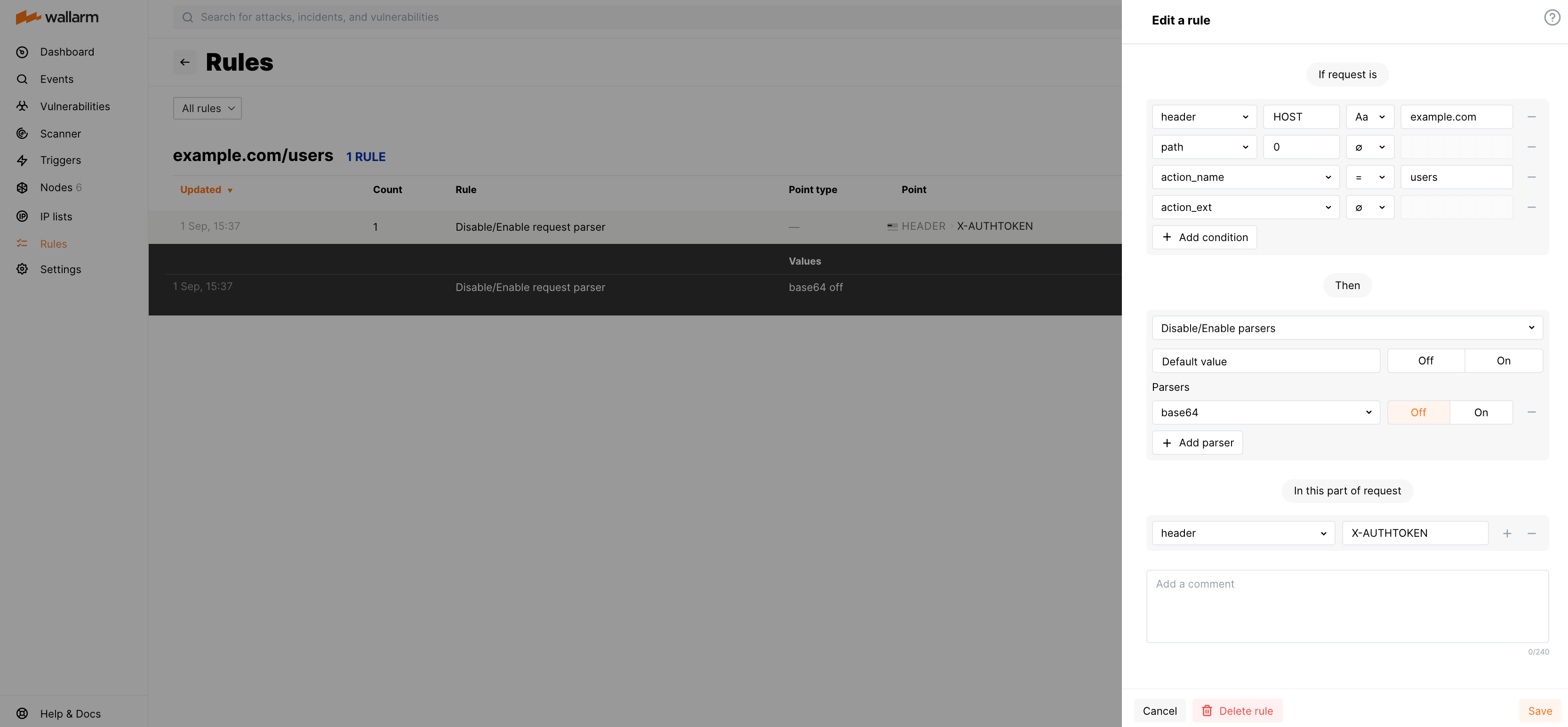
Let us say the requests to `https://example.com/users/` require the authentication header `X-AUTHTOKEN`. The header value may contain specific symbol combinations (e.g. `=` in the end) that may be potentially decoded by Wallarm with the parser `base64` resulting in false detection of attack sign. You need to prevent this decoding to avoid false positives.
To do so, set the rule as displayed on the screenshot:
Parses gRPC API requests, and can be applied only to the request body.
Supports the **protobuf** filter for the Protocol Buffers data.
#### multipart
Parses the request body passed in the `multipart` format, and can be applied only to the request body.
Supports the **header** filter for the headers in the request body.
Example:
```
p1=1&p2[a]=2&p2[b]=3&p3[]=4&p3[]=5&p4=6&p4=7
```
* `[post, multipart, 'p1']` — `1`
* `[post, multipart, 'p2', hash, 'a']` — `2`
* `[post, multipart, 'p2', hash, 'b']` — `3`
* `[post, multipart, 'p3', array, 0]` — `4`
* `[post, multipart, 'p3', array, 1]` — `5`
* `[post, multipart, 'p4', array, 0]` — `6`
* `[post, multipart, 'p4', array, 1]` — `7`
* `[post, multipart, 'p4', pollution]` — `6,7`
If a file name is specified in the `Content-Disposition` header, then the file is considered to be loaded in this parameter. The parameter will look like this:
* `[post, multipart, 'someparam', file]` — file contents
#### viewstate
Designed to analyze the session state. The technology is used by Microsoft ASP.NET, and can be applied only to the request body.
Filters:
* **viewstate_array** for an array
* **viewstate_pair** for an array
* **viewstate_triplet** for an array
* **viewstate_dict** for an associative array
* **viewstate_dict_key** for a string
* **viewstate_dict_value** for a string
* **viewstate_sparse_array** for an associative array
#### jwt
Parses JWT tokens and can be applied to any part of the request.
The JWT parser returns the result in the following parameters according to the detected JWT structure:
* `jwt_prefix`: one of the supported JWT value prefixes - lsapi2, mobapp2, bearer. The parser reads the prefix value in any register.
* `jwt_header`: JWT header. Once getting the value, Wallarm also usually applies the [`base64`](#base64) and [`json_doc`](#json_doc) parsers to it.
* `jwt_payload`: JWT payload. Once getting the value, Wallarm also usually applies the [`base64`](#base64) and [`json_doc`](#json_doc) parsers to it.
JWTs can be passed in any request part. So, before applying the `jwt` parser Wallarm uses the specific request part parser, e.g. [`query`](#query-string-parameters) or [`header`](#headers).
Example of the JWT passed in the `Authentication` header:
```bash
Authentication: Bearer eyJhbGciOiJIUzI1NiIsInR5cCI6IkpXVCJ9.eyJzdWIiOiIxMjM0NTY3ODkwIiwibmFtZSI6IkpvaG4gRG9lIiwiaWF0IjoxNTE2MjM5MDIyfQ.SflKxwRJSMeKKF2QT4fwpMeJf36POk6yJV_adQssw5c
```
* `[header, AUTHENTICATION, jwt, 'jwt_prefix']` — `Bearer`
* `[header, AUTHENTICATION, jwt, 'jwt_header', base64, json_doc, hash, 'alg']` — `HS256`
* `[header, AUTHENTICATION, jwt, 'jwt_header', base64, json_doc, hash, 'typ']` — `JWT`
* `[header, AUTHENTICATION, jwt, 'jwt_payload', base64, json_doc, hash, 'sub']` — `1234567890`
* `[header, AUTHENTICATION, jwt, 'jwt_payload', base64, json_doc, hash, 'name']` — `John Doe`
* `[header, AUTHENTICATION, jwt, 'jwt_payload', base64, json_doc, hash, 'iat']` — `1516239022`
When defining a request element the [rule](https://docs.wallarm.com/user-guides/rules/rules.md) is applied to:
* Choose the parser of the request part containing JWT first
* Specify one of the listed `jwt_*` parameters as the `jwt` parser value, e.g. for the `name` JWT payload parameter value:

#### gql
Parses GraphQL executable definitions (queries, mutations, subscriptions and fragments) that enables an improved detection of the [input validation attacks](https://docs.wallarm.com/attacks-vulns-list.md#attack-types) in GraphQL specific request points. Requires NGINX Node 5.3.0 or higher or native node 0.12.0.
Filters:
* **gql_query** for a query operation
* **gql_mutation** for a mutation operation
* **gql_subscription** for a subscription operation
* **gql_alias** for a field alias
* **gql_arg** for field arguments
* **gql_dir** for a directive
* **gql_spread** for a fragment spread
* **gql_fragment** for a fragment definition
* **gql_type** for the named type of a fragment definition or inline fragment
* **gql_inline** for an inline fragment
* **gql_var** for a variable definition
Examples:
```
query GetUser {
user(id: "1") {
...UserFields @include(if: true)
}
}
```
* `[..., gql, gql_query, 'GetUser', hash, 'user', gql_arg, hash, 'id']` — `1`
* `[..., gql, gql_query, 'GetUser', hash, 'user', gql_spread,` `'UserFields', gql_dir, 'include', gql_arg, hash, 'if']` — `true`
```
query GetAllUsers {
users(limit: 10) {
...UserFields @include(if: true)
}
}
```
* `[..., gql, gql_query, 'GetAllUsers', hash, 'users', gql_arg, hash, 'limit']` — `10`
* `[..., gql, gql_query, 'GetAllUsers', hash, 'users',` `gql_spread, 'UserFields', gql_dir, 'include', gql_arg, hash, 'if']` — `true`
```
fragment UserFields on User {
id
name
email
posts(status: "published") {
title
content
}
}
```
* `[..., gql, gql_fragment, 'UserFields', gql_type,` `'User', hash, 'posts', gql_arg, hash, 'status']` — `published`
The parser allows extracting and displaying values of [GraphQL request parameters in API Sessions](https://docs.wallarm.com/api-sessions/overview.md#graphql-requests-in-api-sessions) and applying [rules](https://docs.wallarm.com/user-guides/rules/rules.md) to GraphQL specific parts of requests:

!!! info "GraphQL protection with Wallarm"
While [always enabled](#managing-parsers) parser by default provides detection of regular attacks (SQLi, RCE, etc.) in GraphQL, Wallarm also allow **configuring** [protection from GraphQL-specific attacks](https://docs.wallarm.com/api-protection/graphql-rule.md).
### Norms
The norms are applied to parsers for array and key data types. Norms are used to define the boundaries of data analysis. The value of the norm is indicated in the parser tag. For example: **hash_all**, **hash_name**.
If the norm is not specified, then the identifier of the entity that requires processing is passed to the parser. For example: the name of the JSON object or other identifier is passed after **hash**.
**all**
Used to get values of all elements, parameters, or objects. For example:
* **path_all** for all parts of URL path
* **query_all** for all query string parameter values
* **header_all** for all header values
* **array_all** for all array element values
* **hash_all** for all JSON object or XML attribute values
* **jwt_all** for all JWT values
**name**
Used to get names of all elements, parameters, or objects. For example:
* **query_name** for all query string parameter names
* **header_name** for all header names
* **hash_name** for all JSON object or XML attribute names
* **jwt_name** for names of all parameters with JWT
## Managing parsers
By default, when analyzing the request the Wallarm node attempts to sequentially apply each of the suitable [parsers](https://docs.wallarm.com/user-guides/rules/request-processing.md) to each element of the request. However, certain parsers can be applied mistakenly and as a result, the Wallarm node may detect attack signs in the decoded value.
For example: the Wallarm node may mistakenly identify unencoded data as encoded into [Base64](https://en.wikipedia.org/wiki/Base64), since the Base64 alphabet symbols are often used in the regular text, token values, UUID values and other data formats. If decoding the unencoded data and detecting attack signs in the resulting value, the [false positive](https://docs.wallarm.com/about-wallarm/protecting-against-attacks.md#false-positives) occurs.
To prevent false positives in such cases, Wallarm provides the **Disable/Enable request parser** rule to disable the parsers mistakenly applied to certain request elements.
**Creating and applying the rule**
1. Proceed to Wallarm Console:
* **Rules** → **Add rule** or your branch → **Add rule**.
* **Attacks** / **Incidents** → attack/incident → hit → **Rule**.
* **API Discovery** (if [enabled](https://docs.wallarm.com/api-discovery/setup.md)) → your endpoint → **Create rule**.
1. Choose **Fine-tuning attack detection** → **Configure parsers**.
1. In **If request is**, [describe](https://docs.wallarm.com/user-guides/rules/rules.md#configuring) the scope to apply the rule to.
1. Add parsers to be `off`/`on`.
1. In **In this part of request**, specify request points for which you wish to set the rule. Wallarm will restrict requests that have the same values for the selected request parameters.
All available points are described in this article above, you can choose those matching your particular use case.
1. Wait for the [rule compilation and uploading to the filtering node to complete](https://docs.wallarm.com/user-guides/rules/rules.md#ruleset-lifecycle).
**Rule example**
Let us say the requests to `https://example.com/users/` require the authentication header `X-AUTHTOKEN`. The header value may contain specific symbol combinations (e.g. `=` in the end) that may be potentially decoded by Wallarm with the parser `base64` resulting in false detection of attack sign. You need to prevent this decoding to avoid false positives.
To do so, set the rule as displayed on the screenshot:
