Business Logic Abuse Detection
Wallarm utilizes LLM-based analysis to detect the attempts to abuse a business logic of your applications and block these attempts. This article describes what business logic abuse is, how detection and protection works, and how to configure it.
Examples of logic abuse
Detecting business logic abuse is often more difficult than detecting traditional injection attacks because the requests themselves may be syntactically "clean." The abuse lies in the intent and the ordering of operations. Here are some examples:
-
Authorization bypass: missing
order_validationoradmin_approvalcalls before the refund trigger. -
Privilege escalation: sudden shift in request headers or roles; accessing
/admin/paths from a standard/user/session. -
Coupon/discount exhaustion: rapid application of multiple distinct codes; applying a code, removing an item, and checking out to keep the discount.
-
Inventory hoarding (denial of Inventory): adding high volumes of items to a cart and holding them without checkout; repeated 'Add to Cart' followed by long periods of inactivity.
-
Account takeover via MFA bypass: repeatedly calling the
verifyendpoint without having successfully triggered thesend-codeendpoint; jumping straight to session creation. -
Scraping via sequential ID enumeration: a user requesting
/api/v1/orders/1001, then1002, then1003in rapid succession within a single session.
See possible Wallarm configuration for these cases.
Requirements
-
This functionality is available in Free Tier subscription.
-
If you utilize other subscriptions, contact Wallarm Support team to enable this feature.
-
Requires NGINX node 6.0.1 or higher or Native node 0.14.1 or higher.
How detection works
The business logic abuse is not detected by default and requires configuration. Once configured, Wallarm utilizes LLM-based analysis to detect any anomalies in API Sessions:
-
Suspicious or wrong sequence of requests
-
Absence of obligatory steps
-
Temporal anomalies - human-impossible speeds between complex steps
-
Variable inconsistency - changes of values (like
priceoruser_id) mid-flow in a way the application didn't intend -
Etc.
If decision is that yes, this is an attempt to abuse business logic, the corresponding requests in API Sessions are marked as part of the Custom logic abuse attack and processed due to the selected mitigation mode.
Creating and applying mitigation control
To create and apply a new mitigation control:
-
Proceed to Wallarm Console → Mitigation Controls.
-
Click Add control.
-
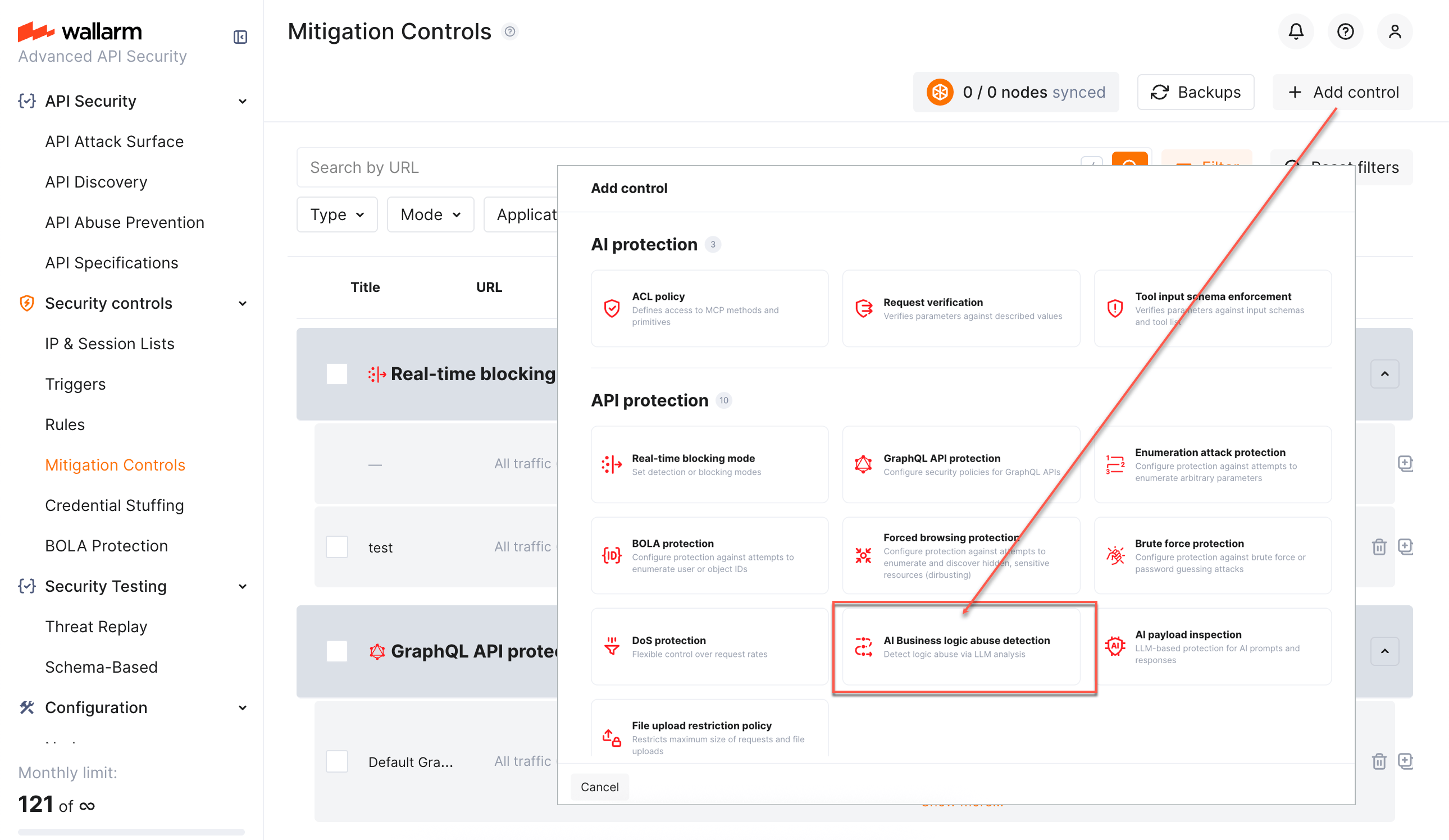
In the Add control dialog, select AI Business logic abuse detection.
-
Configure your control.
-
Click Add. The created control is displayed in the list. It immediately goes into action and performs in accordance with the selected Mitigation mode.
You can temporarily turn off the control right after creation or at any moment later using the On/Off switcher.
Configuration
Business logic abuse detection and mitigation is configured with one or several AI Business logic abuse detection mitigation controls.
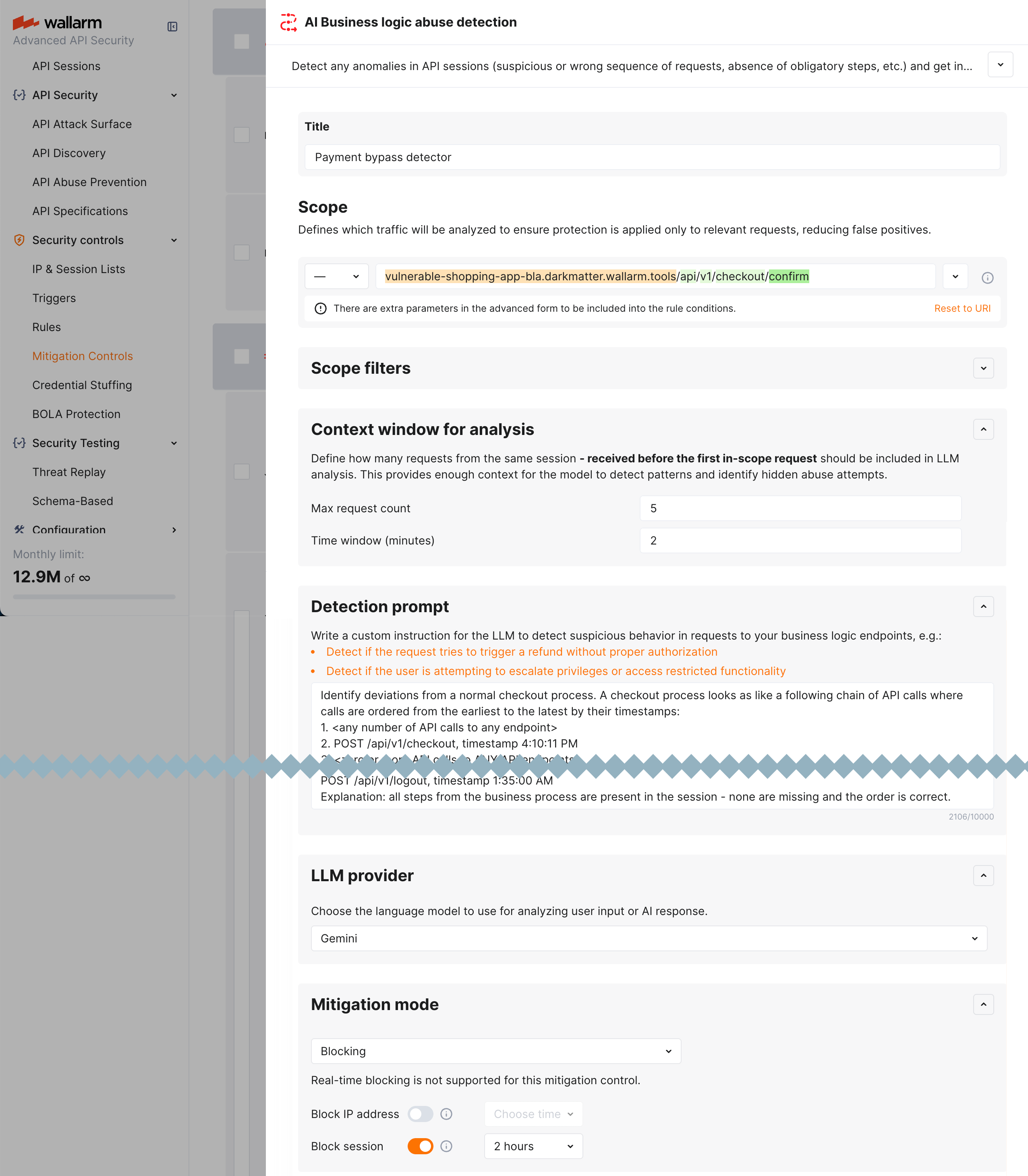
Understand parts of the control from descriptions below.
Scope and scope filters
As in all other mitigation controls Scope and Scope filters define which requests the control applies to (based on URI and other parameters).
For business logic abuse detection, this will often be endpoints related to specific business logic, like /api/v1/orders/ or /send-code/ or their specific methods, parameters, request sources etc.
Detection prompt and context window for analysis
In the Detection prompt field you write an instruction for the LLM to detect suspicious behavior in requests to your business logic endpoints, e.g.:
| Abuse case | Possible prompt |
|---|---|
Authorization bypass: missing order_validation or admin_approval calls before the refund trigger. |
Detect if the request tries to trigger a refund without proper authorization. |
Privilege escalation: sudden shift in request headers or roles; accessing /admin/ paths from a standard /user/ session. |
Detect if the user is attempting to escalate privileges or access restricted functionality. |
| Coupon/discount exhaustion: rapid application of multiple distinct codes; applying a code, removing an item, and checking out to keep the discount. | Analyze the sequence for attempts to stack incompatible discounts or manipulate the cart state to bypass price minimums. |
| Inventory hoarding (denial of Inventory): adding high volumes of items to a cart and holding them without checkout; repeated 'Add to Cart' followed by long periods of inactivity. | Identify if the user is systematically locking inventory without a clear intent to purchase, effectively blocking other users. |
Account takeover via MFA bypass: repeatedly calling the verify endpoint without having successfully triggered the send-code endpoint; jumping straight to session creation. |
Detect if the user is attempting to finalize authentication while skipping the prerequisite multi-factor challenge steps. |
Scraping via sequential ID enumeration: a user requesting /api/v1/orders/1001, then 1002, then 1003 in rapid succession within a single session. |
Determine if the request sequence indicates an automated attempt to scrape data by incrementing resource identifiers. |
While in the table above possible prompts are provided in a brief form, it is often useful to provide the LLM with more precise instructions.
Example of detailed prompt
Identify deviations from a normal checkout process. A checkout process looks like the following chain of API calls where calls are ordered from the earliest to the latest by their timestamps:
1. <any number of API calls to any endpoint>
2. POST /api/v1/checkout, timestamp 4:10:11 PM
3. <zero or more API calls to ANY API endpoints>
5. POST /api/v1/checkout/payment, timestamp 4:11:11 PM
6. <zero or more API calls to ANY API endpoints>
7. POST /api/v1/checkout/confirm, timestamp 4:12:11 PM
8. <zero or more API calls to ANY API endpoints>

Classification guidance:
1. Carefully compare all the requests from the session with the expected sequence of API calls process. You MUST only consider a sequence of calls and attack when you are ABSOLUTELY sure that some requests ARE MISSING from a normal checkout sequence. If all requests are in place it is not an attack.
2. Only trigger attack if there is a MISSING API call. You MUST NOT trigger an attack if an additional call that was not specified in this instruction is present in a session, it is not an attack.
3.  You MUST use timestamps to determine order of calls. If a timestamp of call 1 is higher than a timestamp of call 2, then call 1 happened before call 2.

Example of an attack sequence - you should consider it an attack:
POST /login, timestamp 1:30:05 AM
POST /api/v1/checkout, timestamp 1:30:15 AM
POST /api/v1/checkout/confirm, timestamp 1:30:35 AM
Explanation: the POST /api/v1/checkout/payment step is missing, an attacker was able to bypass this step. Which means it is an attack.

Example of a valid sequence - you MUST NOT consider it an attack:
POST /login, timestamp 1:30:05 AM
POST /api/v1/cart/items, timestamp 1:30:15 AM
POST /api/v1/cart/coupons, timestamp 1:30:25 AM
POST /api/v1/checkout, timestamp 1:30:35 AM
GET /api/v1/cart/items, timestamp 1:30:55 AM
POST /api/v1/checkout/payment, timestamp 1:31:05 AM
POST /api/v1/checkout/confirm, timestamp 1:31:15 AM
POST /api/v1/logout, timestamp 1:35:00 AM
Explanation: all steps from the business process are present in the session - none are missing and the order is correct.
In Context window for analysis you set how many requests from the same session - received before the first in-scope request - should be included in LLM analysis. You do it by setting both number of requests and time window.
How it works:
-
Your prompt is "Detect if the request tries to trigger a refund without proper authorization", and LLM is "Gemini".
-
Your context window is 5 minutes and 20 requests.
-
Request Aarrives; Gemini decides it may be related to a refund. -
Case 1: before
Request A, within 5 minutes, 32 requests occurred:Request Aand 20 from this 32 will be analyzed by Gemini. -
Case 2: before
Request A, within 5 minutes, 5 requests occurred:Request Aand these 5 will be analyzed, 15 more that could be taken are outside time limitation.
The aim of this setting is to provide enough context for the model to detect patterns and identify hidden abuse attempts. You need to rely on your application logic and usual traffic intensity in specific business flows to set the appropriate context.
Keep in mind that bigger context window:
-
Potentially, makes analysis more precise
-
Consumes resources and is subject to rate limits, and may be redundant
About limits: LLM analysis is not free, Wallarm has limits for number of requests analyzed per specific time. Detailed info on these limits can be obtained from Wallarm Support team.
LLM provider
Here, you select which LLM provider will perform the analysis. Available providers are:
-
Gemini
-
ChatGPT
Mitigation mode
Here you decide what to do when business logic abuse is detected: like in many other mitigation controls, you can set to just monitor or block - source IP or session.
In monitoring mode - the Custom logic abuse attack will show up in API Sessions. In blocking mode the same attack will show up and additionally one of the following will be done depending on your configuration:
-
Source IP will be placed in IP Denylist for the specified period of time.
-
The session the attack belongs to will be blocked for the specified period of time. Learn more about when blocking a session is better than blocking source IP.
Viewing detected attacks
When business logic abuse is detected, it shows up in API Sessions:
-
Session having corresponding requests is marked as AI Business logic abuse detection subject with specified action (Monitoring or Blocking).
-
Corresponding requests within session are marked as part of the Custom logic abuse attack.
-
This is an LLM-based decision, so you always have Reason where LLM explains what kind of abuse has happened precisely by its opinion.
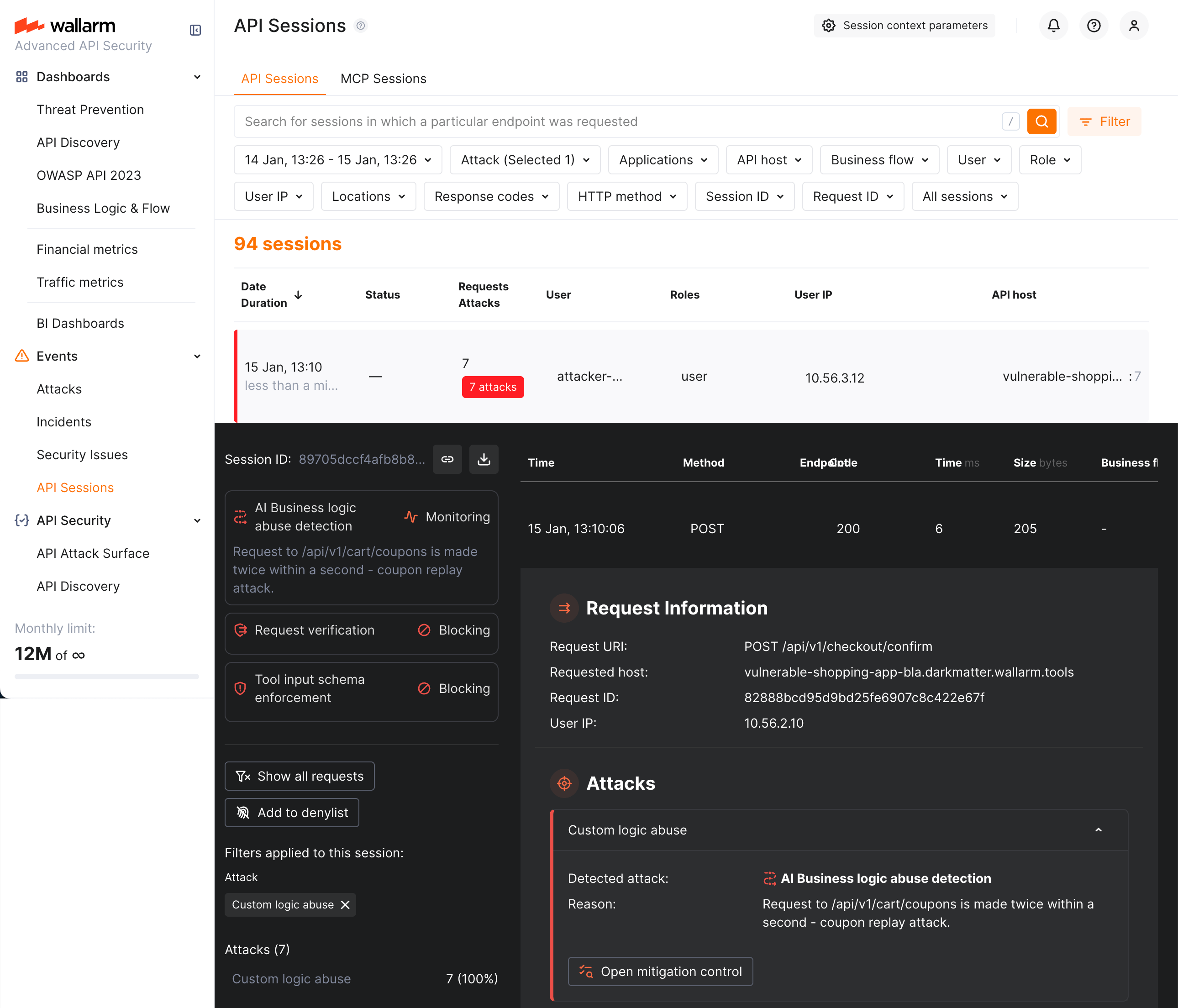
You can find sessions with corresponding attack types using the Attack filter - use the Custom logic abuse attack type to display only sessions with these attacks.
Note that business logic abuse is based entirely on API sessions. Because of that, the attacks found by these mitigation controls are displayed exclusively in the API Sessions section (and not displayed in the Attacks section).