# API Sessions Overview  Wallarm API Sessions provide deep visibility into user actions within your APIs. Instead of analyzing individual requests in isolation, this feature groups them into logical sessions that represent actual user journeys. This article gives an overview of API Sessions: issues addressed by it, its purpose and main possibilities.
## Addressed issues
The primary challenge the API Sessions address is the lack of full context when viewing only individual attacks. By capturing the logical sequence of requests and responses within each session, API Sessions provide insights into broader attack patterns and helps identify the areas of business logic impacted by security measures.
**As there are API sessions precisely identified by Wallarm, they**:
* Make bot detection by API Abuse Prevention [more precise](#api-sessions-and-api-abuse-prevention).
**As you have the API sessions monitored by Wallarm, you can**:
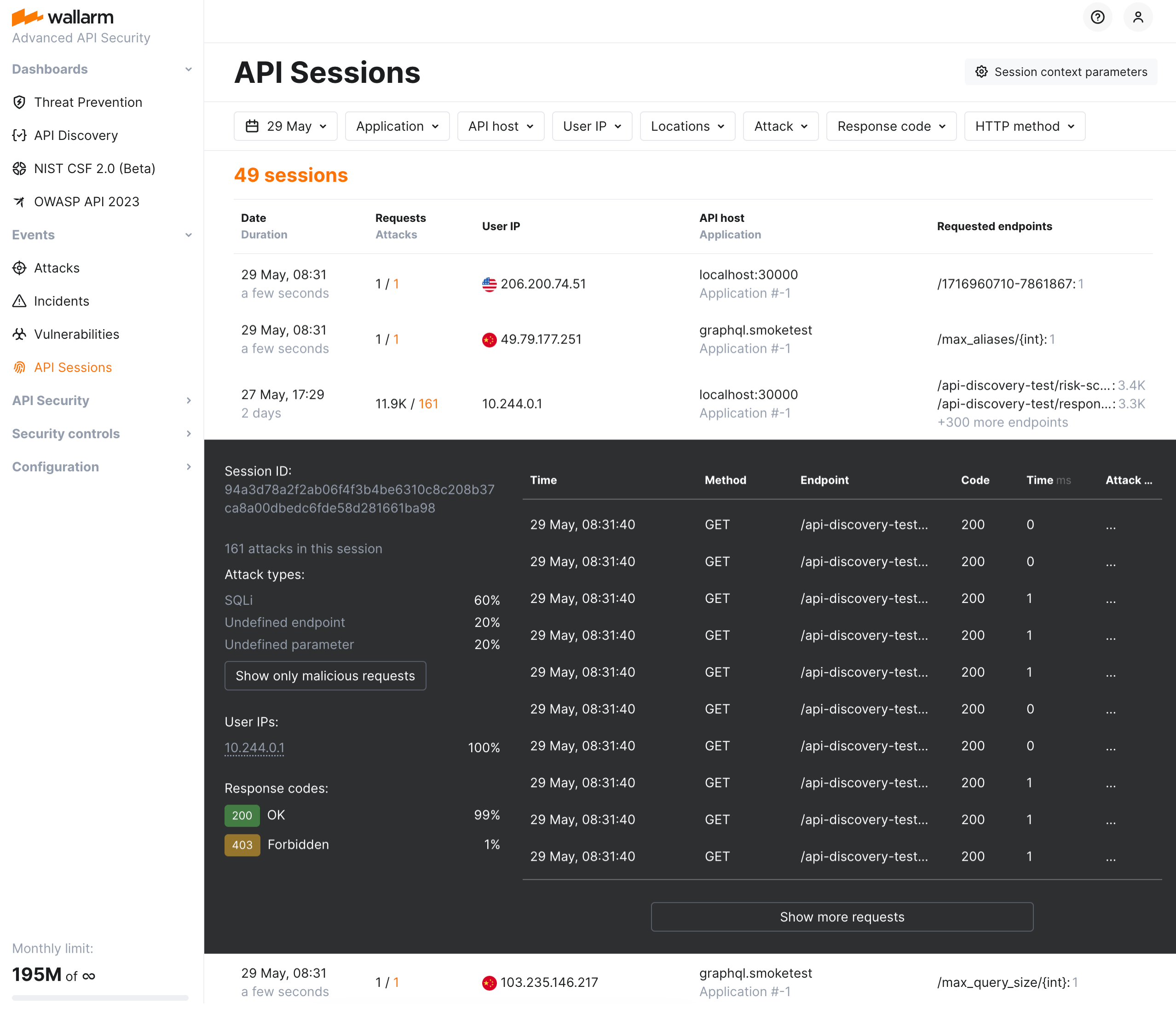
* [Track user activity](https://docs.wallarm.com/api-sessions/exploring.md#full-context-of-threat-actor-activities) by displaying a list of requests made in a single session with an ability to view the parameters of corresponding responses, so you can identify unusual patterns of behavior or deviations from typical usage.
* Know which API flow/business logic sequences will be affected before tuning a particular [false positive](https://docs.wallarm.com/about-wallarm/protecting-against-attacks.md#false-positives), applying the [virtual patch](https://docs.wallarm.com/user-guides/rules/vpatch-rule.md), adding [rules](https://docs.wallarm.com/user-guides/rules/rules.md), or enabling [API Abuse Prevention](https://docs.wallarm.com/api-abuse-prevention/overview.md) controls.
* [Inspect endpoints](https://docs.wallarm.com/api-sessions/exploring.md) requested in user sessions to quickly assess their protection status, risk level, and any detected issues such as being [shadow or zombie](https://docs.wallarm.com/api-discovery/rogue-api.md).
* [Identify performance issues](https://docs.wallarm.com/api-sessions/exploring.md#identifying-performance-issues) and bottlenecks to optimize the user experience.
* [Verify API abuse detection accuracy](https://docs.wallarm.com/api-sessions/exploring.md#verifying-api-abuse-detection-accuracy) by viewing the entire sequence of requests that were flagged as malicious bot activity along with corresponding responses.
## How API Sessions work
All traffic that Wallarm node is enabled to secure is organized into sessions and displayed in the **API Sessions** section.
You can customize how requests should be grouped into sessions based on your applications' logic. Also, you can specify which parameters of requests and corresponding responses should be displayed within session to help you to understand the session content: what and in what order the user did (context parameters). See details in [API Sessions Setup](https://docs.wallarm.com/api-sessions/setup.md).
Note that Wallarm stores and displays sessions **only for the last week**. The older sessions are deleted to provide an optimal performance and resource consumption.
## API Sessions and API Abuse Prevention
Wallarm's [API Abuse Prevention](https://docs.wallarm.com/api-abuse-prevention/overview.md) detects malicious bots analyzing the sequences of requests in one or several related sessions, for example, sessions having the same value of the `SESSION-ID` header and only divided by time/date.
Thus, when you [customize how requests are grouped](https://docs.wallarm.com/api-sessions/setup.md#session-grouping) into sessions in accordance with your specific application logic, it affects the work of API Abuse Prevention making both session identification and bot detection more precise.
## MCP Sessions
Wallarm provides dedicated support for [Model Context Protocol](https://modelcontextprotocol.io/) (MCP) sessions, displayed in a separate **MCP Sessions** tab. MCP sessions group AI agent interactions with MCP servers — tool calls, resource reads, and prompt invocations — into logical sessions based on the `MCP-SESSION-ID` header.
See [MCP Sessions](https://docs.wallarm.com/api-sessions/mcp-sessions.md) for details on setup and usage.
## GraphQL requests in API Sessions
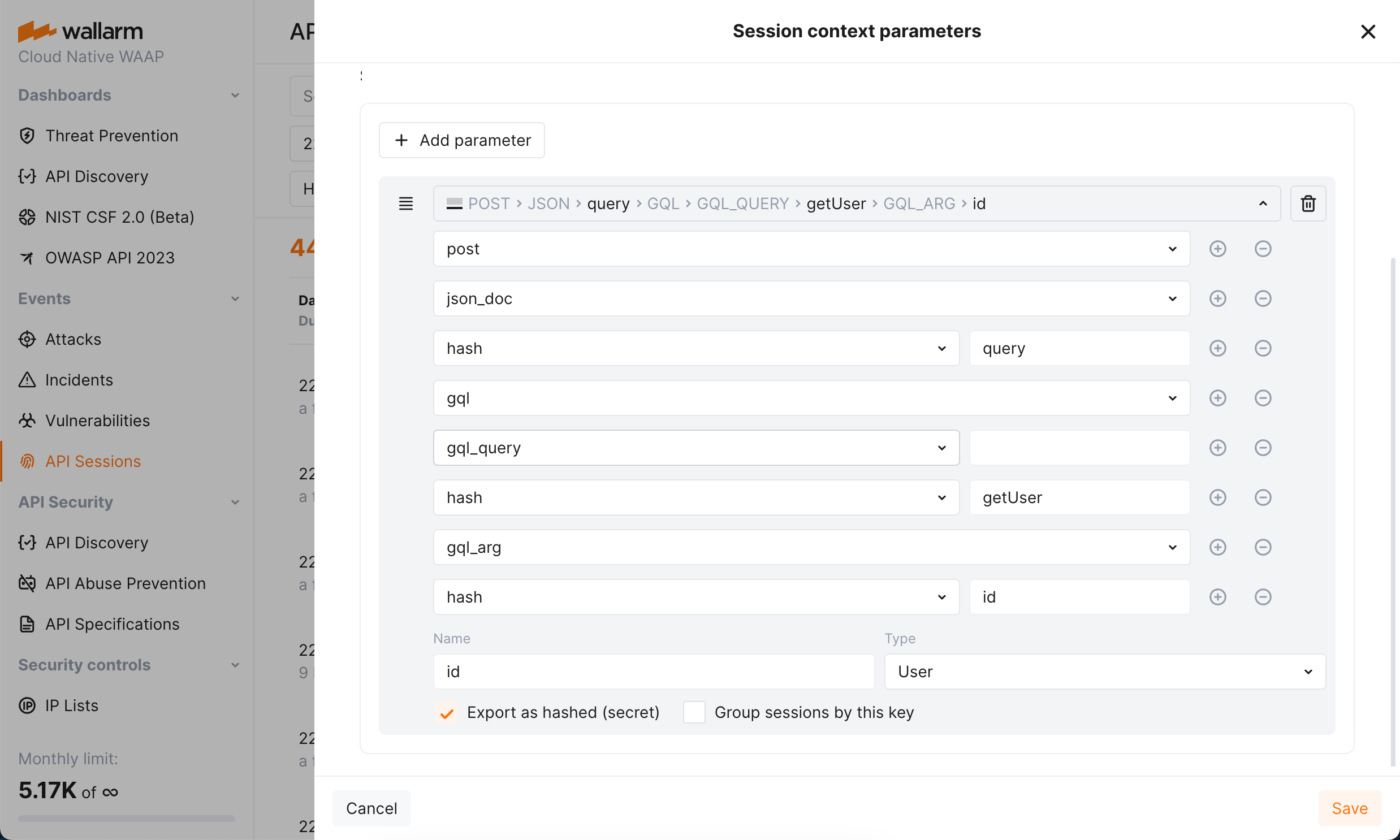
API Sessions support working with [GraphQL requests](https://docs.wallarm.com/user-guides/rules/request-processing.md#gql) and their specific request points, you can configure sessions to extract and display values of GraphQL request parameters.
Requires NGINX Node 5.3.0 or higher or native node 0.12.0.
Wallarm API Sessions provide deep visibility into user actions within your APIs. Instead of analyzing individual requests in isolation, this feature groups them into logical sessions that represent actual user journeys. This article gives an overview of API Sessions: issues addressed by it, its purpose and main possibilities.

## Addressed issues
The primary challenge the API Sessions address is the lack of full context when viewing only individual attacks. By capturing the logical sequence of requests and responses within each session, API Sessions provide insights into broader attack patterns and helps identify the areas of business logic impacted by security measures.
**As there are API sessions precisely identified by Wallarm, they**:
* Make bot detection by API Abuse Prevention [more precise](#api-sessions-and-api-abuse-prevention).
**As you have the API sessions monitored by Wallarm, you can**:
* [Track user activity](https://docs.wallarm.com/api-sessions/exploring.md#full-context-of-threat-actor-activities) by displaying a list of requests made in a single session with an ability to view the parameters of corresponding responses, so you can identify unusual patterns of behavior or deviations from typical usage.
* Know which API flow/business logic sequences will be affected before tuning a particular [false positive](https://docs.wallarm.com/about-wallarm/protecting-against-attacks.md#false-positives), applying the [virtual patch](https://docs.wallarm.com/user-guides/rules/vpatch-rule.md), adding [rules](https://docs.wallarm.com/user-guides/rules/rules.md), or enabling [API Abuse Prevention](https://docs.wallarm.com/api-abuse-prevention/overview.md) controls.
* [Inspect endpoints](https://docs.wallarm.com/api-sessions/exploring.md) requested in user sessions to quickly assess their protection status, risk level, and any detected issues such as being [shadow or zombie](https://docs.wallarm.com/api-discovery/rogue-api.md).
* [Identify performance issues](https://docs.wallarm.com/api-sessions/exploring.md#identifying-performance-issues) and bottlenecks to optimize the user experience.
* [Verify API abuse detection accuracy](https://docs.wallarm.com/api-sessions/exploring.md#verifying-api-abuse-detection-accuracy) by viewing the entire sequence of requests that were flagged as malicious bot activity along with corresponding responses.
## How API Sessions work
All traffic that Wallarm node is enabled to secure is organized into sessions and displayed in the **API Sessions** section.
You can customize how requests should be grouped into sessions based on your applications' logic. Also, you can specify which parameters of requests and corresponding responses should be displayed within session to help you to understand the session content: what and in what order the user did (context parameters). See details in [API Sessions Setup](https://docs.wallarm.com/api-sessions/setup.md).
Note that Wallarm stores and displays sessions **only for the last week**. The older sessions are deleted to provide an optimal performance and resource consumption.
## API Sessions and API Abuse Prevention
Wallarm's [API Abuse Prevention](https://docs.wallarm.com/api-abuse-prevention/overview.md) detects malicious bots analyzing the sequences of requests in one or several related sessions, for example, sessions having the same value of the `SESSION-ID` header and only divided by time/date.
Thus, when you [customize how requests are grouped](https://docs.wallarm.com/api-sessions/setup.md#session-grouping) into sessions in accordance with your specific application logic, it affects the work of API Abuse Prevention making both session identification and bot detection more precise.
## MCP Sessions
Wallarm provides dedicated support for [Model Context Protocol](https://modelcontextprotocol.io/) (MCP) sessions, displayed in a separate **MCP Sessions** tab. MCP sessions group AI agent interactions with MCP servers — tool calls, resource reads, and prompt invocations — into logical sessions based on the `MCP-SESSION-ID` header.
See [MCP Sessions](https://docs.wallarm.com/api-sessions/mcp-sessions.md) for details on setup and usage.
## GraphQL requests in API Sessions
API Sessions support working with [GraphQL requests](https://docs.wallarm.com/user-guides/rules/request-processing.md#gql) and their specific request points, you can configure sessions to extract and display values of GraphQL request parameters.

Requires NGINX Node 5.3.0 or higher or native node 0.12.0.