# GraphQL API Protection  Wallarm detects regular attacks (SQLi, RCE, [etc.](https://docs.wallarm.com/attacks-vulns-list.md)) in GraphQL [by default](https://docs.wallarm.com/user-guides/rules/request-processing.md#gql) even under the basic [WAAP](https://docs.wallarm.com/about-wallarm/subscription-plans.md#core-subscription-plans) subscription plan. However, some aspects of the protocol allow implementing [GraphQL-specific](https://docs.wallarm.com/attacks-vulns-list.md#graphql-attacks) attacks related to excessive information exposure and DoS. This document describes how to use Wallarm to protect your APIs from these attacks by setting **GraphQL policy** - a set of limits for the GraphQL requests.
Being the extended protection, GraphQL API Protection is the part of the advanced [API Security](https://docs.wallarm.com/about-wallarm/subscription-plans.md#core-subscription-plans) subscription plan. When plan is purchased, start protection by setting your organization's GraphQL policy in the **GraphQL API protection** [mitigation control](https://docs.wallarm.com/about-wallarm/mitigation-controls-overview.md).
## Supported GraphQL formats
GraphQL queries are typically sent as HTTP POST requests to a GraphQL server endpoint. The request includes a `CONTENT-TYPE` header to specify the media type of the body sent to the server. For `CONTENT-TYPE`, Wallarm supports:
* commonly used options: `application/json` and `application/graphql`
* options that can also occur: `text/plain` and `multipart/form-data`
GraphQL queries can be also sent as HTTP GET requests. In such case, the query is included as a query parameter in the URL. While GET requests can be used for GraphQL queries, it's less common than the POST requests, especially for the more complex queries. The cause of that is that GET requests are typically used for idempotent operations (i.e., operations that can be repeated without different outcomes), and they have length restrictions that can be problematic for longer queries.
Wallarm supports both POST and GET HTTP methods for GraphQL requests.
## Configuration method
Depending on your subscription plan, one of the following configuration methods for GraphQL API protection will be available:
* Mitigation controls ([Advanced API Security](https://docs.wallarm.com/about-wallarm/subscription-plans.md#core-subscription-plans) subscription)
* Rules ([Cloud Native WAAP](https://docs.wallarm.com/about-wallarm/subscription-plans.md#core-subscription-plans) subscription)
## Mitigation control-based protection
!!! tip ""
Requires [NGINX Node](https://docs.wallarm.com/installation/nginx-native-node-internals.md#nginx-node) 6.2.0 or higher or [Native Node](https://docs.wallarm.com/installation/nginx-native-node-internals.md#native-node) 0.15.1 or higher.
### Default protection
Wallarm provides [default](https://docs.wallarm.com/about-wallarm/mitigation-controls-overview.md#default-controls) **GraphQL API protection** mitigation controls. They contain generic configuration to detect GraphQL API anomalies and enabled for all traffic in the `Monitoring` [mode](https://docs.wallarm.com/about-wallarm/mitigation-controls-overview.md#mitigation-mode).
To review GraphQL default controls, in Wallarm Console → **Security Controls** → **Mitigation Controls**, in **GraphQL API protection** section check controls with the `Default` label.
You can duplicate or edit default controls or disable them. Editing allows you to customize a default control based on the specific needs of the application, traffic patterns, or business context. For example, you can narrow **Scope** to limit control to the GraphQL specific endpoints or adjust thresholds.
!!! info "Subject to change"
The list of default mitigation controls is subject to change:
* New controls may be introduced over time.
* If a mitigation control is disabled, Wallarm may still update its parameters to improve quality and performance.
### Creating and applying mitigation control
GraphQL mitigation control is recommended to be created for the GraphQL specific endpoints. Creating it as an **all traffic** mitigation control for the entire system is not recommended.
!!! info "Generic information on mitigation controls"
Before proceeding: use the [Mitigation Controls](https://docs.wallarm.com/about-wallarm/mitigation-controls-overview.md#configuration) article to get familiar with how **Scope** and **Mitigation mode** are set for any mitigation control.
To set and apply GraphQL policy:
1. Proceed to Wallarm Console → **Mitigation Controls**.
1. Use **Add control** → **GraphQL API protection**.
1. Describe the **Scope** to apply the mitigation control to.
1. Set thresholds for GraphQL requests in accordance with your traffic metrics (if left empty/unselected, no limitation is applied by this criteria):
* **Maximum total query size in kilobytes** - sets the upper limit for the size of an entire GraphQL query. It's crucial for preventing Denial of Service (DoS) attacks that exploit server resources by submitting excessively large queries.
* **Maximum value size in kilobytes** - sets the maximum size for any individual value (whether a variable or query parameter) within a GraphQL query. This limit helps mitigate attacks that attempt to overwhelm the server through Excessive Value Length, where attackers send requests with overly long string values for variables or arguments.
* **Maximum query depth** - determines the maximum allowed depth for a GraphQL query. By limiting query depth, the server can avoid performance issues or resource exhaustion from maliciously crafted, deeply nested queries.
* **Maximum number of aliases** - sets the limit on the number of aliases that can be used in a single GraphQL query. Restricting the number of aliases prevents Resource Exhaustion and DoS attacks that exploit alias functionality to create overly complex queries.
* **Maximum batched queries** - caps the number of batched queries that can be sent in a single request. This parameter is essential for thwarting batching attacks, where attackers combine multiple operations into a single request to bypass security measures like rate limiting.
* **Block/register introspection queries** - when enabled, the server will treat introspection requests—which can reveal the structure of your GraphQL schema—as potential attacks. Disabling or monitoring introspection queries is a crucial measure for protecting the schema from being exposed to attackers.
* **Block/register debug requests** - enabling this option means that requests containing the debug mode parameter will be considered potential attacks. This setting is useful for catching instances where debug mode is inadvertently left enabled in production, preventing attackers from accessing excessive error reporting messages that could reveal sensitive information about the backend.
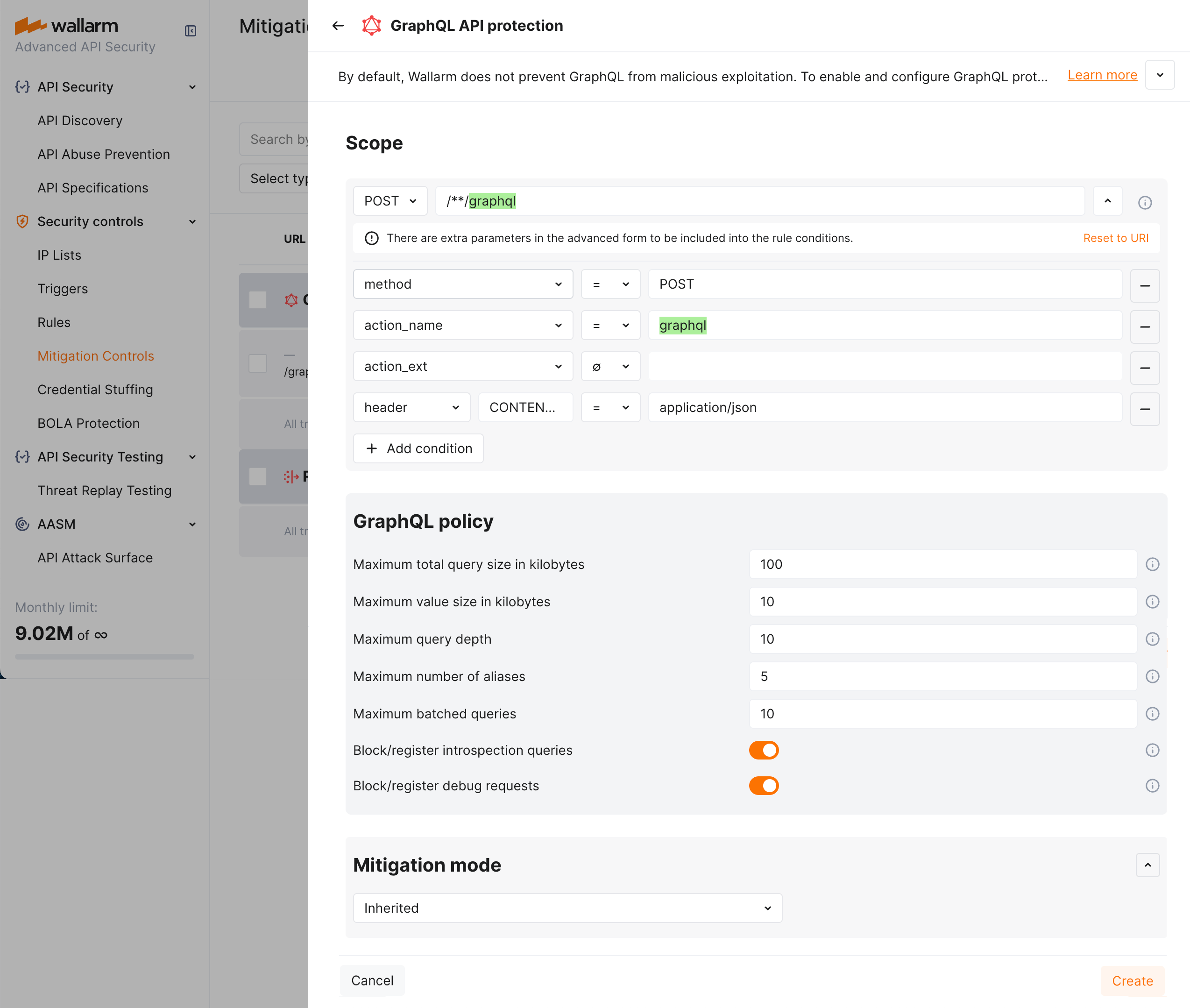
By default, a policy sets maximum POST request query size to 100 KB, value size to 10 KB, query depth and batched query limits to 10, aliases to 5, plus deny introspection and debug queries as displayed on the screenshot (note that you can change default values to your own considering statistics of your common legitimate GraphQL queries):
1. In the **Mitigation mode** section, set action to be done.
1. Click **Add**.
### Mitigation control examples
#### Setting policy for your GraphQL endpoints to block attacks
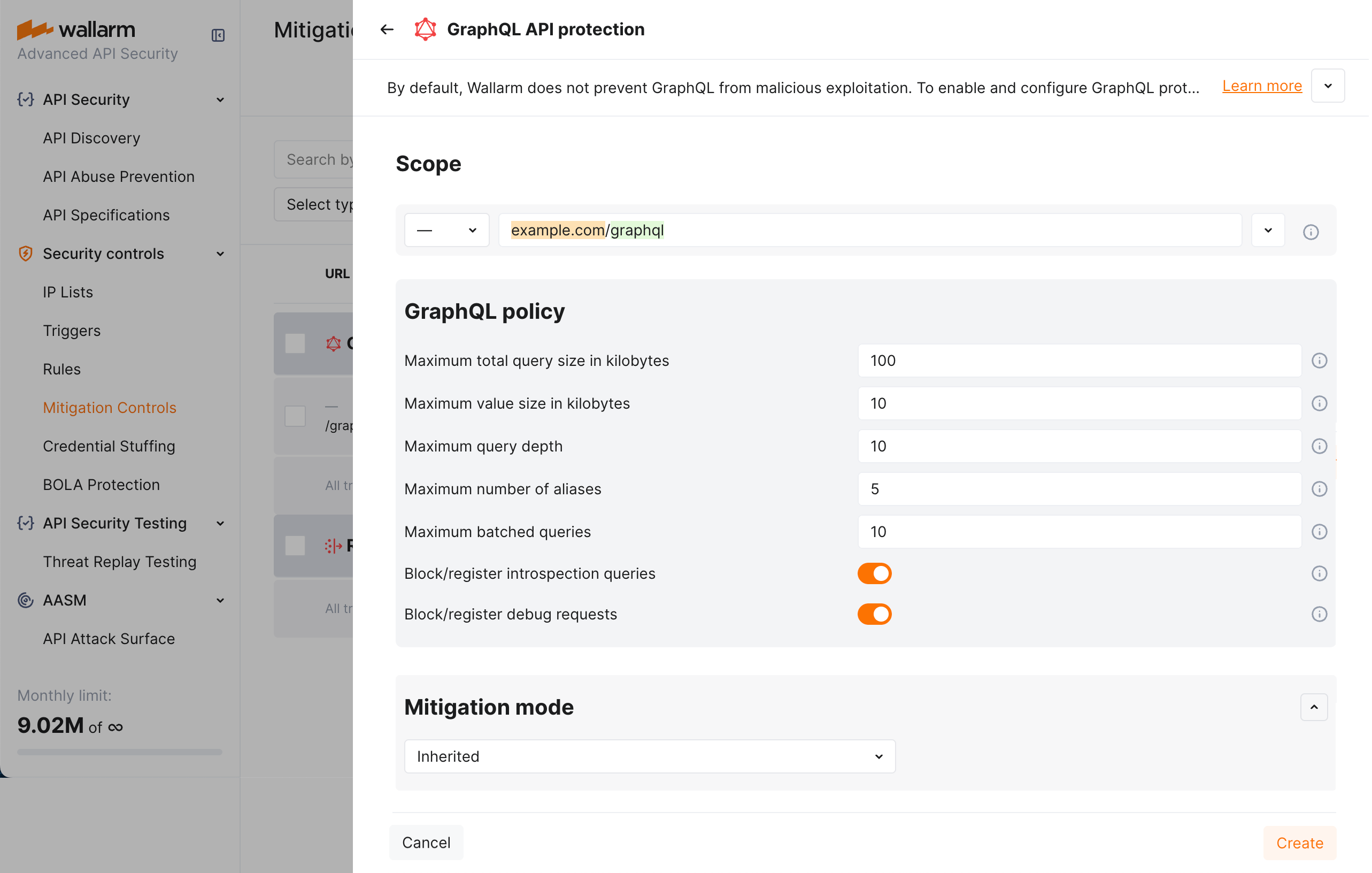
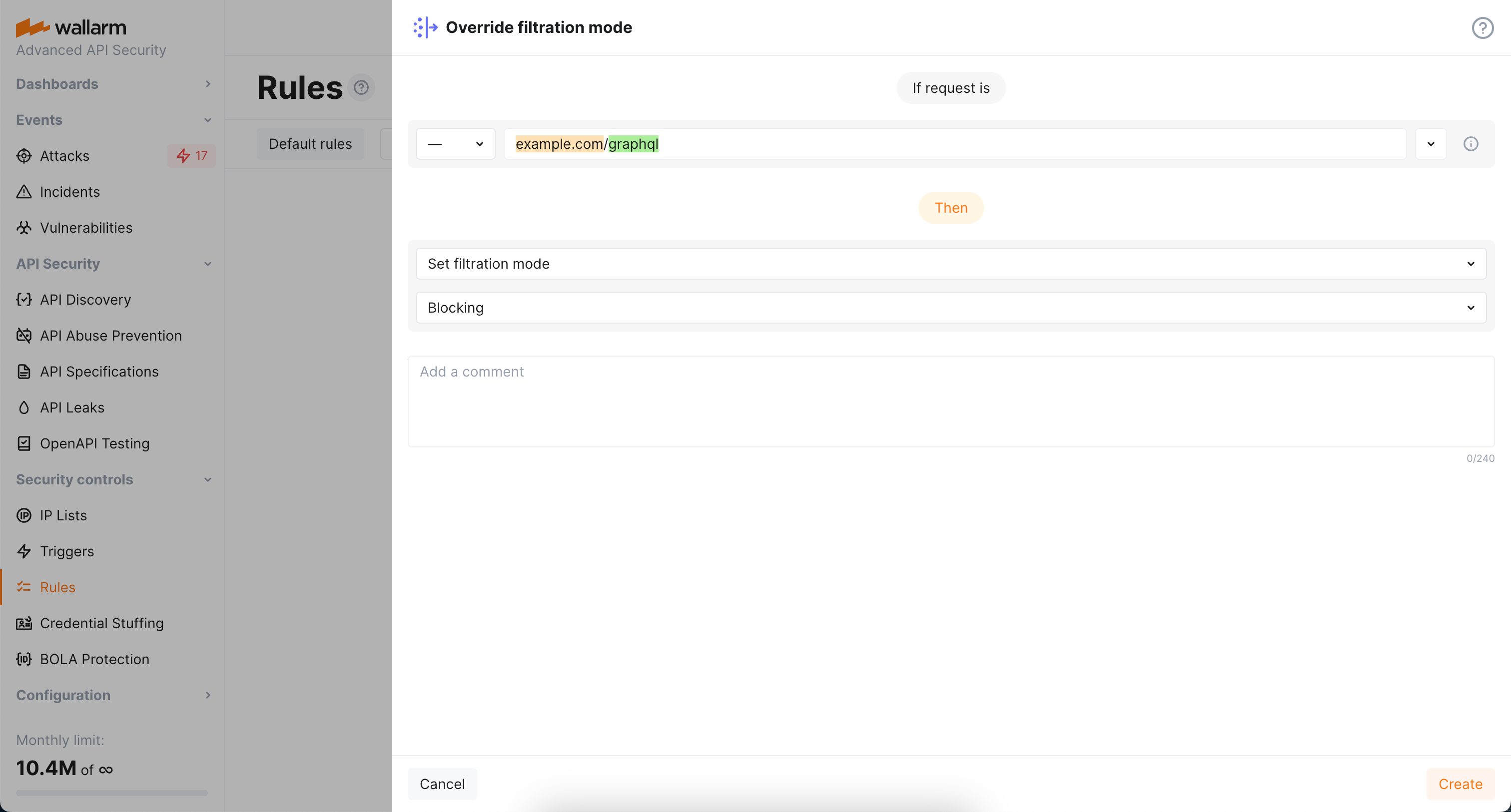
Let us say you want to set limits for the requests to your application GraphQL endpoints located under `example.com/graphql` to block all potential [GraphQL specific](https://docs.wallarm.com/attacks-vulns-list.md#graphql-attacks) attacks to them. Filtration mode for `example.com` is `monitoring`.
To do so:
1. Set the **GraphQL API protection** mitigation control as displayed on the screenshot (note that these are the example values - for the real-life rules you should define your own values considering statistics of your common legitimate GraphQL queries):
1. As filtration mode for `example.com` is `monitoring` and you want `block` for its GraphQL endpoints, configure the **Override filtration mode** rule as displayed on the screenshot:
#### Altering policy for specific endpoints
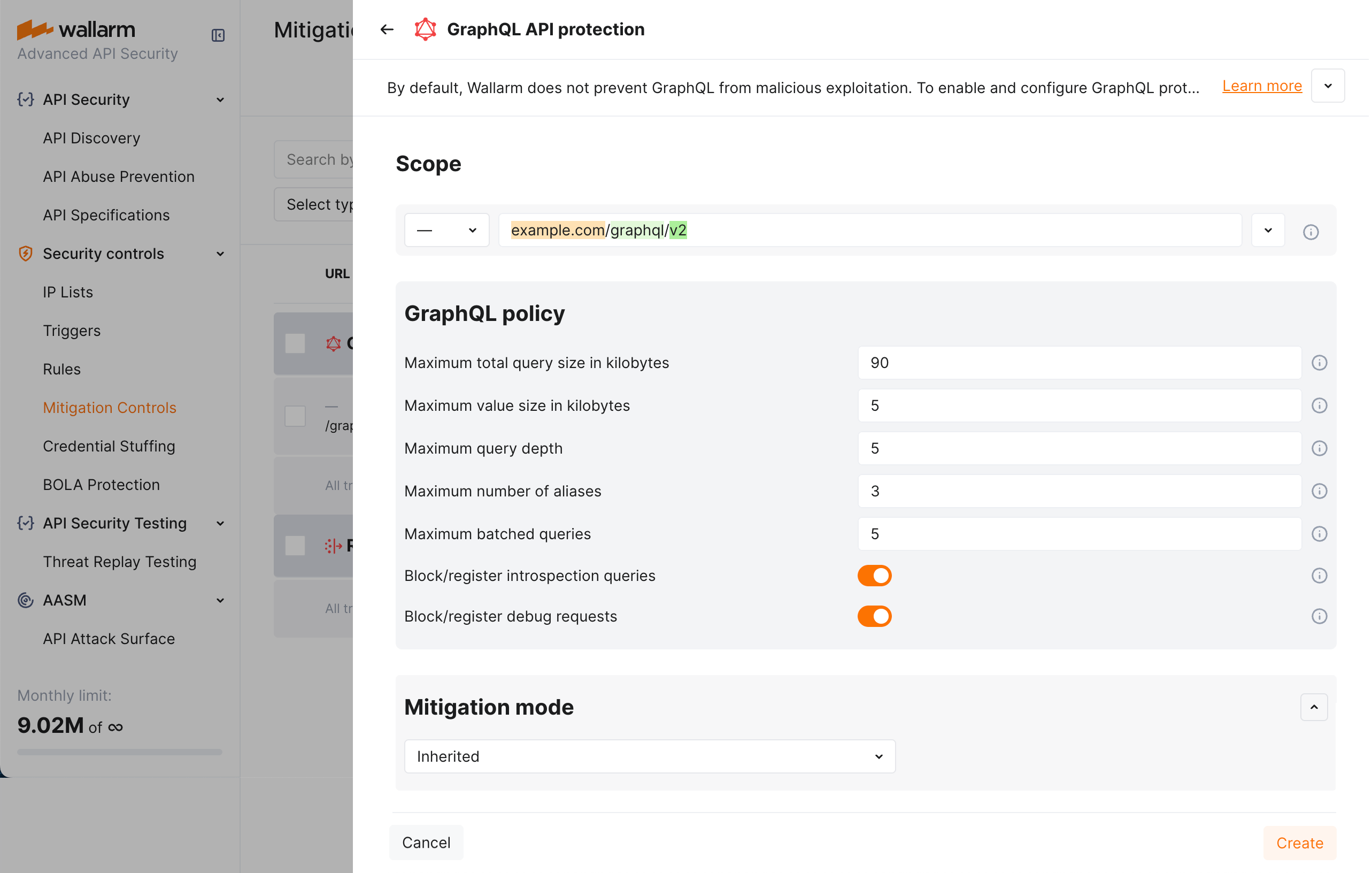
Continuing the [previous](#setting-policy-for-your-graphql-endpoints-to-block-attacks) example, let us say you want to set stricter limits for `example.com/graphql/v2` child endpoint. As limits are stricter, before blocking anything, they should be tested in the `monitoring` mode.
To do so:
1. Set the **GraphQL API protection** mitigation control as displayed on the screenshot (note that these are the example values - for the real-life rules you should define your own values considering statistics of your common legitimate GraphQL queries):
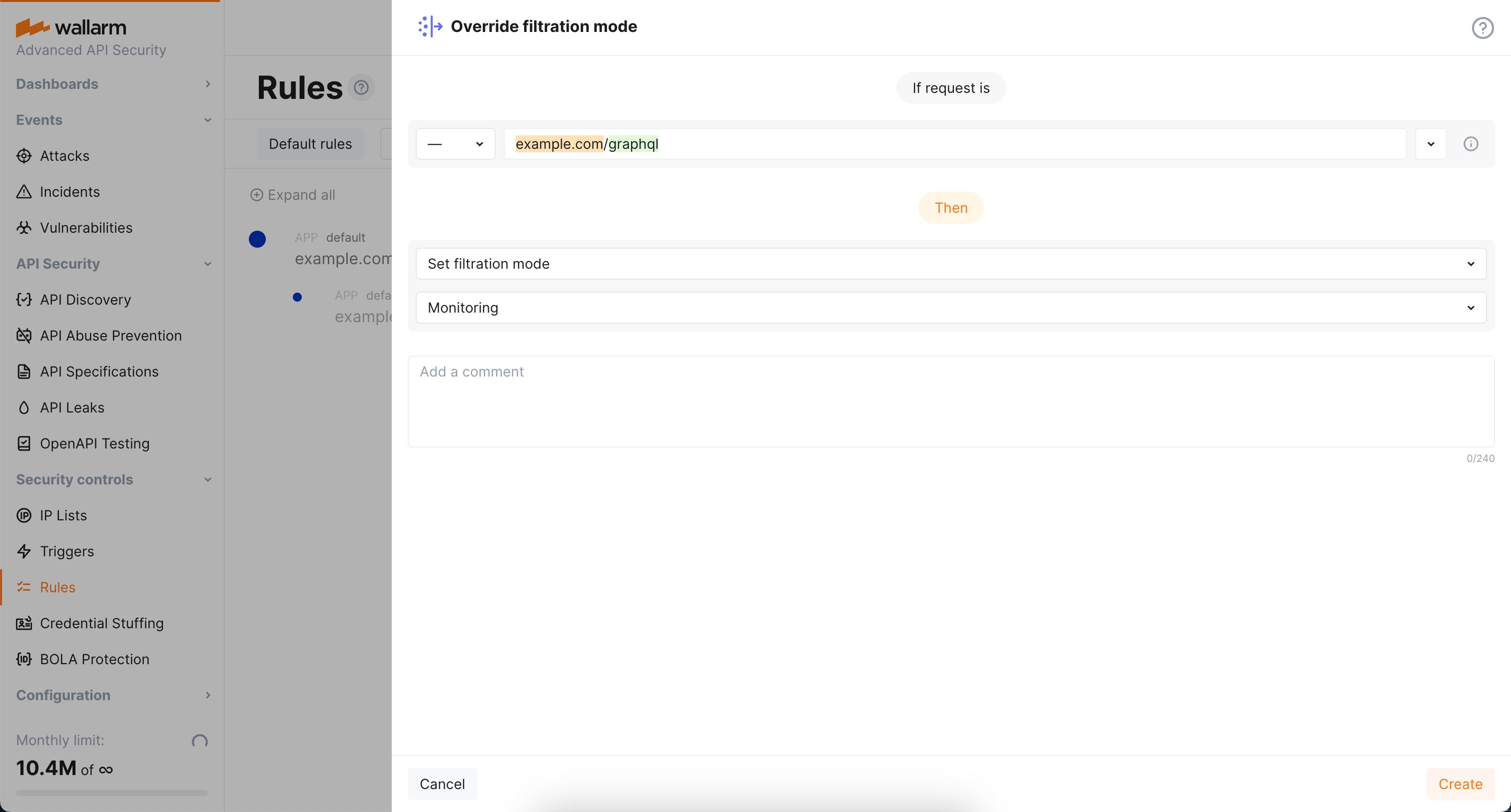
1. As filtration mode for `example.com/graphql` is `block` and you want `monitoring` for `example.com/graphql/v2`, configure the **Override filtration mode** rule as displayed on the screenshot:
## Rule-based protection
Use same settings as described for the **GraphQL API protection** mitigation control, with the only difference in that you act in Wallarm Console → **Security Controls** → **Rules**.
Wallarm detects regular attacks (SQLi, RCE, [etc.](https://docs.wallarm.com/attacks-vulns-list.md)) in GraphQL [by default](https://docs.wallarm.com/user-guides/rules/request-processing.md#gql) even under the basic [WAAP](https://docs.wallarm.com/about-wallarm/subscription-plans.md#core-subscription-plans) subscription plan. However, some aspects of the protocol allow implementing [GraphQL-specific](https://docs.wallarm.com/attacks-vulns-list.md#graphql-attacks) attacks related to excessive information exposure and DoS. This document describes how to use Wallarm to protect your APIs from these attacks by setting **GraphQL policy** - a set of limits for the GraphQL requests.
Being the extended protection, GraphQL API Protection is the part of the advanced [API Security](https://docs.wallarm.com/about-wallarm/subscription-plans.md#core-subscription-plans) subscription plan. When plan is purchased, start protection by setting your organization's GraphQL policy in the **GraphQL API protection** [mitigation control](https://docs.wallarm.com/about-wallarm/mitigation-controls-overview.md).
## Supported GraphQL formats
GraphQL queries are typically sent as HTTP POST requests to a GraphQL server endpoint. The request includes a `CONTENT-TYPE` header to specify the media type of the body sent to the server. For `CONTENT-TYPE`, Wallarm supports:
* commonly used options: `application/json` and `application/graphql`
* options that can also occur: `text/plain` and `multipart/form-data`
GraphQL queries can be also sent as HTTP GET requests. In such case, the query is included as a query parameter in the URL. While GET requests can be used for GraphQL queries, it's less common than the POST requests, especially for the more complex queries. The cause of that is that GET requests are typically used for idempotent operations (i.e., operations that can be repeated without different outcomes), and they have length restrictions that can be problematic for longer queries.
Wallarm supports both POST and GET HTTP methods for GraphQL requests.
## Configuration method
Depending on your subscription plan, one of the following configuration methods for GraphQL API protection will be available:
* Mitigation controls ([Advanced API Security](https://docs.wallarm.com/about-wallarm/subscription-plans.md#core-subscription-plans) subscription)
* Rules ([Cloud Native WAAP](https://docs.wallarm.com/about-wallarm/subscription-plans.md#core-subscription-plans) subscription)
## Mitigation control-based protection
!!! tip ""
Requires [NGINX Node](https://docs.wallarm.com/installation/nginx-native-node-internals.md#nginx-node) 6.2.0 or higher or [Native Node](https://docs.wallarm.com/installation/nginx-native-node-internals.md#native-node) 0.15.1 or higher.
### Default protection
Wallarm provides [default](https://docs.wallarm.com/about-wallarm/mitigation-controls-overview.md#default-controls) **GraphQL API protection** mitigation controls. They contain generic configuration to detect GraphQL API anomalies and enabled for all traffic in the `Monitoring` [mode](https://docs.wallarm.com/about-wallarm/mitigation-controls-overview.md#mitigation-mode).
To review GraphQL default controls, in Wallarm Console → **Security Controls** → **Mitigation Controls**, in **GraphQL API protection** section check controls with the `Default` label.
You can duplicate or edit default controls or disable them. Editing allows you to customize a default control based on the specific needs of the application, traffic patterns, or business context. For example, you can narrow **Scope** to limit control to the GraphQL specific endpoints or adjust thresholds.
!!! info "Subject to change"
The list of default mitigation controls is subject to change:
* New controls may be introduced over time.
* If a mitigation control is disabled, Wallarm may still update its parameters to improve quality and performance.
### Creating and applying mitigation control
GraphQL mitigation control is recommended to be created for the GraphQL specific endpoints. Creating it as an **all traffic** mitigation control for the entire system is not recommended.
!!! info "Generic information on mitigation controls"
Before proceeding: use the [Mitigation Controls](https://docs.wallarm.com/about-wallarm/mitigation-controls-overview.md#configuration) article to get familiar with how **Scope** and **Mitigation mode** are set for any mitigation control.
To set and apply GraphQL policy:
1. Proceed to Wallarm Console → **Mitigation Controls**.
1. Use **Add control** → **GraphQL API protection**.
1. Describe the **Scope** to apply the mitigation control to.
1. Set thresholds for GraphQL requests in accordance with your traffic metrics (if left empty/unselected, no limitation is applied by this criteria):
* **Maximum total query size in kilobytes** - sets the upper limit for the size of an entire GraphQL query. It's crucial for preventing Denial of Service (DoS) attacks that exploit server resources by submitting excessively large queries.
* **Maximum value size in kilobytes** - sets the maximum size for any individual value (whether a variable or query parameter) within a GraphQL query. This limit helps mitigate attacks that attempt to overwhelm the server through Excessive Value Length, where attackers send requests with overly long string values for variables or arguments.
* **Maximum query depth** - determines the maximum allowed depth for a GraphQL query. By limiting query depth, the server can avoid performance issues or resource exhaustion from maliciously crafted, deeply nested queries.
* **Maximum number of aliases** - sets the limit on the number of aliases that can be used in a single GraphQL query. Restricting the number of aliases prevents Resource Exhaustion and DoS attacks that exploit alias functionality to create overly complex queries.
* **Maximum batched queries** - caps the number of batched queries that can be sent in a single request. This parameter is essential for thwarting batching attacks, where attackers combine multiple operations into a single request to bypass security measures like rate limiting.
* **Block/register introspection queries** - when enabled, the server will treat introspection requests—which can reveal the structure of your GraphQL schema—as potential attacks. Disabling or monitoring introspection queries is a crucial measure for protecting the schema from being exposed to attackers.
* **Block/register debug requests** - enabling this option means that requests containing the debug mode parameter will be considered potential attacks. This setting is useful for catching instances where debug mode is inadvertently left enabled in production, preventing attackers from accessing excessive error reporting messages that could reveal sensitive information about the backend.
By default, a policy sets maximum POST request query size to 100 KB, value size to 10 KB, query depth and batched query limits to 10, aliases to 5, plus deny introspection and debug queries as displayed on the screenshot (note that you can change default values to your own considering statistics of your common legitimate GraphQL queries):

1. In the **Mitigation mode** section, set action to be done.
1. Click **Add**.
### Mitigation control examples
#### Setting policy for your GraphQL endpoints to block attacks
Let us say you want to set limits for the requests to your application GraphQL endpoints located under `example.com/graphql` to block all potential [GraphQL specific](https://docs.wallarm.com/attacks-vulns-list.md#graphql-attacks) attacks to them. Filtration mode for `example.com` is `monitoring`.
To do so:
1. Set the **GraphQL API protection** mitigation control as displayed on the screenshot (note that these are the example values - for the real-life rules you should define your own values considering statistics of your common legitimate GraphQL queries):

1. As filtration mode for `example.com` is `monitoring` and you want `block` for its GraphQL endpoints, configure the **Override filtration mode** rule as displayed on the screenshot:

#### Altering policy for specific endpoints
Continuing the [previous](#setting-policy-for-your-graphql-endpoints-to-block-attacks) example, let us say you want to set stricter limits for `example.com/graphql/v2` child endpoint. As limits are stricter, before blocking anything, they should be tested in the `monitoring` mode.
To do so:
1. Set the **GraphQL API protection** mitigation control as displayed on the screenshot (note that these are the example values - for the real-life rules you should define your own values considering statistics of your common legitimate GraphQL queries):

1. As filtration mode for `example.com/graphql` is `block` and you want `monitoring` for `example.com/graphql/v2`, configure the **Override filtration mode** rule as displayed on the screenshot:

## Rule-based protection
Use same settings as described for the **GraphQL API protection** mitigation control, with the only difference in that you act in Wallarm Console → **Security Controls** → **Rules**.