# Authentication Flow Detection  API Discovery analyzes HTTP headers and request parameters in the traffic to automatically identify the **authentication flow** used by each endpoint. This helps you find endpoints that lack proper authentication — the #1 API security risk.
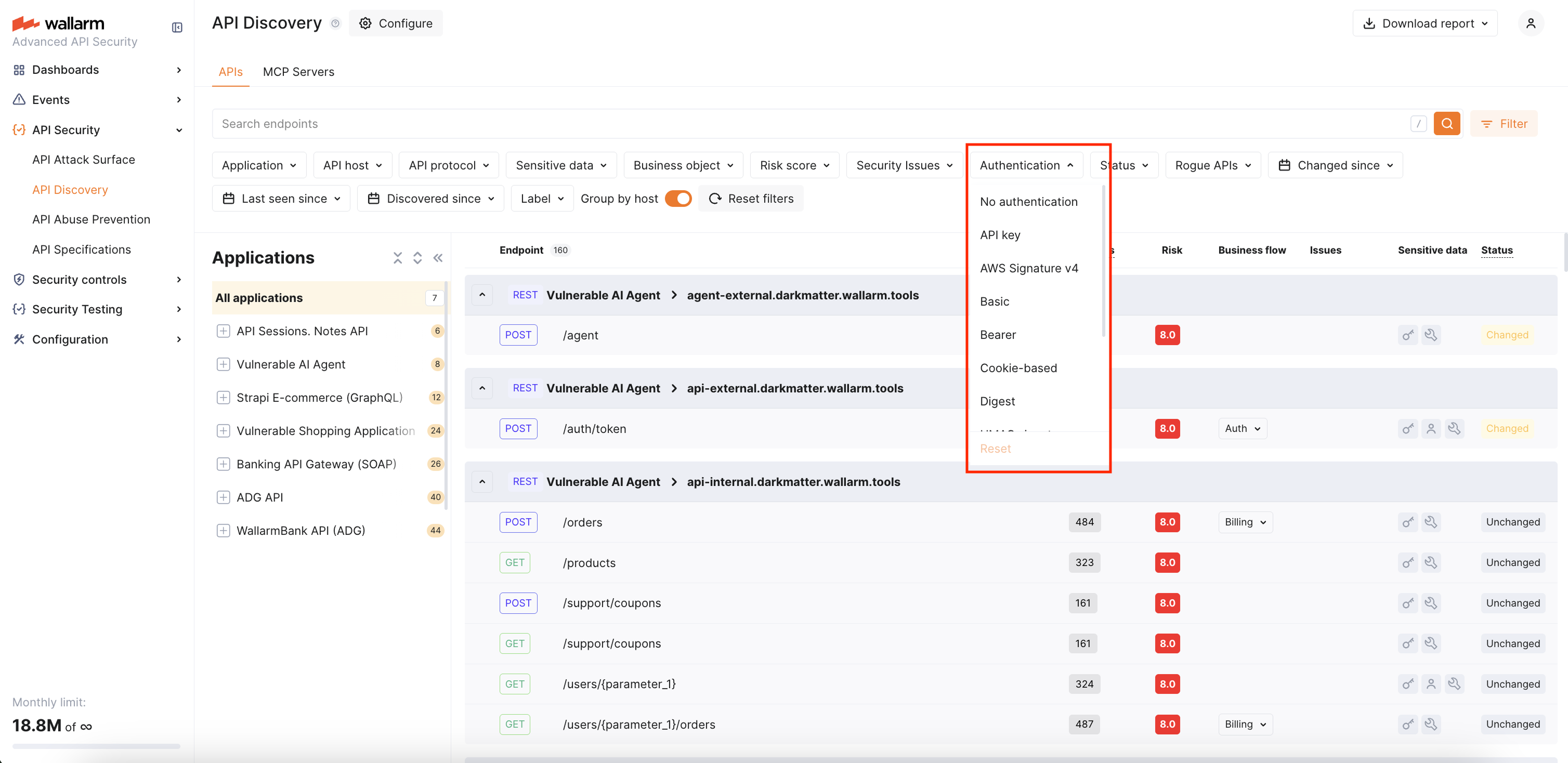
You can use the **Authentication** filter in the API Discovery inventory to quickly find unauthenticated endpoints or endpoints using a specific authentication type.
## Requirements
Authentication flow detection is supported starting from [NGINX Node](https://docs.wallarm.com/installation/nginx-native-node-internals.md#nginx-node) 6.11.0 and [Native Node](https://docs.wallarm.com/installation/nginx-native-node-internals.md#native-node) 0.24.0.
## Default authentication types
Wallarm recognizes the following authentication types:
| Authentication flow | Description |
| --- | --- |
| **API key** | API key in headers (e.g., `x-api-key`) or query parameters. |
| **AWS Signature v4** | AWS request signing (`AWS4-HMAC-SHA256` in `Authorization` header). |
| **Basic** | HTTP Basic authentication. |
| **Bearer** | Bearer token in `Authorization` header. |
| **Cookie-based** | Session-based authentication using cookies (`cookie` / `set-cookie` headers). |
| **Digest** | HTTP Digest authentication. |
| **Hawk** | Hawk authentication scheme. |
| **HMAC signature** | HMAC-based request signing. |
| **Negotiate** | SPNEGO/Kerberos authentication. |
| **NTLM** | NTLM authentication. |
| **SCRAM** | Salted Challenge Response Authentication Mechanism. |
An endpoint can have multiple authentication types if different requests use different authentication mechanisms.
## Default authentication parameters
In addition to the recognized authentication types above, Wallarm ships a curated list of common authentication parameter names that are detected automatically — no configuration needed.
The defaults cover the following request points grouped by request location:
| Location | Parameter names |
| --- | --- |
| HTTP headers | `APIKEY`, `CLIENT_SECRET`, `JWT`, `OCP-APIM-SUBSCRIPTION-KEY`, `X-SECRET`, `X-TOKEN` |
| Cookies | `access-token`, `access_token`, `auth-token`, `Authorization`, `jwt`, `KEYCLOAK_IDENTITY`, `refresh_token`, `session-token` |
| Query string | `access_token`, `api_key`, `apiKey`, `apikey`, `Authorization`, `authorization`, `client_secret`, `refresh_token` |
| Form-encoded body (`application/x-www-form-urlencoded`) | `access_token`, `api_key`, `apiKey`, `Authorization`, `authorization`, `client_secret`, `refresh_token` |
| JSON body (`application/json`) | `access_token`, `api_key`, `apiKey`, `client_secret`, `refresh_token` |
Header names are matched case-insensitively. Cookie, query, and body parameter names are matched as written — different casings (`apiKey`, `apikey`, `APIKEY`) are listed separately because real APIs use them inconsistently.
If your APIs use parameter names that fall outside this list, you can [extend the per-tenant configuration](#customizing-detected-authentication-parameters).
## Authentication status
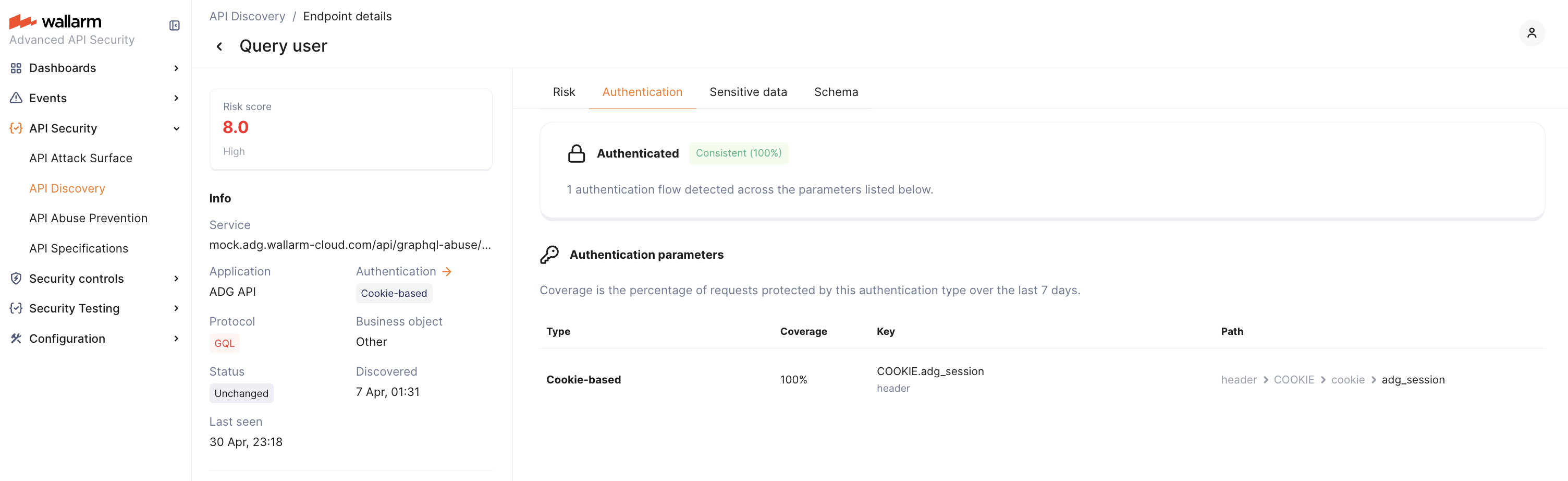
In the **Authentication** tab of the endpoint details, Wallarm displays the overall authentication status for the endpoint. The status is based on the last 7 days of traffic and reflects what percentage of requests contained authentication parameters with valid values:
| Status | Condition | Description |
| --- | --- | --- |
| **Consistent** | 95%+ of requests authenticated | The endpoint is reliably protected by authentication. |
| **Partial** | 0–95% of requests authenticated | Some requests reach the endpoint without valid authentication. This may indicate recently added authentication that has not yet reached full coverage, or a misconfiguration. |
| **Missing** | 0% of requests authenticated | No valid authentication was detected in any requests to this endpoint over the observation period. |
!!! info "7-day observation window"
Authentication status and coverage are calculated based on the last 7 days of traffic. When authentication is newly added to an endpoint, it initially appears as **Partial** and gradually moves to **Consistent** as the 7-day window fills with authenticated requests.
## Authentication parameters
In the **Authentication** tab of the endpoint details, Wallarm lists every detected authentication parameter with the following details:
| Column | Description |
| --- | --- |
| **Type** | Authentication type (e.g., Bearer, Cookie, API key). |
| **Coverage** | Percentage of requests where this parameter contained a valid authentication value over the last 7 days. |
| **Key** | Parameter name and its context — header, cookie, or body field. |
| **Path** | Hierarchical location of the parameter within the request structure. |
A single endpoint can have multiple authentication parameters. For example, one endpoint might use a Bearer token in the `Authorization` header for 80% of requests and an API key in the body for 5%. Each parameter's coverage is calculated independently — coverages may not add up to 100%.
## Customizing detected authentication parameters
If your APIs use authentication parameters that are not part of the [default parameters](#default-authentication-parameters) — for example, a custom header, a non-standard cookie name, or a token field in the request body — you can extend the per-tenant detection list through the Wallarm API. After a parameter is added, requests carrying it are counted as authenticated when calculating endpoint authentication status, coverage, and the **Authentication** filter.
The configuration is per client (tenant). Changes affect only the client whose ID is in the request path.
### Reviewing the current configuration
To retrieve the parameters currently in effect for a client, send a `GET` request:
**US Cloud:**
``` bash
curl -X GET \
'https://us1.api.wallarm.com/v1/clients//apid/config/auth-parameters' \
-H 'X-WallarmApi-Token: '
```
**EU Cloud:**
``` bash
curl -X GET \
'https://api.wallarm.com/v1/clients//apid/config/auth-parameters' \
-H 'X-WallarmApi-Token: '
```
**ME Cloud:**
``` bash
curl -X GET \
'https://me1.api.wallarm.com/v1/clients//apid/config/auth-parameters' \
-H 'X-WallarmApi-Token: '
```
Learn how to get an [API token](https://docs.wallarm.com/api-discovery/api/overview.md#your-own-api-client).
The response lists every authentication parameter that the tenant currently treats as a valid authentication signal — the recognized defaults plus any custom entries previously added.
### Adding a new authentication parameter
To register a parameter, send a `POST` request describing where the parameter sits in a request. The location is described by a `point` array — a hierarchical path that mirrors how Wallarm parses a request:
| Location | `point` shape | Example |
| --- | --- | --- |
| HTTP header | `["header", ""]` | `["header", "X-API-KEY"]` |
| Cookie | `["header", "COOKIE", "cookie", ""]` | `["header", "COOKIE", "cookie", "session"]` |
| Query string | `["get", ""]` | `["get", "access_token"]` |
| Form-encoded body field | `["post", "form_urlencoded", ""]` | `["post", "form_urlencoded", "client_secret"]` |
| JSON body field | `["post", "json_doc", "json_obj", ""]` | `["post", "json_doc", "json_obj", "refresh_token"]` |
Header names in the `point` array are written in uppercase and are matched case-insensitively against incoming requests. Query and body field names preserve case as written.
**US Cloud:**
``` bash
curl -X POST \
'https://us1.api.wallarm.com/v1/clients//apid/config/auth-parameters' \
-H 'X-WallarmApi-Token: ' \
-H 'Content-Type: application/json' \
-d '{"point": [["header", "X-CUSTOM-AUTH"]]}'
```
**EU Cloud:**
``` bash
curl -X POST \
'https://api.wallarm.com/v1/clients//apid/config/auth-parameters' \
-H 'X-WallarmApi-Token: ' \
-H 'Content-Type: application/json' \
-d '{"point": [["header", "X-CUSTOM-AUTH"]]}'
```
**ME Cloud:**
``` bash
curl -X POST \
'https://me1.api.wallarm.com/v1/clients//apid/config/auth-parameters' \
-H 'X-WallarmApi-Token: ' \
-H 'Content-Type: application/json' \
-d '{"point": [["header", "X-CUSTOM-AUTH"]]}'
```
Learn how to get an [API token](https://docs.wallarm.com/api-discovery/api/overview.md#your-own-api-client).
The endpoint accepts **one parameter per request**. To register multiple parameters, send a separate `POST` for each one. Use the `GET` call above to review the current list and avoid duplicates.
After a parameter is added, authentication coverage is recalculated for new traffic. Existing endpoints transition between [authentication statuses](#authentication-status) on the same 7-day observation window.
The [authentication type](#default-authentication-types) for a custom parameter is determined by analyzing the parameter value.
API Discovery analyzes HTTP headers and request parameters in the traffic to automatically identify the **authentication flow** used by each endpoint. This helps you find endpoints that lack proper authentication — the #1 API security risk.
You can use the **Authentication** filter in the API Discovery inventory to quickly find unauthenticated endpoints or endpoints using a specific authentication type.

## Requirements
Authentication flow detection is supported starting from [NGINX Node](https://docs.wallarm.com/installation/nginx-native-node-internals.md#nginx-node) 6.11.0 and [Native Node](https://docs.wallarm.com/installation/nginx-native-node-internals.md#native-node) 0.24.0.
## Default authentication types
Wallarm recognizes the following authentication types:
| Authentication flow | Description |
| --- | --- |
| **API key** | API key in headers (e.g., `x-api-key`) or query parameters. |
| **AWS Signature v4** | AWS request signing (`AWS4-HMAC-SHA256` in `Authorization` header). |
| **Basic** | HTTP Basic authentication. |
| **Bearer** | Bearer token in `Authorization` header. |
| **Cookie-based** | Session-based authentication using cookies (`cookie` / `set-cookie` headers). |
| **Digest** | HTTP Digest authentication. |
| **Hawk** | Hawk authentication scheme. |
| **HMAC signature** | HMAC-based request signing. |
| **Negotiate** | SPNEGO/Kerberos authentication. |
| **NTLM** | NTLM authentication. |
| **SCRAM** | Salted Challenge Response Authentication Mechanism. |
An endpoint can have multiple authentication types if different requests use different authentication mechanisms.
## Default authentication parameters
In addition to the recognized authentication types above, Wallarm ships a curated list of common authentication parameter names that are detected automatically — no configuration needed.
The defaults cover the following request points grouped by request location:
| Location | Parameter names |
| --- | --- |
| HTTP headers | `APIKEY`, `CLIENT_SECRET`, `JWT`, `OCP-APIM-SUBSCRIPTION-KEY`, `X-SECRET`, `X-TOKEN` |
| Cookies | `access-token`, `access_token`, `auth-token`, `Authorization`, `jwt`, `KEYCLOAK_IDENTITY`, `refresh_token`, `session-token` |
| Query string | `access_token`, `api_key`, `apiKey`, `apikey`, `Authorization`, `authorization`, `client_secret`, `refresh_token` |
| Form-encoded body (`application/x-www-form-urlencoded`) | `access_token`, `api_key`, `apiKey`, `Authorization`, `authorization`, `client_secret`, `refresh_token` |
| JSON body (`application/json`) | `access_token`, `api_key`, `apiKey`, `client_secret`, `refresh_token` |
Header names are matched case-insensitively. Cookie, query, and body parameter names are matched as written — different casings (`apiKey`, `apikey`, `APIKEY`) are listed separately because real APIs use them inconsistently.
If your APIs use parameter names that fall outside this list, you can [extend the per-tenant configuration](#customizing-detected-authentication-parameters).
## Authentication status
In the **Authentication** tab of the endpoint details, Wallarm displays the overall authentication status for the endpoint. The status is based on the last 7 days of traffic and reflects what percentage of requests contained authentication parameters with valid values:
| Status | Condition | Description |
| --- | --- | --- |
| **Consistent** | 95%+ of requests authenticated | The endpoint is reliably protected by authentication. |
| **Partial** | 0–95% of requests authenticated | Some requests reach the endpoint without valid authentication. This may indicate recently added authentication that has not yet reached full coverage, or a misconfiguration. |
| **Missing** | 0% of requests authenticated | No valid authentication was detected in any requests to this endpoint over the observation period. |
!!! info "7-day observation window"
Authentication status and coverage are calculated based on the last 7 days of traffic. When authentication is newly added to an endpoint, it initially appears as **Partial** and gradually moves to **Consistent** as the 7-day window fills with authenticated requests.

## Authentication parameters
In the **Authentication** tab of the endpoint details, Wallarm lists every detected authentication parameter with the following details:
| Column | Description |
| --- | --- |
| **Type** | Authentication type (e.g., Bearer, Cookie, API key). |
| **Coverage** | Percentage of requests where this parameter contained a valid authentication value over the last 7 days. |
| **Key** | Parameter name and its context — header, cookie, or body field. |
| **Path** | Hierarchical location of the parameter within the request structure. |
A single endpoint can have multiple authentication parameters. For example, one endpoint might use a Bearer token in the `Authorization` header for 80% of requests and an API key in the body for 5%. Each parameter's coverage is calculated independently — coverages may not add up to 100%.
## Customizing detected authentication parameters
If your APIs use authentication parameters that are not part of the [default parameters](#default-authentication-parameters) — for example, a custom header, a non-standard cookie name, or a token field in the request body — you can extend the per-tenant detection list through the Wallarm API. After a parameter is added, requests carrying it are counted as authenticated when calculating endpoint authentication status, coverage, and the **Authentication** filter.
The configuration is per client (tenant). Changes affect only the client whose ID is in the request path.
### Reviewing the current configuration
To retrieve the parameters currently in effect for a client, send a `GET` request:
**US Cloud:**
``` bash
curl -X GET \
'https://us1.api.wallarm.com/v1/clients//apid/config/auth-parameters' \
-H 'X-WallarmApi-Token: '
```
**EU Cloud:**
``` bash
curl -X GET \
'https://api.wallarm.com/v1/clients//apid/config/auth-parameters' \
-H 'X-WallarmApi-Token: '
```
**ME Cloud:**
``` bash
curl -X GET \
'https://me1.api.wallarm.com/v1/clients//apid/config/auth-parameters' \
-H 'X-WallarmApi-Token: '
```
Learn how to get an [API token](https://docs.wallarm.com/api-discovery/api/overview.md#your-own-api-client).
The response lists every authentication parameter that the tenant currently treats as a valid authentication signal — the recognized defaults plus any custom entries previously added.
### Adding a new authentication parameter
To register a parameter, send a `POST` request describing where the parameter sits in a request. The location is described by a `point` array — a hierarchical path that mirrors how Wallarm parses a request:
| Location | `point` shape | Example |
| --- | --- | --- |
| HTTP header | `["header", ""]` | `["header", "X-API-KEY"]` |
| Cookie | `["header", "COOKIE", "cookie", ""]` | `["header", "COOKIE", "cookie", "session"]` |
| Query string | `["get", ""]` | `["get", "access_token"]` |
| Form-encoded body field | `["post", "form_urlencoded", ""]` | `["post", "form_urlencoded", "client_secret"]` |
| JSON body field | `["post", "json_doc", "json_obj", ""]` | `["post", "json_doc", "json_obj", "refresh_token"]` |
Header names in the `point` array are written in uppercase and are matched case-insensitively against incoming requests. Query and body field names preserve case as written.
**US Cloud:**
``` bash
curl -X POST \
'https://us1.api.wallarm.com/v1/clients//apid/config/auth-parameters' \
-H 'X-WallarmApi-Token: ' \
-H 'Content-Type: application/json' \
-d '{"point": [["header", "X-CUSTOM-AUTH"]]}'
```
**EU Cloud:**
``` bash
curl -X POST \
'https://api.wallarm.com/v1/clients//apid/config/auth-parameters' \
-H 'X-WallarmApi-Token: ' \
-H 'Content-Type: application/json' \
-d '{"point": [["header", "X-CUSTOM-AUTH"]]}'
```
**ME Cloud:**
``` bash
curl -X POST \
'https://me1.api.wallarm.com/v1/clients//apid/config/auth-parameters' \
-H 'X-WallarmApi-Token: ' \
-H 'Content-Type: application/json' \
-d '{"point": [["header", "X-CUSTOM-AUTH"]]}'
```
Learn how to get an [API token](https://docs.wallarm.com/api-discovery/api/overview.md#your-own-api-client).
The endpoint accepts **one parameter per request**. To register multiple parameters, send a separate `POST` for each one. Use the `GET` call above to review the current list and avoid duplicates.
After a parameter is added, authentication coverage is recalculated for new traffic. Existing endpoints transition between [authentication statuses](#authentication-status) on the same 7-day observation window.
The [authentication type](#default-authentication-types) for a custom parameter is determined by analyzing the parameter value.