# MCP Mitigation Controls  Wallarm protects [MCP](https://modelcontextprotocol.io/) servers at two levels. Standard attacks (SQL injection, XSS, path traversal, etc.) are [detected automatically](https://docs.wallarm.com/about-wallarm/protecting-against-attacks.md) since MCP operates over HTTP with JSON-RPC payloads. For MCP‑specific threats, Wallarm provides three dedicated mitigation controls:
* [**ACL policy**](#acl-policy) - controls who can access specific MCP methods and primitives
* [**Request verification**](#request-verification) - verifies that request parameters contain expected values before allowing the request
* [**Tool input schema enforcement**](#tool-input-schema-enforcement) - validates tool call arguments against the schema learned from `tools/list`
## Requirements
* The [Advanced API Security](https://docs.wallarm.com/about-wallarm/subscription-plans.md#core-subscription-plans) subscription plan
* [NGINX Node](https://docs.wallarm.com/installation/nginx-native-node-internals.md#nginx-node) 6.12.0 or higher, or [Native Node](https://docs.wallarm.com/installation/nginx-native-node-internals.md#native-node) 0.25.0 or higher
* [API Discovery](https://docs.wallarm.com/api-discovery/overview.md) active (MCP discovery is enabled by default)
* For ACL policies by user or role: configure MCP user and role extraction in [MCP session context parameters](https://docs.wallarm.com/api-sessions/mcp-sessions.md#mcp-session-configuration). IP address and country are available automatically.
* For request verification: any parameters you want to check (e.g., JWT claims) must be exported as [session context parameters](https://docs.wallarm.com/api-sessions/setup.md#session-context) so the node can evaluate them.
## Creating MCP mitigation controls
To create an MCP mitigation control:
1. Go to Wallarm Console → **Mitigation Controls** → **Add control**.
1. Select the desired control type:
* ACL policy
* Request verification
* Tool input schema enforcement
1. Configure the control as described below.
!!! info ""
For general information on how mitigation controls work, see [Mitigation controls](https://docs.wallarm.com/about-wallarm/mitigation-controls-overview.md).
## ACL policy
The **ACL policy** control restricts access to specific MCP methods and primitives based on the identity or network properties of the request source.
MCP servers often expose powerful tools - deleting accounts, transferring funds, accessing internal databases - that should only be available to authorized actors. Without access control at the MCP layer, any AI agent with network access to the server can invoke any tool. This control lets you define allow/deny rules based on user, role, IP address, or country.
For example, you can allow only users with the `admin` role to call the `delete_account` tool, or block access to all MCP tools from specific countries.
### Configuration
| Parameter | Description |
|---|---|
| **MCP server** | The MCP server this control applies to. Each control targets exactly one MCP server. Select a server from the dropdown (populated from [API Discovery](https://docs.wallarm.com/agentic-ai/mcp-discovery.md)) or enter a URI manually. |
| **MCP parameters** | MCP methods and primitives the control applies to, within the selected MCP server.
Wallarm protects [MCP](https://modelcontextprotocol.io/) servers at two levels. Standard attacks (SQL injection, XSS, path traversal, etc.) are [detected automatically](https://docs.wallarm.com/about-wallarm/protecting-against-attacks.md) since MCP operates over HTTP with JSON-RPC payloads. For MCP‑specific threats, Wallarm provides three dedicated mitigation controls:
* [**ACL policy**](#acl-policy) - controls who can access specific MCP methods and primitives
* [**Request verification**](#request-verification) - verifies that request parameters contain expected values before allowing the request
* [**Tool input schema enforcement**](#tool-input-schema-enforcement) - validates tool call arguments against the schema learned from `tools/list`
## Requirements
* The [Advanced API Security](https://docs.wallarm.com/about-wallarm/subscription-plans.md#core-subscription-plans) subscription plan
* [NGINX Node](https://docs.wallarm.com/installation/nginx-native-node-internals.md#nginx-node) 6.12.0 or higher, or [Native Node](https://docs.wallarm.com/installation/nginx-native-node-internals.md#native-node) 0.25.0 or higher
* [API Discovery](https://docs.wallarm.com/api-discovery/overview.md) active (MCP discovery is enabled by default)
* For ACL policies by user or role: configure MCP user and role extraction in [MCP session context parameters](https://docs.wallarm.com/api-sessions/mcp-sessions.md#mcp-session-configuration). IP address and country are available automatically.
* For request verification: any parameters you want to check (e.g., JWT claims) must be exported as [session context parameters](https://docs.wallarm.com/api-sessions/setup.md#session-context) so the node can evaluate them.
## Creating MCP mitigation controls
To create an MCP mitigation control:
1. Go to Wallarm Console → **Mitigation Controls** → **Add control**.
1. Select the desired control type:
* ACL policy
* Request verification
* Tool input schema enforcement
1. Configure the control as described below.
!!! info ""
For general information on how mitigation controls work, see [Mitigation controls](https://docs.wallarm.com/about-wallarm/mitigation-controls-overview.md).
## ACL policy
The **ACL policy** control restricts access to specific MCP methods and primitives based on the identity or network properties of the request source.
MCP servers often expose powerful tools - deleting accounts, transferring funds, accessing internal databases - that should only be available to authorized actors. Without access control at the MCP layer, any AI agent with network access to the server can invoke any tool. This control lets you define allow/deny rules based on user, role, IP address, or country.
For example, you can allow only users with the `admin` role to call the `delete_account` tool, or block access to all MCP tools from specific countries.
### Configuration
| Parameter | Description |
|---|---|
| **MCP server** | The MCP server this control applies to. Each control targets exactly one MCP server. Select a server from the dropdown (populated from [API Discovery](https://docs.wallarm.com/agentic-ai/mcp-discovery.md)) or enter a URI manually. |
| **MCP parameters** | MCP methods and primitives the control applies to, within the selected MCP server.- **Methods** - MCP protocol methods such as `tools/call`, `resources/read`, `prompts/get`, etc. Supports wildcards (e.g., `resources/*`).
- **Primitives** - specific MCP entities targeted by the selected methods. For `tools/call`, these are tool names (e.g., `get_user_profile`). For `resources/read`, these are resource URIs (e.g., `data://config`). For `prompts/get`, these are prompt names.
If no methods or primitives are specified, the control applies to all methods and primitives on the selected MCP server. |
| **Access mode** | **Allow** - only requests matching the specified access objects are permitted; all other requests are blocked with a `403` response. **Deny** - requests matching the specified access objects are blocked with a `403` response; all other requests are permitted. |
| **Access objects** | One or more conditions defining who the policy targets: **IP address**, **Country**, **User name**, or **User role**. Multiple object types can be combined. |
!!! info "User and role in MCP sessions"
To use ACL by user or role, the user and role information must be present in the MCP session context. Configure user and role extraction in [MCP Session Configuration](https://docs.wallarm.com/api-sessions/mcp-sessions.md#mcp-session-configuration).
### Attack type
When verification fails, an **ACL violation** attack is registered.
### Example
A CRM system exposes an MCP server at `crm.example.com/mcp` with tools like `delete_account`, `update_opportunity_stage`, and `list_contacts_for_account`. The `delete_account` tool should only be accessible to administrators - no other user or AI agent should be able to invoke it.
Create an ACL policy with:
* **MCP server:** `crm.example.com/mcp`
* **Methods:** `tools/call`
* **Primitives:** `delete_account`
* **Access mode:** Allow
* **Access objects:** User role = `admin`
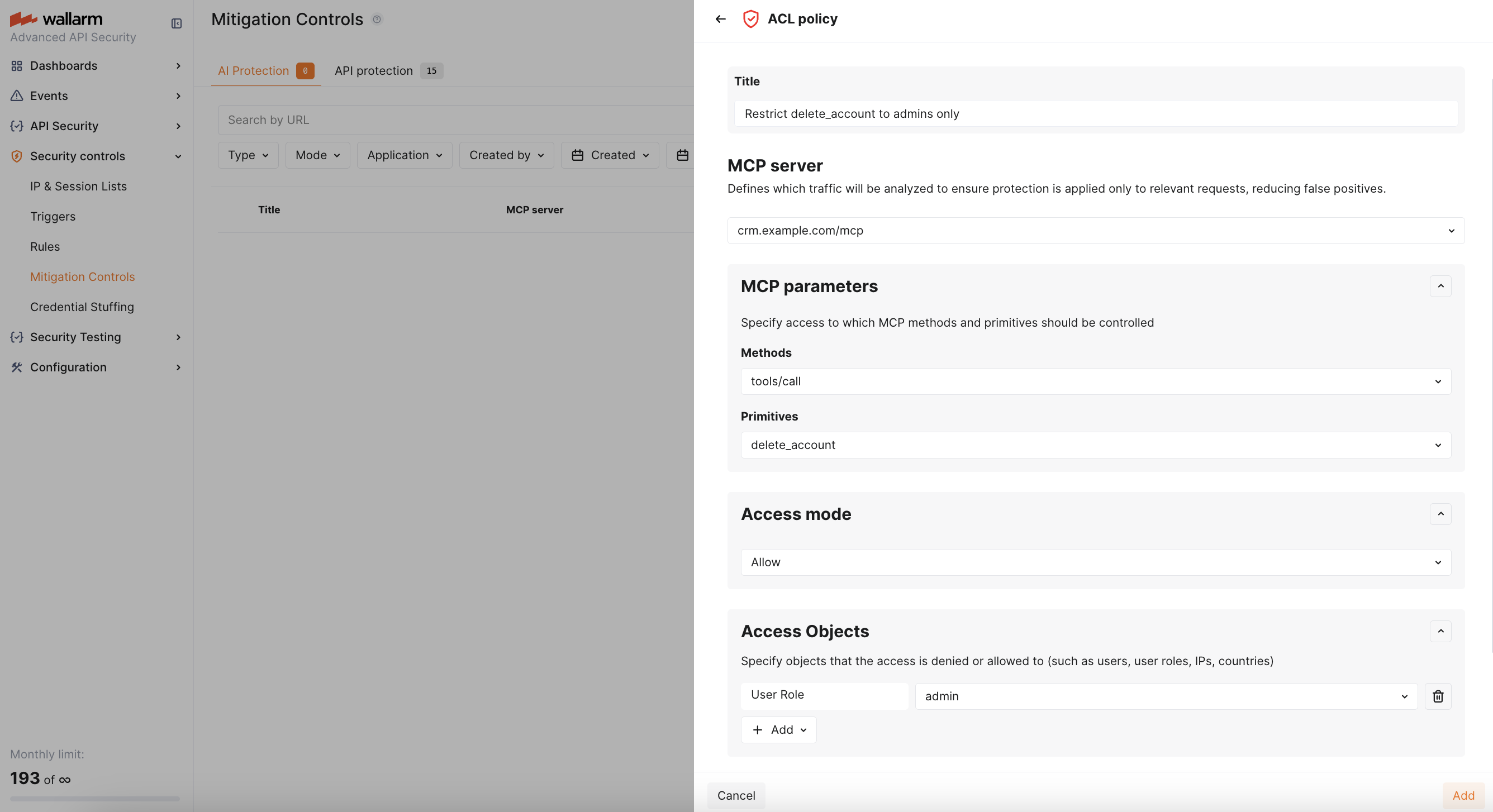
With this policy, only agents acting on behalf of users with the `admin` role can call `delete_account`. All other requests to this tool are blocked with a `403` response and an **ACL violation** attack is registered.
## Request verification
The **request verification** control checks that specific parameters in an MCP request contain expected values before allowing the request to proceed.
MCP requests often carry important context: JWT tokens with scoped permissions, client identifiers, tenant IDs. However, the MCP server itself has no built-in mechanism to validate this context -it simply processes whatever the AI agent sends. This control closes that gap by letting you define what values must be present in specific request fields (headers, JWT claims, body parameters) for each method and primitive.
For example, you can require that `tools/call` requests to `profile_read` carry a JWT with the `profile:read` scope, or that the `X-Client-Id` header matches an expected tenant identifier.
### Configuration
| Parameter | Description |
|---|---|
| **MCP server** | The MCP server this control applies to. Each control targets exactly one MCP server. Select a server from the dropdown (populated from [API Discovery](https://docs.wallarm.com/agentic-ai/mcp-discovery.md)) or enter a URI manually. |
| **MCP parameters** | MCP methods and primitives the control applies to, within the selected MCP server.- **Methods** - MCP protocol methods such as `tools/call`, `resources/read`, `prompts/get`, etc. Supports wildcards (e.g., `resources/*`).
- **Primitives** - specific MCP entities targeted by the selected methods. For `tools/call`, these are tool names (e.g., `get_user_profile`). For `resources/read`, these are resource URIs (e.g., `data://config`). For `prompts/get`, these are prompt names.
If no methods or primitives are specified, the control applies to all methods and primitives on the selected MCP server. |
| **Verification parameters** | One or more rules, each defining a **call point** and **expected values**.
A call point is a sequence of parsers that the node applies to reach the target parameter in the request (see [request point syntax](https://docs.wallarm.com/user-guides/rules/rules.md#advanced-edit-form) for details).
The control is triggered when any parameter value is not in the expected list. |
| **Scope verification** | Points to the JWT `scope` claim using the same call point syntax. The JWT `scope` claim is a space-separated string of permissions (e.g., `"read:profile is:developer data:read"`).
A typical path is: `header` → `AUTHORIZATION` → `jwt` → `jwt_payload` → `base64` → `json_doc` → `hash` → `scope`.
Scope verification parses this string into individual values and checks them against the expected values. When multiple expected values are specified, the **operator** (`AND` or `OR`) defines the matching logic. |
| **Mitigation mode** | **Monitoring** - log attack only. **Blocking** - block the request and return a `403 Forbidden` response. |
!!! info "Available call points"
Only exported [session context parameters](https://docs.wallarm.com/api-sessions/setup.md) can be used as call points, since only their values are available to the Wallarm node. The header name in the call point path (e.g., `AUTHORIZATION`) may differ depending on where your application passes the JWT token.
### Attack type
When verification fails, an **MCP request verification failure** attack is registered.
### Example
A CRM MCP server uses OAuth with JWT tokens. The `get_user_profile` and `get_account_details` tools should only be callable by agents whose JWT token contains the `profile:read` scope. An AI agent acting on behalf of a user who only granted `calendar:read` should not be able to read profiles.
Create a request verification control with:
* **MCP server:** `crm.example.com/mcp`
* **Methods:** `tools/call`
* **Primitives:** `get_user_profile`, `get_account_details`
* **Scope verification:** point to the `scope` claim in the JWT payload, expected value `profile:read`
* **Mitigation mode:** Blocking
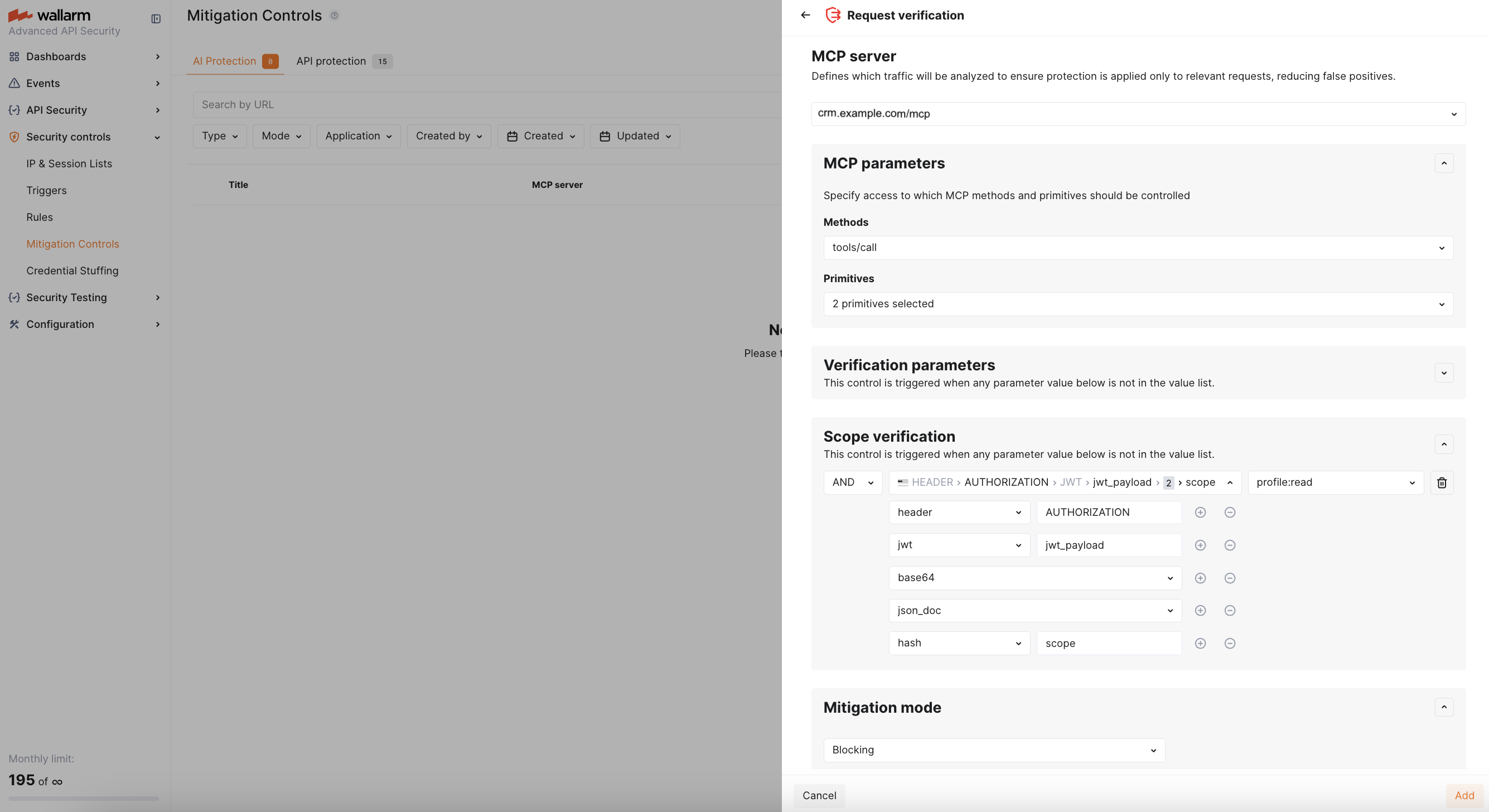
With this control, if the agent's JWT token does not contain `profile:read` in its scope claim, the request is blocked with a `403` response and an **MCP request verification failure** attack is registered.
## Tool input schema enforcement
The **tool input schema enforcement** control validates that MCP `tools/call` arguments conform to the input schema published by the MCP server. No spec upload is required - [API Discovery](https://docs.wallarm.com/agentic-ai/mcp-discovery.md) automatically captures `tools/list` responses, learns the expected schema (parameter names, types, required fields) for each tool, and distributes it to all nodes via the Wallarm Cloud.
MCP tool calls accept free-form JSON arguments, which makes them a natural target for injection attacks - an attacker or compromised agent can pass unexpected parameters, wrong types, or call tools that don't exist. This control enforces the schema learned by API Discovery on every `tools/call` request - blocking calls with unknown arguments, wrong types, or calls to tools not present in the schema.
### Configuration
| Parameter | Description |
|---|---|
| **MCP server** | The MCP server this control applies to. Each control targets exactly one MCP server. Select a server from the dropdown (populated from [API Discovery](https://docs.wallarm.com/agentic-ai/mcp-discovery.md)) or enter a URI manually. |
| **MCP tools** | Select which tools to enforce the schema for. If set to **All**, all tools reported by `tools/list` are validated. You can also select specific tools. |
| **Allow tools undefined in the schema** | When enabled (default), tool calls to tools not listed in the `tools/list` response are allowed. When disabled, calls to unknown tools are treated as violations. |
| **Mitigation mode** | **Monitoring** - log attack only. **Blocking** - block the request and return a `403 Forbidden` response. |
### Attack type
When a violation is detected, an **Invalid tool call** attack is registered. This includes:
* Calls to tools not present in the `tools/list` response (if **Allow tools undefined in the schema** is disabled)
* Arguments with types that do not match the schema
* Unknown arguments not defined in the tool's input schema
### Example
A CRM MCP server exposes tools like `get_user_profile(user_id: string)` and `list_accounts(limit: integer)`. A compromised AI agent sends a `tools/call` request to `get_user_profile` with `{"user_id": "123", "__proto__": {"admin": true}}` - injecting an extra parameter not defined in the schema. Another agent calls a tool named `exec_command` that doesn't exist on the server.
Create a tool input schema enforcement control with:
* **MCP server:** `crm.example.com/mcp`
* **MCP tools:** All
* **Allow tools undefined in the schema:** Off
* **Mitigation mode:** Blocking
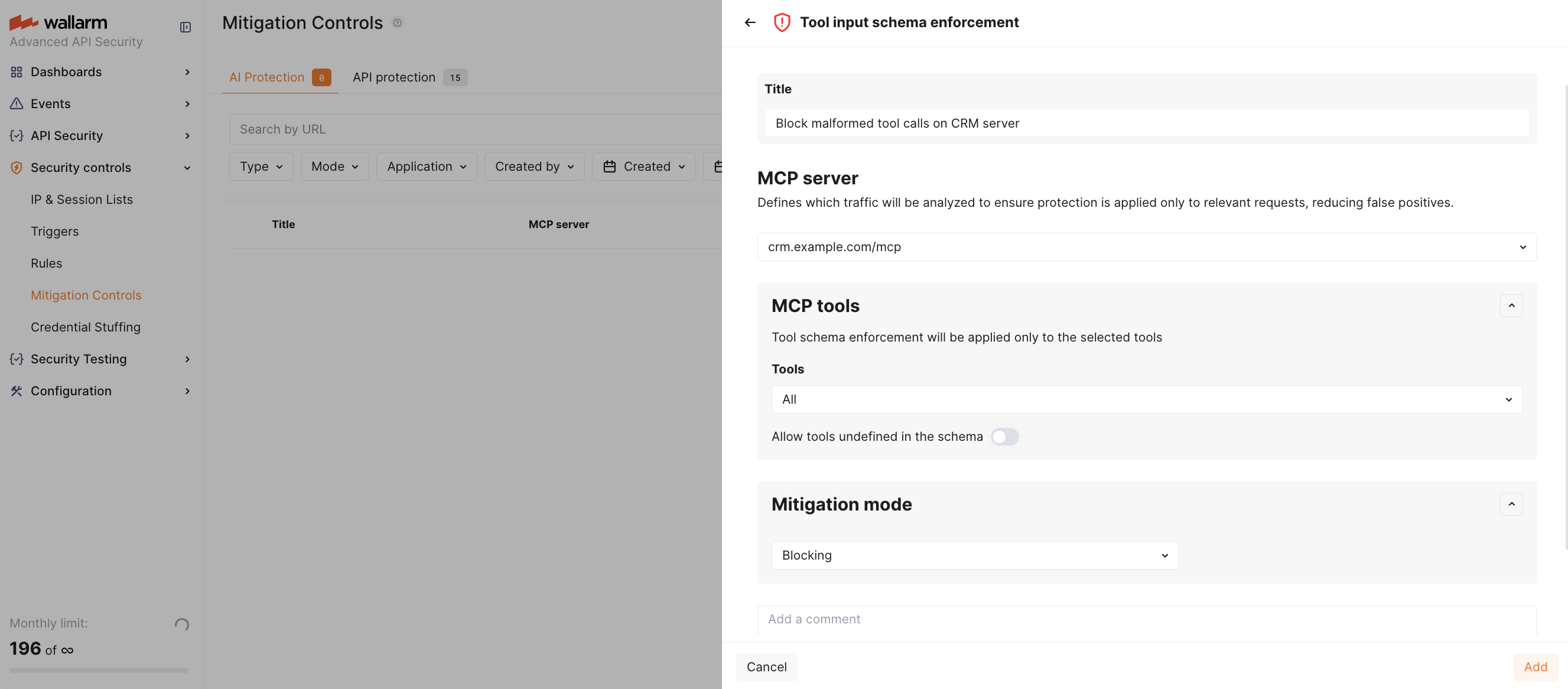
With this control, the `__proto__` parameter is rejected as an unknown argument, and the `exec_command` call is rejected as an unknown tool. Both are blocked with a `403` response and an **invalid tool call** attack is registered.
## Viewing detected attacks
Attacks detected by MCP mitigation controls are displayed in Wallarm Console → **API Sessions** → **MCP Sessions** tab. Each session shows the MCP server, requested primitives, and individual requests with their MCP method and primitive name.
In the request details, the attack type and back-link to the mitigation control that triggered detection are displayed.