# Configuring Synchronization between Wallarm Node and Cloud
The filtering node regularly synchronizes with the Wallarm Cloud to:
* Get updates for [traffic processing rules (LOM)](https://docs.wallarm.com/user-guides/rules/rules.md)
* Get updates of [proton.db](https://docs.wallarm.com/about-wallarm/protecting-against-attacks.md#basic-set-of-detectors)
* Send data on detected attacks and vulnerabilities
* Send metrics for processed traffic
* Get updates for [IP lists](https://docs.wallarm.com/user-guides/ip-lists/overview.md) (separate process)
These instructions describe parameters and methods used to configure filtering node and Wallarm Cloud synchronization.
## Access parameters
Parameters such as the filtering node name, UUID, and Wallarm API secret key, which enable filtering node to access the Cloud, are explicitly set in `node.yaml`. This file is automatically generated by the `register-node` script.
* For Docker NGINX-based image, cloud images, NGINX Node all-in-one installer and Native Node installations, find the file at `/opt/wallarm/etc/wallarm/node.yaml`, unless overridden by the [`wallarm_api_conf`](https://docs.wallarm.com/admin-en/configure-parameters-en.md#wallarm_api_conf) directive.
* For other installations, the `node.yaml` location may vary or be overridden by the [`wallarm_api_conf`](https://docs.wallarm.com/admin-en/configure-parameters-en.md#wallarm_api_conf) directive. Use search or check the `wallarm_api_conf` value to locate the file.
The `node.yaml` file may contain the following access parameters:
| Parameter | Description | Default value |
| --------- | ----------- | ------------- |
| `api.regtoken` | Token for node to be able to access the Wallarm API. | Provided by `register-node` |
| `api.uuid` | Filtering node UUID. This variable is **required** to be set in the `node.yaml` file. | Provided by `regtoken` |
| `api.secret` | Secret key to access the Wallarm API. This variable is **required** to be set in the `node.yaml` file. | Provided by `regtoken` |
| `api.host` | Wallarm API endpoint. Can be:- `us1.api.wallarm.com` for the US Cloud
- `api.wallarm.com` for the EU Cloud
- `me1.api.wallarm.com` for the ME Cloud
| `api.wallarm.com` |
| `api.port` | Wallarm API port. | `443` |
| `api.use_ssl` | Whether to use SSL when connecting to Wallarm API. | `true` |
| `api.ca_verify` | Whether to enable/disable Wallarm API server certificate verification. Can be:- `true` to enable verification
- `false` to disable verification
. | `true` |
To change synchronization parameters, proceed with the following steps:
1. Make changes to the `node.yaml` file by adding the required parameters and assigning the desired values to them.
1. Restart NGINX to apply updated settings to the synchronization process:
**Debian:**
```bash
sudo systemctl restart nginx
```
**Ubuntu:**
```bash
sudo service nginx restart
```
**CentOS or Amazon Linux 2.0.2021x and lower:**
```bash
sudo systemctl restart nginx
```
**AlmaLinux, Rocky Linux or Oracle Linux 8.x:**
```bash
sudo systemctl restart nginx
```
**RHEL 8.x:**
```bash
sudo systemctl restart nginx
```
## Synchronization interval
By default, the filtering node synchronizes with the Wallarm Cloud every 120‑240 seconds (2‑4 minutes). You can change the synchronization interval via the system environment variable `WALLARM_SYNCNODE_INTERVAL`.
To change the interval between filtering node and Wallarm Cloud synchronizations:
1. Open the file `/etc/environment`.
2. Add the `WALLARM_SYNCNODE_INTERVAL` variable to the file and set a desired value to the variable in seconds. The value cannot be less than the default value (`120` seconds). For example:
```bash
WALLARM_SYNCNODE_INTERVAL=800
```
3. Save the changed file `/etc/environment`. New interval value will be applied to the synchronization process automatically.
## Configuration example
Example of the valid `node.yaml` contents:
```bash
api:
uuid: ea1xa0xe-xxxx-42a0-xxxx-b1b446xxxxxx
secret: b827axxxxxxxxxxxcbe45c855c71389a2a5564920xxxxxxxxxxxxxxxxxxc4613260
host: api.wallarm.com
port: 443
ca_verify: true
```
## IP lists synchronization
The [IP lists](https://docs.wallarm.com/user-guides/ip-lists/overview.md) are formed in a Cloud and then sent to a Node to become effective. This synchronization is process separate from synching of other entities described in this article and performed **every minute** (not configurable).
## Troubleshooting
Troubles with synchronization between Wallarm Node and Cloud are visible from [Wallarm logs](https://docs.wallarm.com/admin-en/configure-logging.md) and are also generally reported by [OWASP API 2023 Dashboard](https://docs.wallarm.com/user-guides/dashboards/owasp-api-top-ten.md) in the **API8:2023 Security Misconfiguration** section.
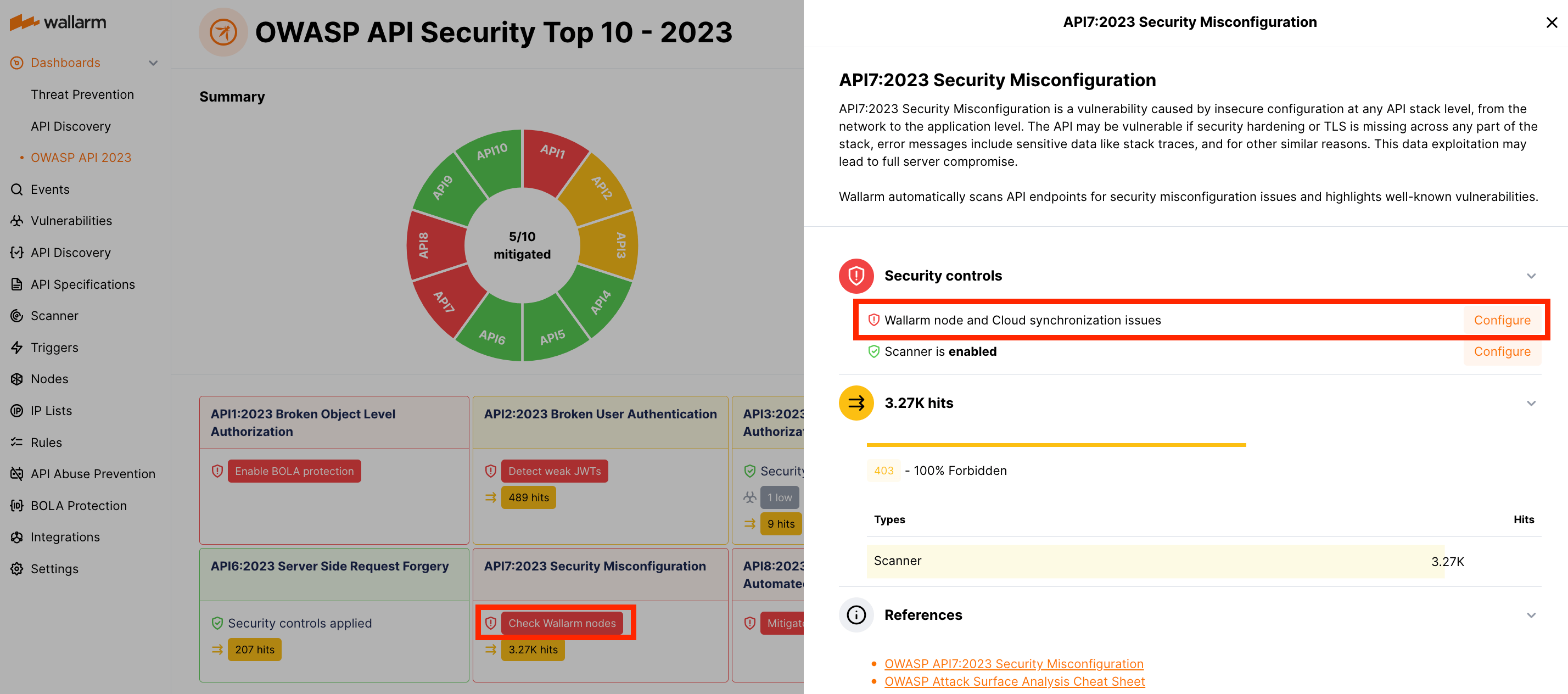
See details on troubleshooting synchronization issues [here](https://docs.wallarm.com/faq/node-issues-on-owasp-dashboards.md#wallarm-node-and-cloud-have-synchronization-issues).