# Tracking changes in API  If changes occur in your API, [API Discovery](https://docs.wallarm.com/5.x/api-discovery/overview.md) updates the built API inventory, highlights the changes and gives you information on when and what has changed. Additionally, you can set up notifications on all or some of the changes.
The company may have several teams, disparate programming languages, and a variety of language frameworks. Thus changes can come to API at any time from different sources which make them difficult to control. For security officers it is important to detect changes as soon as possible and analyze them. If missed, such changes may hold some risks, for example:
* The development team can start using a third-party library with a separate API and they do not notify the security specialists about that. This way the company gets endpoints that are not monitored and not checked for vulnerabilities. They can be potential attack directions.
* The PII data begin to be transferred to the endpoint. An unplanned transfer of PII can lead to a violation of compliance with the requirements of regulators, as well as lead to reputational risks.
* Important for the business logic endpoint (for example, `/login`, `/order/{order_id}/payment/`) is no longer called.
* Other parameters that should not be transferred, for example `is_admin` (someone accesses the endpoint and tries to do it with administrator rights) begin to be transferred to the endpoint.
## Highlighting changes in API
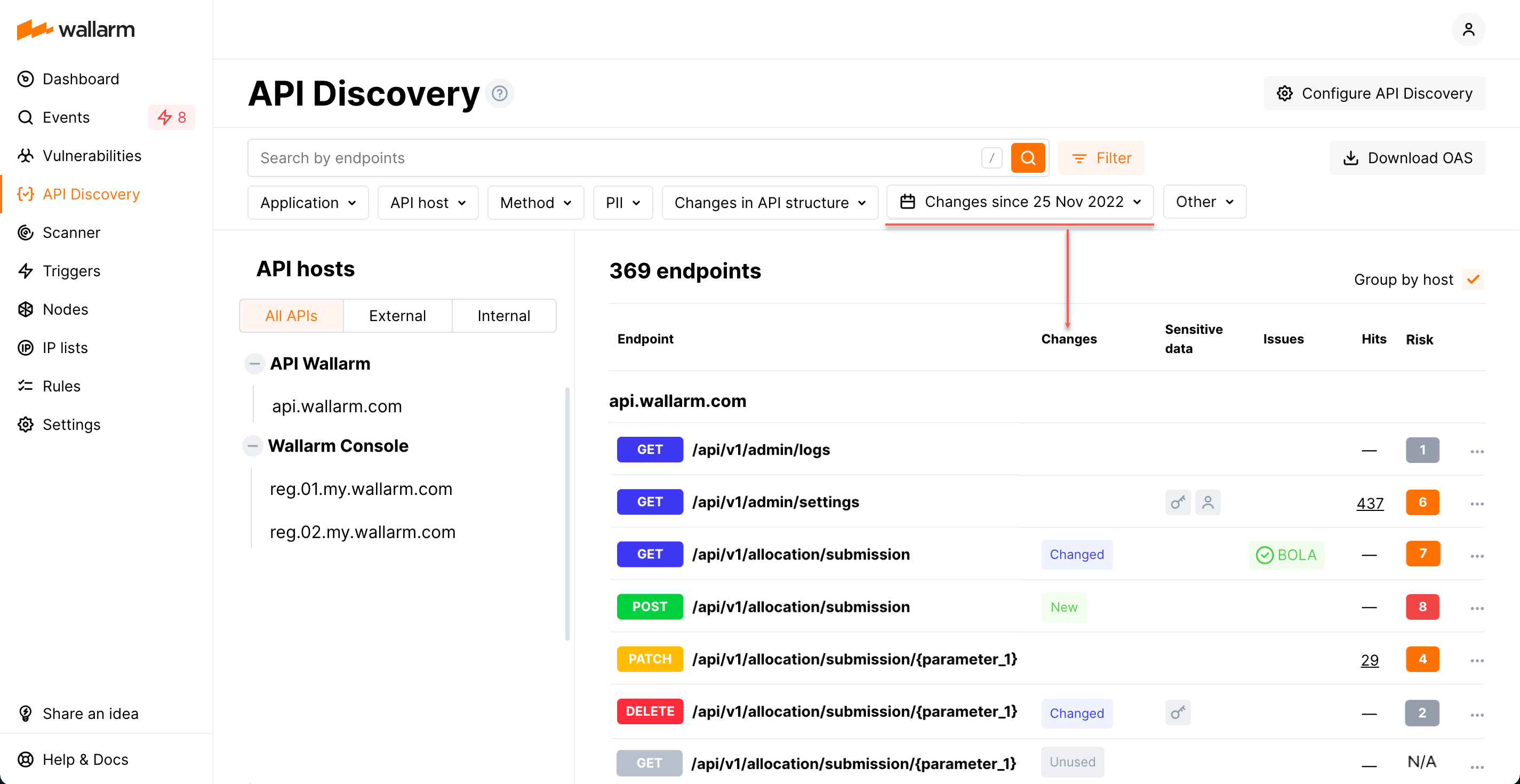
Each time you open the **API Discovery** section, the **Changes since** filter goes to the `Last week` state, which means the changes occurred within the last week are highlighted. To change the time period, redefine dates in the **Changes since** filter.
In the endpoint list, the following marks highlight the changes in API:
* **New** for the endpoints added to the list within the period.
* **Changed** for the endpoints that have newly discovered parameters or parameters that obtained the `Unused` status within the period. In the details of the endpoint such parameters will have a corresponding mark.
* A parameter gets the `New` status if is is discovered within the period.
* A parameter gets the `Unused` status if it does not pass any data for 7 days.
* If later the parameter in the `Unused` status passes data again it will lose the `Unused` status.
* **Unused** for the endpoints that obtained the `Unused` status within the period.
* An endpoint gets the `Unused` status if it is not requested (with the code 200 in response) for 7 days.
* If later the endpoint in the `Unused` status is requested (with the code 200 in response) again it will lose the `Unused` status.
Note that whatever period is selected, if nothing is highlighted with the **New**, **Changed** or **Unused** mark, this means there are no changes in API for that period.

Quick tips for endpoints marked as rogue:
* Mouse over the **New**, **Changed** or **Unused** labels to see when the change happened
* Go to **Changed** endpoint details to see reason of this status: **New** parameters and parameters that got **Unused** status - mouse over labels to see when the parameter change occurred
* Counters for all types of changes for the last 7 days are displayed at the [API Discovery Dashboard](https://docs.wallarm.com/5.x/api-discovery/dashboard.md).
## Filtering changes in API
In the **API Discovery** section, using the **Changes since** filter only highlights the endpoints changed within the selected period, but does not filter out endpoints without changes.
The **Changes in API** filter works differently and shows **only** endpoints changed within the selected period and filters out all the rest.
Let us consider the example: say your API today has 10 endpoints (there were 12, but 3 of them were marked unused 10 days ago). 1 of this 10 was added yesterday, 2 have changes in their parameters occurred 5 days ago for one and 10 days ago for another:
* Each time you open the **API Discovery** section today, the **Changes since** filter will go to the `Last week` state; page will display 10 endpoints, in the **Changes** column 1 of them will have the **New** mark, and 1 - the **Changed** mark.
* Switch **Changes since** to `Last 2 weeks` - 13 endpoints will be displayed, in the **Changes** column 1 of them will have the **New** mark, 2 - the **Changed** mark, and 3 - the **Unused** mark.
* Set **Changes in API** to `Unused endpoints` - 3 endpoints will be displayed, all with the **Unused** mark.
* Change **Changes in API** to `New endpoints + Unused endpoints` - 4 endpoints will be displayed, 3 with the **Unused** mark, and 1 with the **New** mark.
* Switch **Changes since** back to `Last week` - 1 endpoint will be displayed, it will have the **New** mark.
## Getting notified
To get immediate notifications about changes in API to your messenger, SIEM or log management system, configure [triggers](https://docs.wallarm.com/5.x/user-guides/triggers/triggers.md) with the **Changes in API** condition.
You can get messages about new, changed or unused endpoints or about all of these changes. You can also narrow notifications by application or host that you want to monitor and by the type of presented sensitive data.
**Trigger example: notification about new endpoints in Slack**
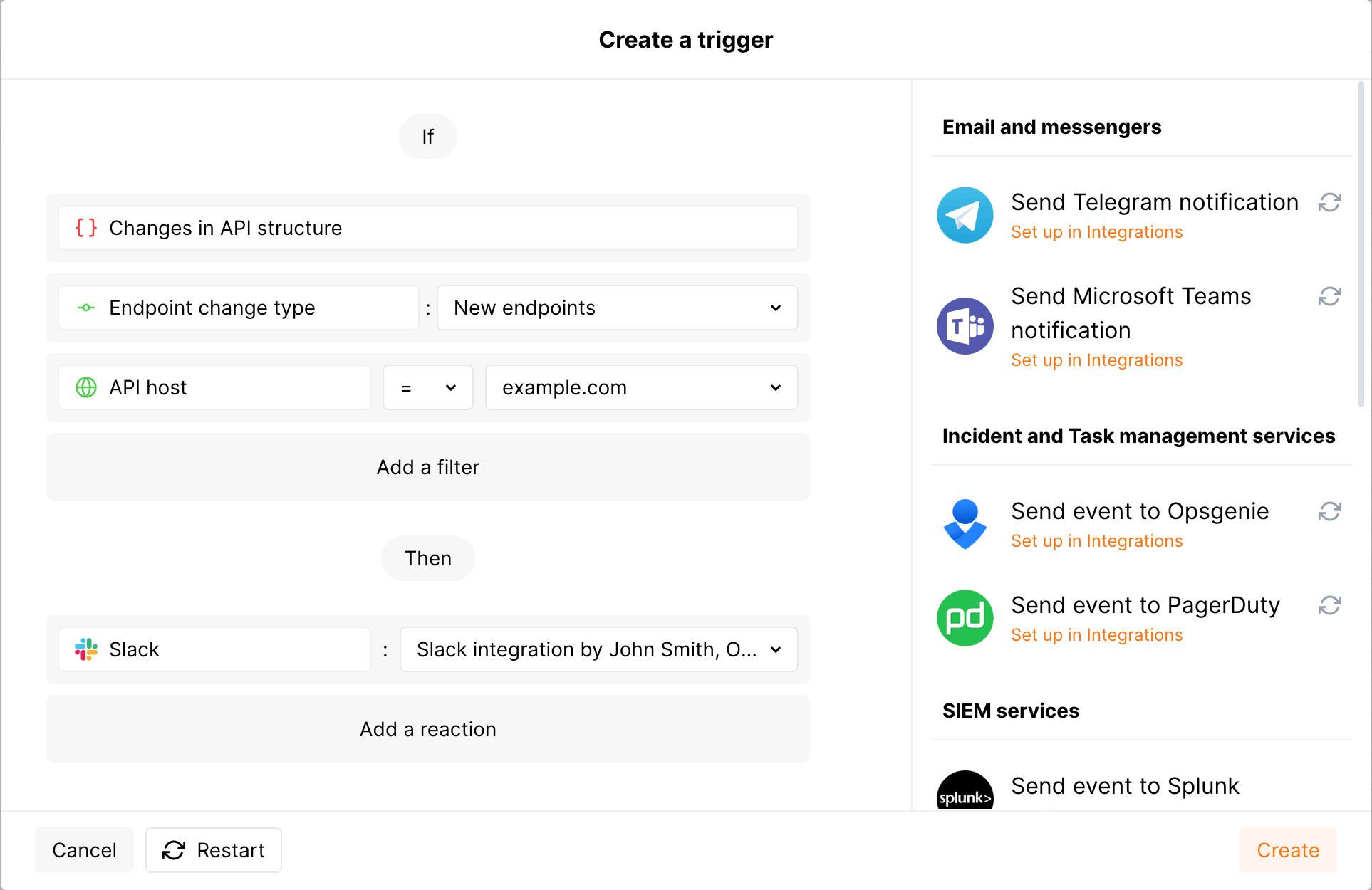
In this example, if new endpoints for the `example.com` API host are discovered by the API Discovery module, the notification about this will be sent to your configured Slack channel.
**To test the trigger:**
1. Go to Wallarm Console → **Integrations** in the [US](https://us1.my.wallarm.com/integrations/) or [EU](https://my.wallarm.com/integrations/), or [ME](https://me1.my.wallarm.com/integrations/) cloud, and configure [integration with Slack](https://docs.wallarm.com/5.x/user-guides/settings/integrations/slack.md).
1. In the **Triggers** section, create a trigger as shown above.
1. Send several requests to the `example.com/users` endpoint to get the `200` (`OK`) response.
1. In the **API Discovery** section, check that your endpoint was added with the **New** mark.
1. Check messages in your Slack channel like:
```
[wallarm] A new endpoint has been discovered in your API
Notification type: api_structure_changed
The new GET example.com/users endpoint has been discovered in your API.
Client: Client 001
Cloud: US
Details:
application: Application 1802
domain: example.com
endpoint_path: /users
http_method: GET
change_type: added
link: https://my.wallarm.com/api-discovery?instance=1802&method=GET&q=example.com%2Fusers
```
If changes occur in your API, [API Discovery](https://docs.wallarm.com/5.x/api-discovery/overview.md) updates the built API inventory, highlights the changes and gives you information on when and what has changed. Additionally, you can set up notifications on all or some of the changes.

The company may have several teams, disparate programming languages, and a variety of language frameworks. Thus changes can come to API at any time from different sources which make them difficult to control. For security officers it is important to detect changes as soon as possible and analyze them. If missed, such changes may hold some risks, for example:
* The development team can start using a third-party library with a separate API and they do not notify the security specialists about that. This way the company gets endpoints that are not monitored and not checked for vulnerabilities. They can be potential attack directions.
* The PII data begin to be transferred to the endpoint. An unplanned transfer of PII can lead to a violation of compliance with the requirements of regulators, as well as lead to reputational risks.
* Important for the business logic endpoint (for example, `/login`, `/order/{order_id}/payment/`) is no longer called.
* Other parameters that should not be transferred, for example `is_admin` (someone accesses the endpoint and tries to do it with administrator rights) begin to be transferred to the endpoint.
## Highlighting changes in API
Each time you open the **API Discovery** section, the **Changes since** filter goes to the `Last week` state, which means the changes occurred within the last week are highlighted. To change the time period, redefine dates in the **Changes since** filter.
In the endpoint list, the following marks highlight the changes in API:
* **New** for the endpoints added to the list within the period.
* **Changed** for the endpoints that have newly discovered parameters or parameters that obtained the `Unused` status within the period. In the details of the endpoint such parameters will have a corresponding mark.
* A parameter gets the `New` status if is is discovered within the period.
* A parameter gets the `Unused` status if it does not pass any data for 7 days.
* If later the parameter in the `Unused` status passes data again it will lose the `Unused` status.
* **Unused** for the endpoints that obtained the `Unused` status within the period.
* An endpoint gets the `Unused` status if it is not requested (with the code 200 in response) for 7 days.
* If later the endpoint in the `Unused` status is requested (with the code 200 in response) again it will lose the `Unused` status.
Note that whatever period is selected, if nothing is highlighted with the **New**, **Changed** or **Unused** mark, this means there are no changes in API for that period.

Quick tips for endpoints marked as rogue:
* Mouse over the **New**, **Changed** or **Unused** labels to see when the change happened
* Go to **Changed** endpoint details to see reason of this status: **New** parameters and parameters that got **Unused** status - mouse over labels to see when the parameter change occurred
* Counters for all types of changes for the last 7 days are displayed at the [API Discovery Dashboard](https://docs.wallarm.com/5.x/api-discovery/dashboard.md).
## Filtering changes in API
In the **API Discovery** section, using the **Changes since** filter only highlights the endpoints changed within the selected period, but does not filter out endpoints without changes.
The **Changes in API** filter works differently and shows **only** endpoints changed within the selected period and filters out all the rest.
Let us consider the example: say your API today has 10 endpoints (there were 12, but 3 of them were marked unused 10 days ago). 1 of this 10 was added yesterday, 2 have changes in their parameters occurred 5 days ago for one and 10 days ago for another:
* Each time you open the **API Discovery** section today, the **Changes since** filter will go to the `Last week` state; page will display 10 endpoints, in the **Changes** column 1 of them will have the **New** mark, and 1 - the **Changed** mark.
* Switch **Changes since** to `Last 2 weeks` - 13 endpoints will be displayed, in the **Changes** column 1 of them will have the **New** mark, 2 - the **Changed** mark, and 3 - the **Unused** mark.
* Set **Changes in API** to `Unused endpoints` - 3 endpoints will be displayed, all with the **Unused** mark.
* Change **Changes in API** to `New endpoints + Unused endpoints` - 4 endpoints will be displayed, 3 with the **Unused** mark, and 1 with the **New** mark.
* Switch **Changes since** back to `Last week` - 1 endpoint will be displayed, it will have the **New** mark.
## Getting notified
To get immediate notifications about changes in API to your messenger, SIEM or log management system, configure [triggers](https://docs.wallarm.com/5.x/user-guides/triggers/triggers.md) with the **Changes in API** condition.
You can get messages about new, changed or unused endpoints or about all of these changes. You can also narrow notifications by application or host that you want to monitor and by the type of presented sensitive data.
**Trigger example: notification about new endpoints in Slack**
In this example, if new endpoints for the `example.com` API host are discovered by the API Discovery module, the notification about this will be sent to your configured Slack channel.

**To test the trigger:**
1. Go to Wallarm Console → **Integrations** in the [US](https://us1.my.wallarm.com/integrations/) or [EU](https://my.wallarm.com/integrations/), or [ME](https://me1.my.wallarm.com/integrations/) cloud, and configure [integration with Slack](https://docs.wallarm.com/5.x/user-guides/settings/integrations/slack.md).
1. In the **Triggers** section, create a trigger as shown above.
1. Send several requests to the `example.com/users` endpoint to get the `200` (`OK`) response.
1. In the **API Discovery** section, check that your endpoint was added with the **New** mark.
1. Check messages in your Slack channel like:
```
[wallarm] A new endpoint has been discovered in your API
Notification type: api_structure_changed
The new GET example.com/users endpoint has been discovered in your API.
Client: Client 001
Cloud: US
Details:
application: Application 1802
domain: example.com
endpoint_path: /users
http_method: GET
change_type: added
link: https://my.wallarm.com/api-discovery?instance=1802&method=GET&q=example.com%2Fusers
```